 Real .pptx out, built in
- Spec in ChatGPT & Gemini
- Instant download
- No subscription
- Lifetime updates
One self-contained prompt that turns an objective and your raw material into a board-grade PowerPoint deck. The router, the narrative spines, the slide blueprints, the chart rules, the house style, the evidence rules, the edge cases and the QA gates are all baked in — so the AI runs the real pipeline instead of guessing, and never invents a number to fill a gap. Below, the two menus it opens with, and six worked examples, one for each kind of audience.
standalone premium product · instant download
Free guides: How to make a board presentation with Claude · The best AI PowerPoint generators, compared
Real .pptx out, built in Six of the ten deck types, worked through
Each tab is a worked example run through the same prompt: the brief, the eight steps, and the real slides it built. Each tab shows its deck-type number from the menu. Every company is fictional, so every number is ours to show you.
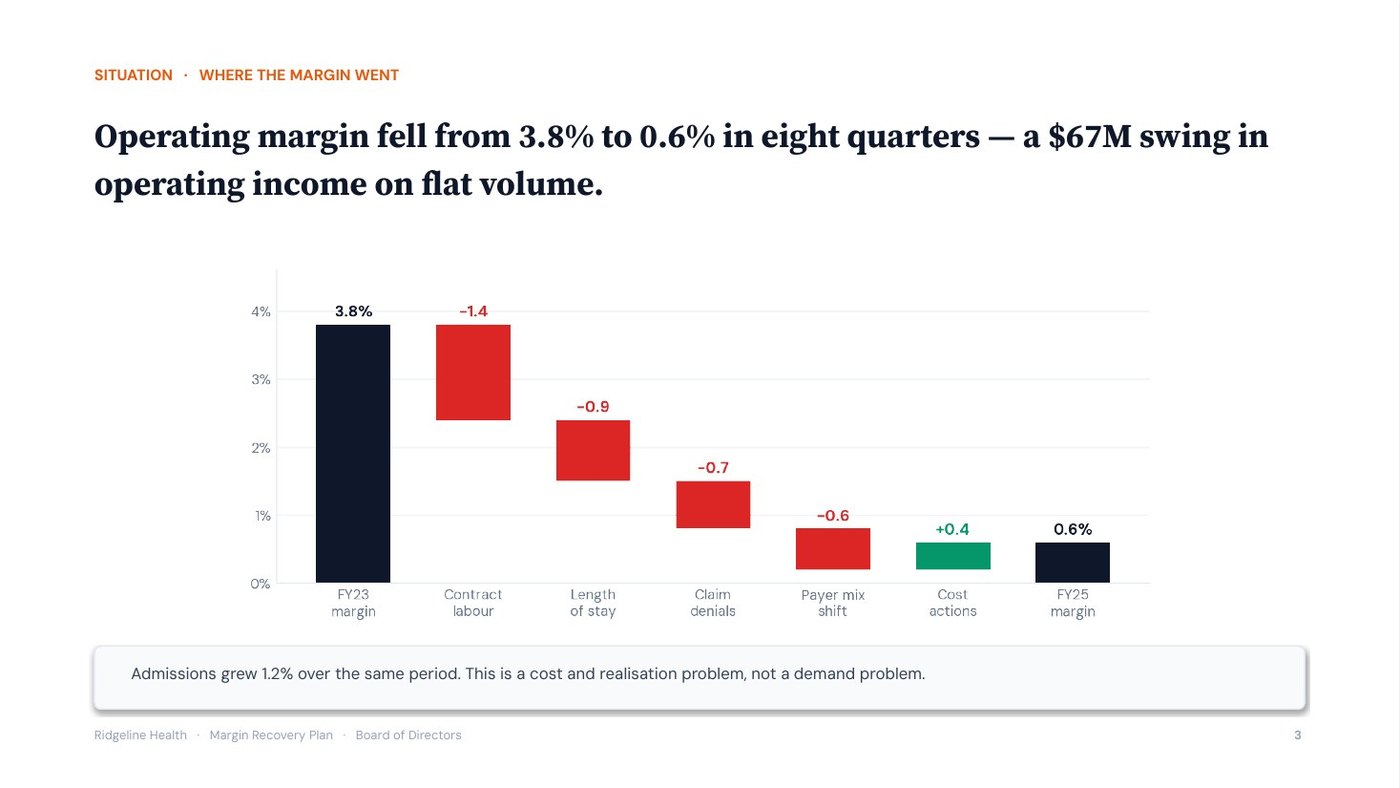
“Ridgeline Health, nine hospitals, $2.1B net patient revenue. Operating margin has fallen from 3.8% to 0.6% in two years. I need a margin recovery plan for the board in three weeks.” With three years of finance and operations figures, that is the whole input. Answered 1 and 2 — strategy / board deck, board audience — the one prompt builds the twelve-slide board deck.
The pipeline · in → out
Opens with the two menus, then asks only what is missing.
“Ridgeline Health, nine hospitals, $2.1B net patient revenue. Margin has fallen from 3.8% to 0.6% in two years. Recovery plan for the board in three weeks.” + the FY23–FY25 finance and operations figures.
Answered with two numbers, then restated in 7 lines — objective: board approval of a margin recovery plan. It pauses for your confirmation.
The deck type sets the storyline and the slides; the audience sets what the deck leads with and what it cuts. A board approves or rejects a recommendation; it does not want the working.
Takeaway: the board has three weeks and one question: approve the plan or not.
Picks the spine, the analyses and the slide blueprint for the deck type, and applies the audience overlay.
The restated brief.
Edge cases checked: none apply. Pauses for your OK.
Situation-Complication-Resolution (SCR) is a storyline in three moves: what nobody disputes, what has changed and forces action, and what to do about it. Answer-first puts the resolution at the front.
Takeaway: a board that hears the answer on slide 2 spends the meeting testing it rather than waiting for it.
Runs only the analyses the route names, grades every finding, and finds one uncomfortable insight.
Three years of finance and operations figures.
Uncomfortable insight: the FY24 cost programme cut the appeals team by 30%, and denials overturned on appeal fell from 64% to 41%. Part of the margin loss was self-inflicted. Pauses.
Evidence grading labels every finding: Evidence (in the material or a cited source), Inference (reasoned from evidence, saying from what) or Assumption (neither, with what would confirm it).
Takeaway: the FY24 cost programme cut the appeals team by 30%, and the share of denied claims won back on appeal fell from 64% to 41%.
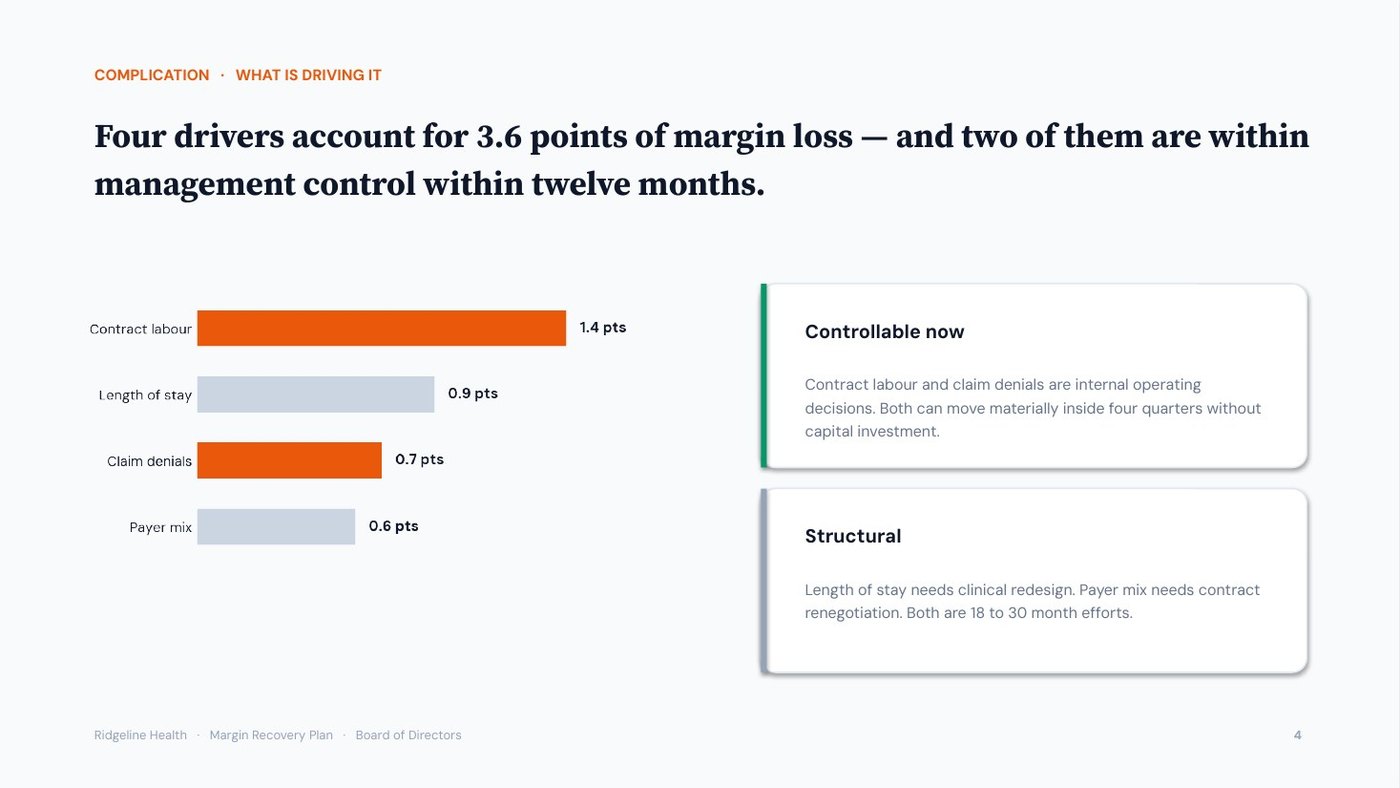
One governing thought, stated as the answer, with three MECE arguments beneath it.
The graded findings.
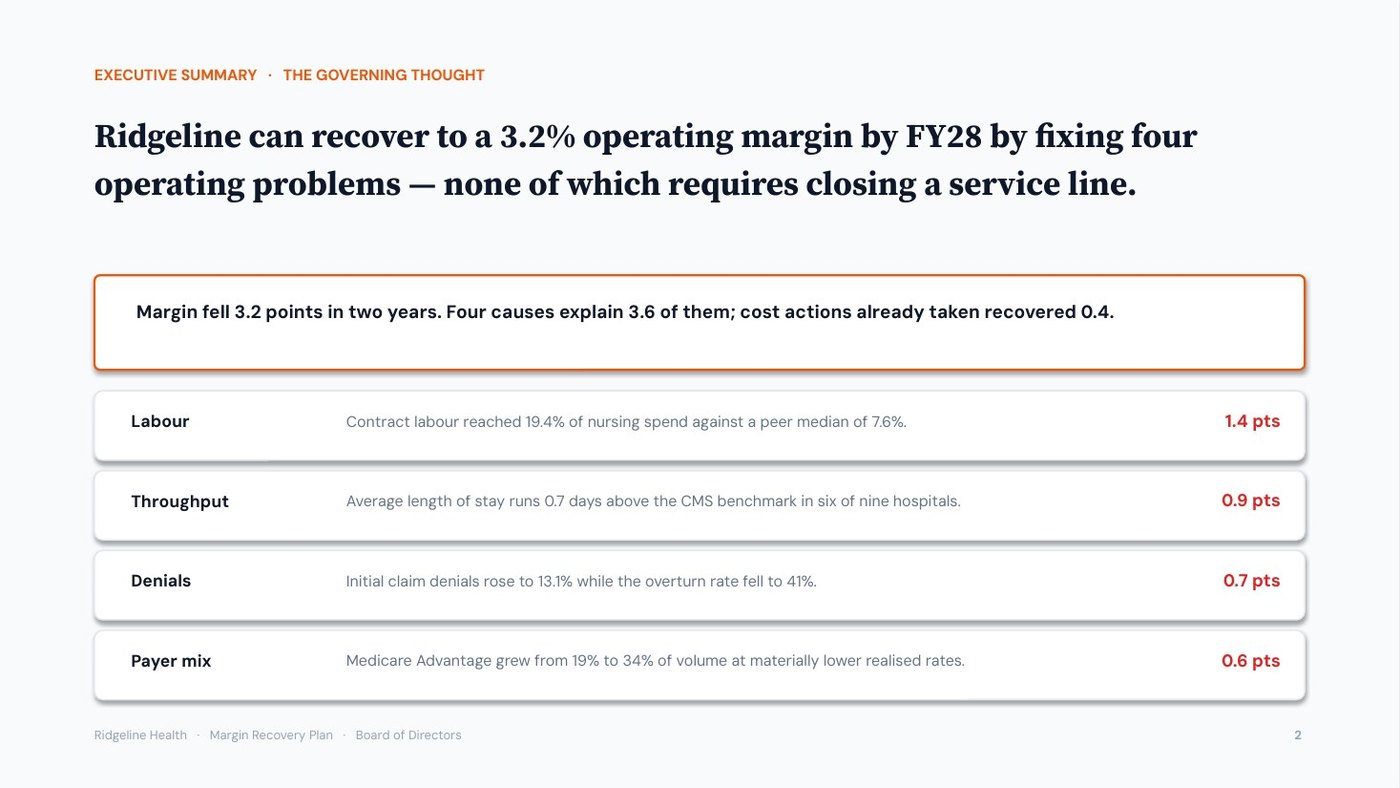
“Ridgeline can recover to a 3.2% operating margin by FY28 by fixing four operating problems — none of which requires closing a service line.”
Three MECE arguments beneath it, each with its strongest proof, and the 60-second spoken version. Pauses.
The governing thought is the one sentence the whole deck proves, stated as the answer. Beneath it, the Pyramid Principle groups the arguments so they are MECE: mutually exclusive (no overlaps) and collectively exhaustive (no gaps).
Takeaway: each slide that follows proves one of the four drivers, so no slide carries two ideas or none.
Lays out the slide-by-slide skeleton, then recomputes every total before a slide is drawn.
The storyline.
The number check lists every figure the deck will show, with its source, and recomputes every total, bridge and percentage before a single slide is drawn.
Takeaway: a board member who adds up any bridge gets the number the deck shows.
Locks the action title and the right chart for every slide, in the house style or your brand.
The blueprint.
An action title states the slide’s conclusion as a full sentence; a topic label only names the subject. The chart selector then picks the one chart that proves that sentence.
Takeaway: reading only the twelve titles, a board member gets the full argument in under a minute.
Runs eleven quality gates, slide by slide, and fixes every failure.
The drafted deck.
Caught: a topic-label title (“Roadmap”), and $55M shown without its arithmetic — now 2.6 points × $2.1B = $54.6M in the speaker note.
The quality gates are eleven checks run on every slide and reported PASS or FAIL; each failure is fixed and the gates are run again before handover.
Takeaway: both failures are the kind a board member spots first.
Builds the .pptx with native, editable charts, then opens it to check.
The checked deck.
Then: paste the final deck into the Script Generator for the word-for-word talk.
A native chart is an editable PowerPoint chart with its data inside it, not a picture, so the numbers can be updated in the file. Speaker notes carry what to say and the source of every number.
Takeaway: the board receives one decision, with every number traced to its source.
The deck it builds
The real slides from this run, exported from the .pptx. Click a title, or swipe through them.
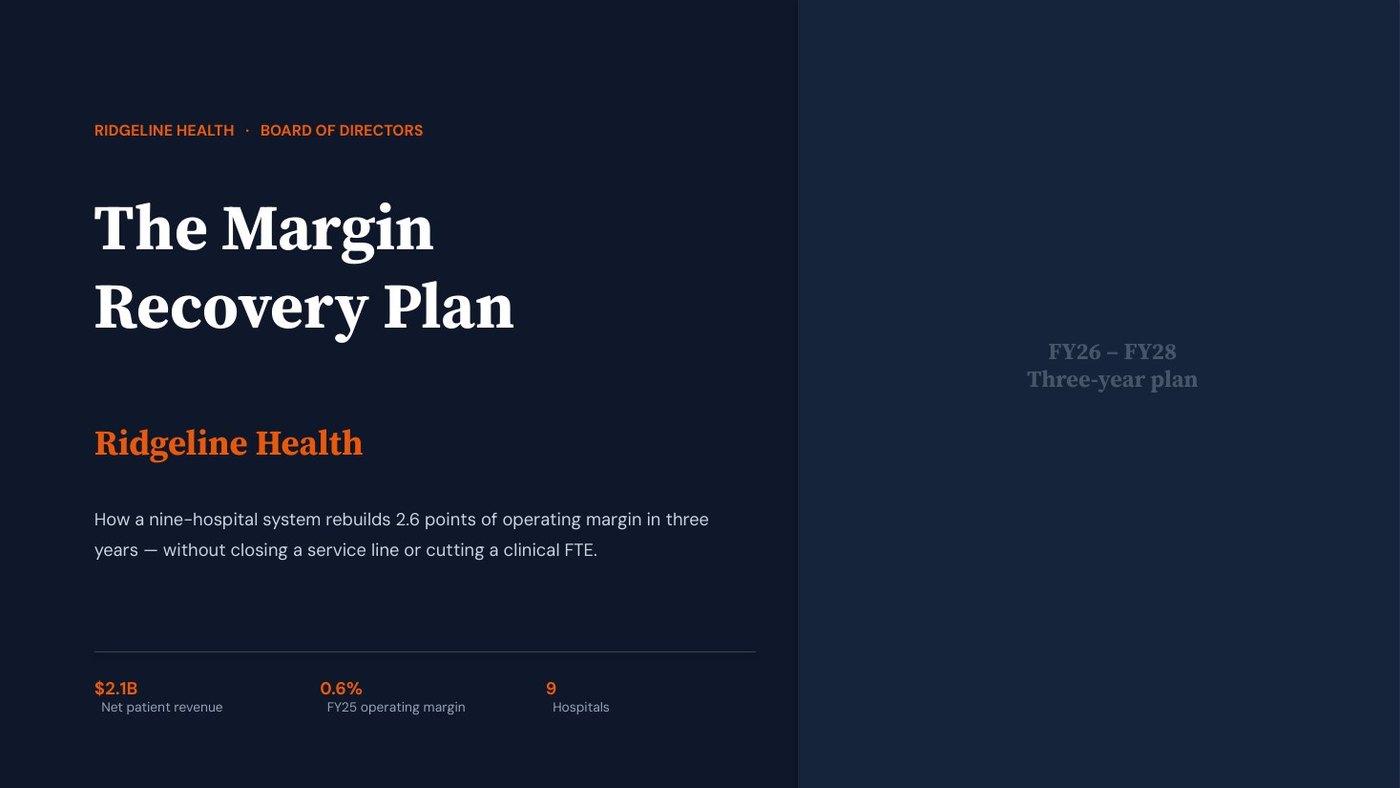
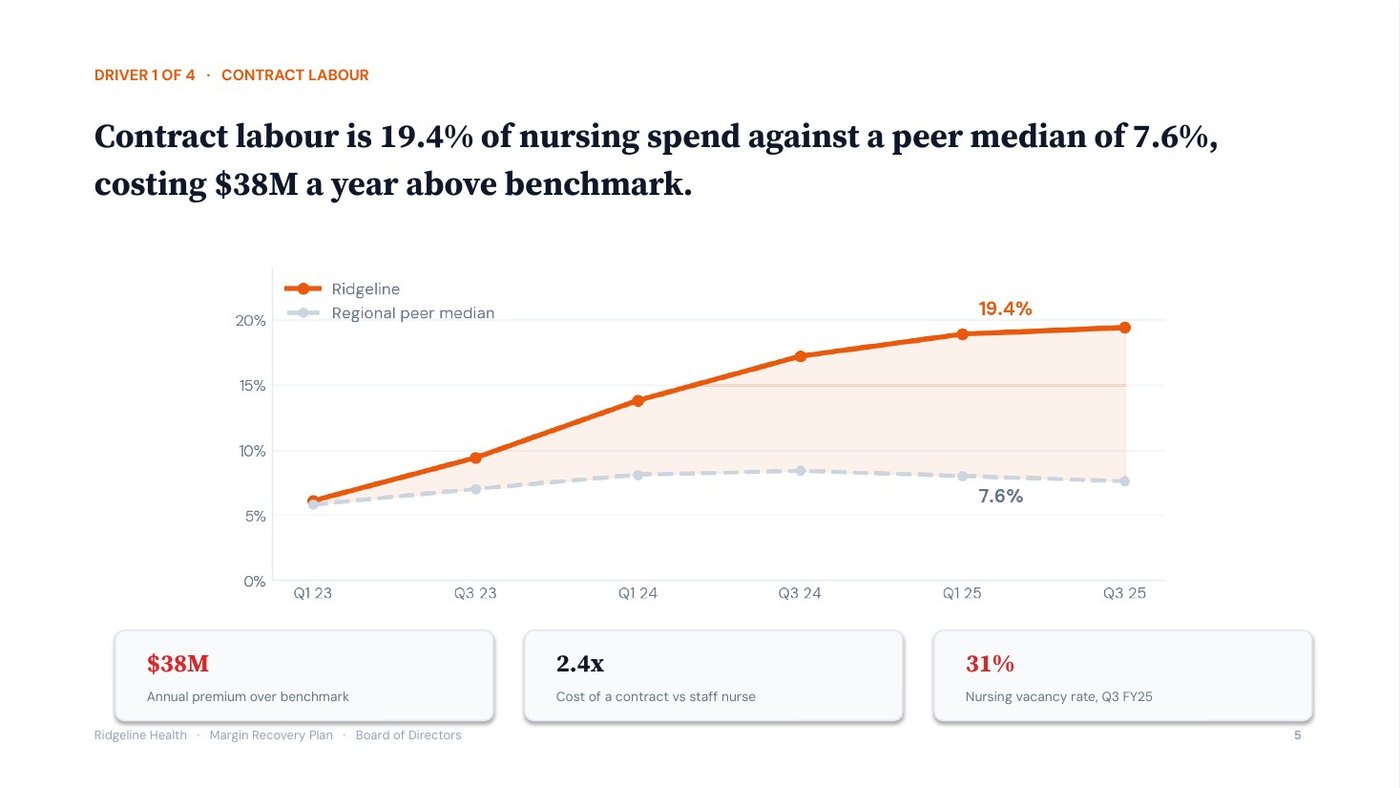
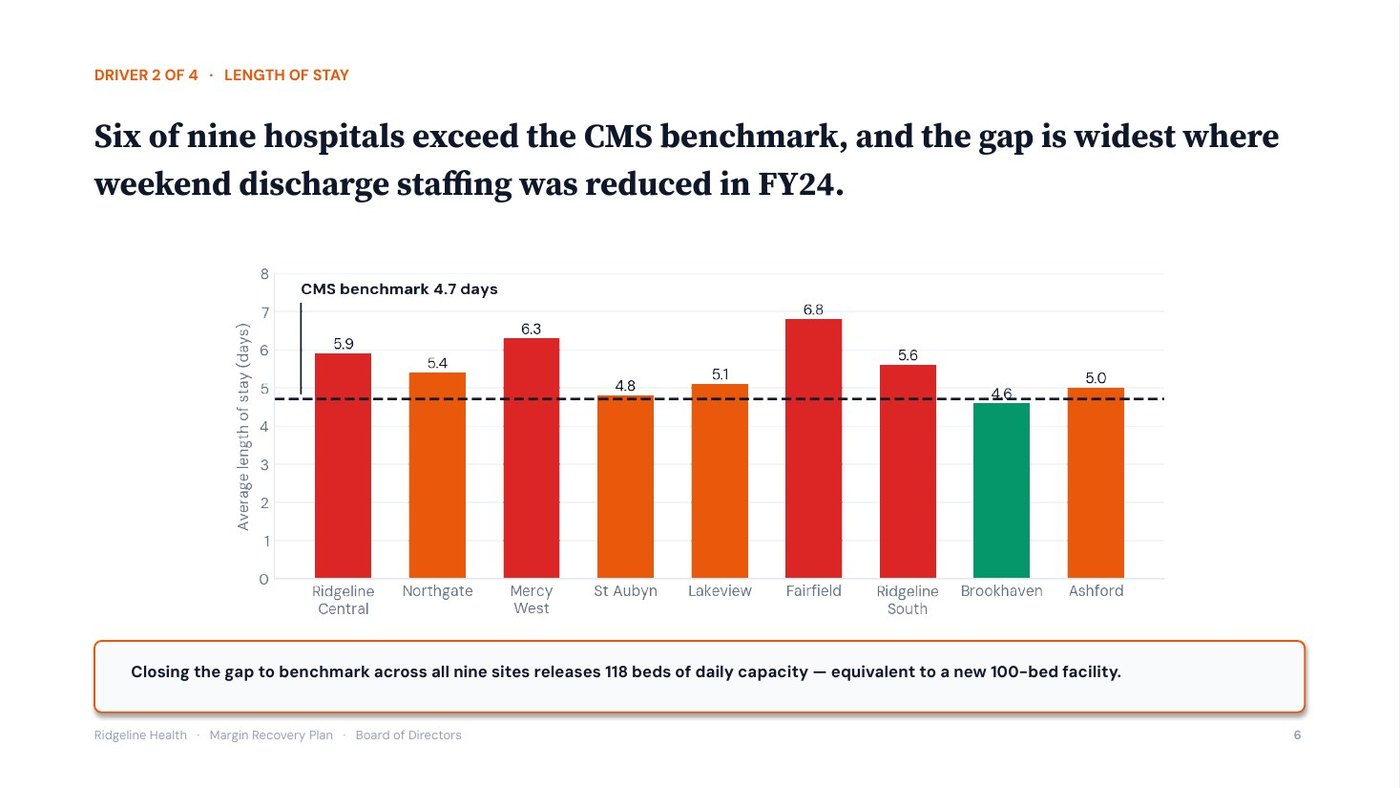
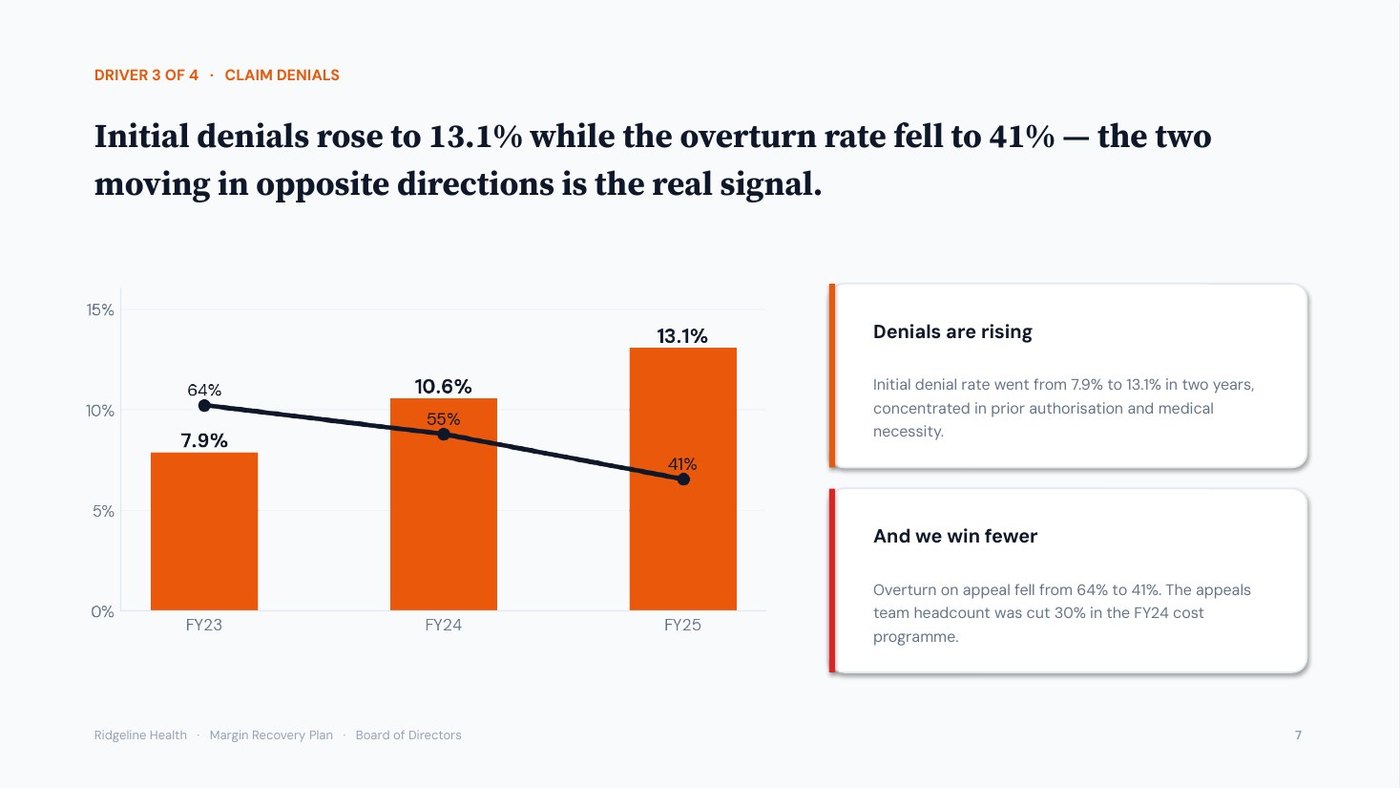
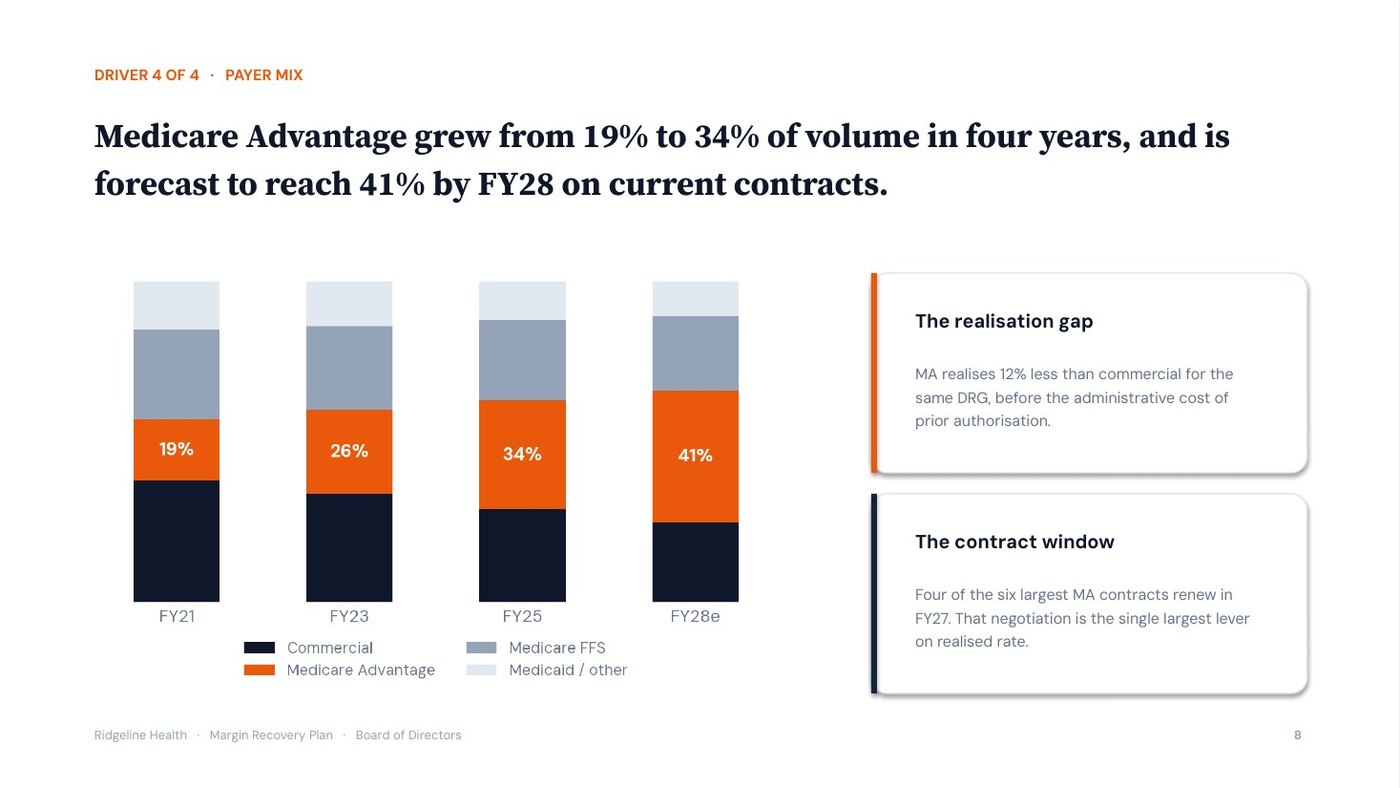
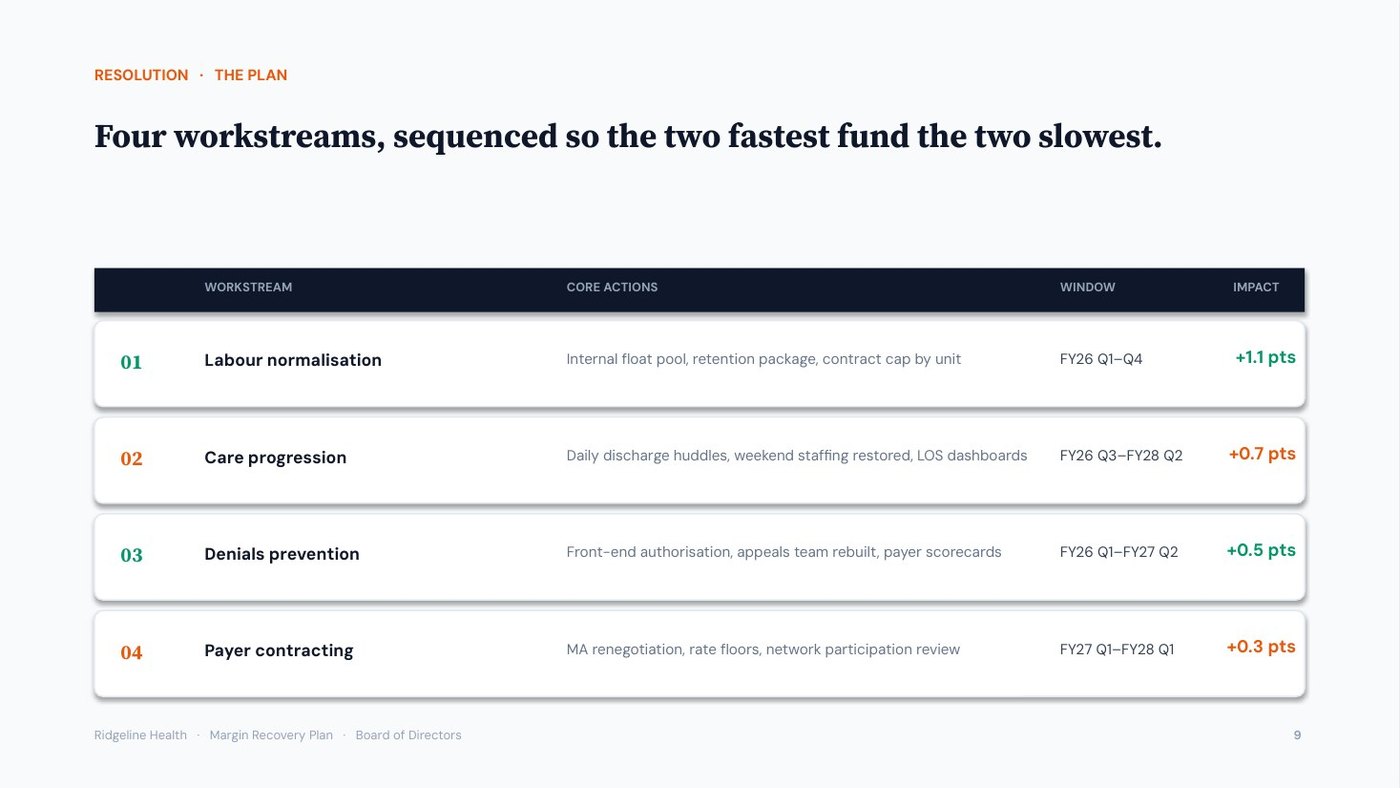
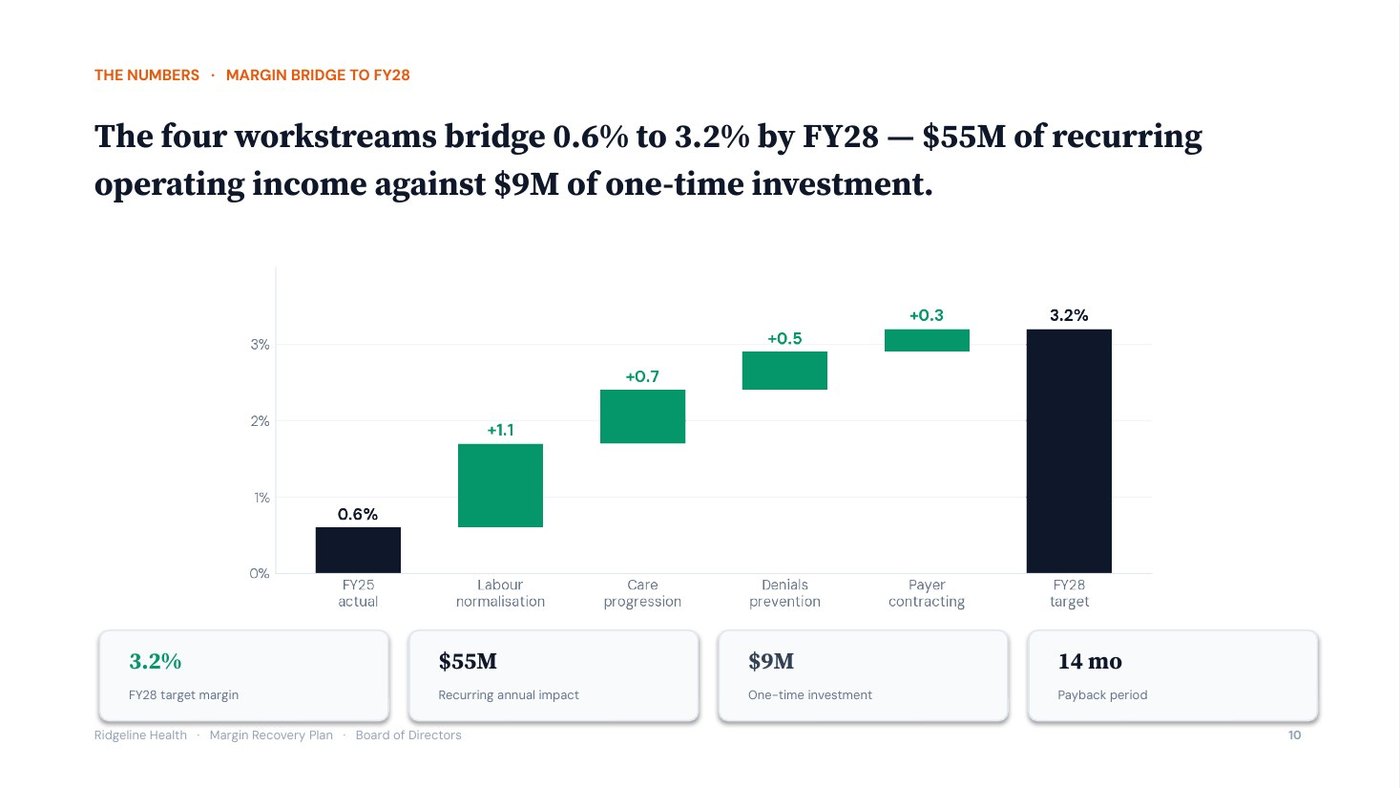
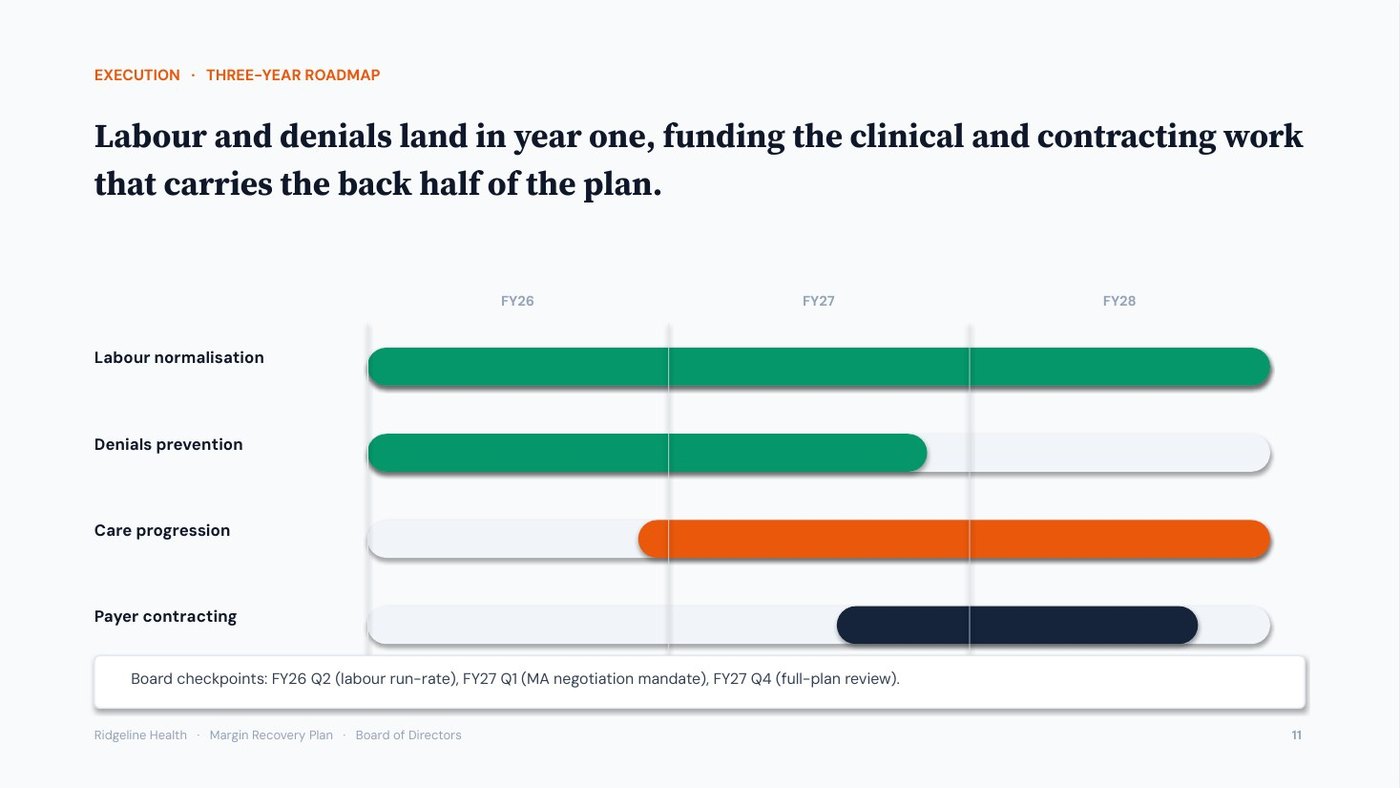
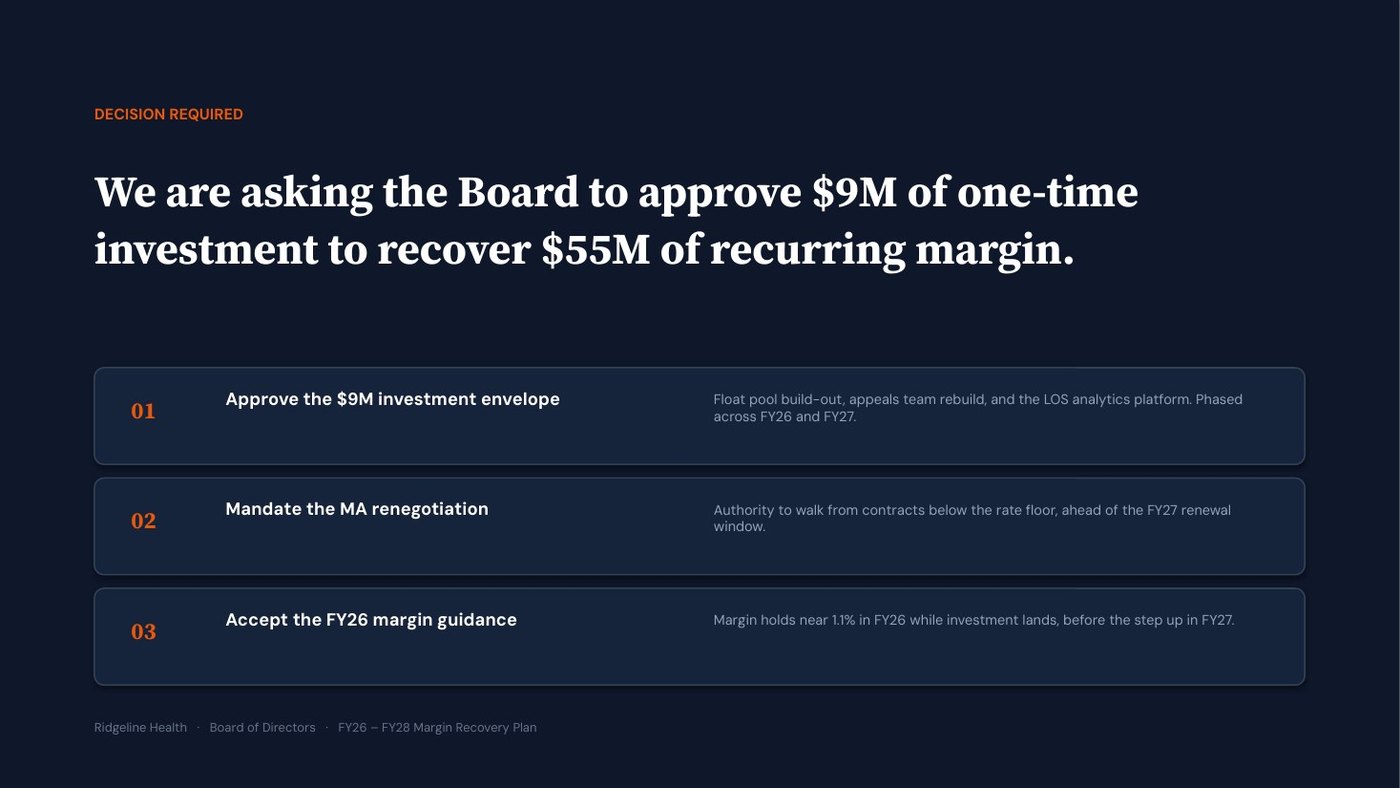
Slide 1 · Cover: the margin recovery plan
An MBA consulting project: “Our client, Sheetcraft, is a YouTube channel with 85,000 subscribers. Should it launch a paid financial modelling course, and at what price?” With the client’s channel analytics and a survey of 1,150 of its subscribers, that is the whole input. Answered 2 and 1 — market study, CEO, because the channel’s owner decides — the one prompt sizes the market and recommends a price. There was no source for the total market, so it proposed an estimate tagged ASSUMPTION rather than invent a fact.
The pipeline · in → out
Opens with the two menus, then asks only what is missing.
“Our client Sheetcraft, 85,000 subscribers: should it launch a paid modelling course, and at what price?” + the client’s channel analytics + a survey of 1,150 subscribers.
No source for the total market: it offers the three ways forward, and you pick (b), an estimate tagged ASSUMPTION. It pauses for your confirmation.
A market study answers how big a market is, who in it will buy and how to enter. The CEO overlay leads with bottom-line impact and the one trade-off, here the price.
Takeaway: the study must end on a yes or no, a price and a launch date.
Picks the spine, the analyses and the slide blueprint for the deck type, and applies the audience overlay.
The restated brief.
Edge case named: thin raw material for the total market, handled at intake. Pauses for your OK.
Situation-Complication-Resolution (SCR) is the default storyline for a market study. A profit pool is where the money in a market is made; whitespace is a part of the market no competitor serves.
Takeaway: a gap in the data is declared on day one, not discovered by the client.
Runs only the analyses the route names, grades every finding, and finds one uncomfortable insight.
Channel analytics and the survey.
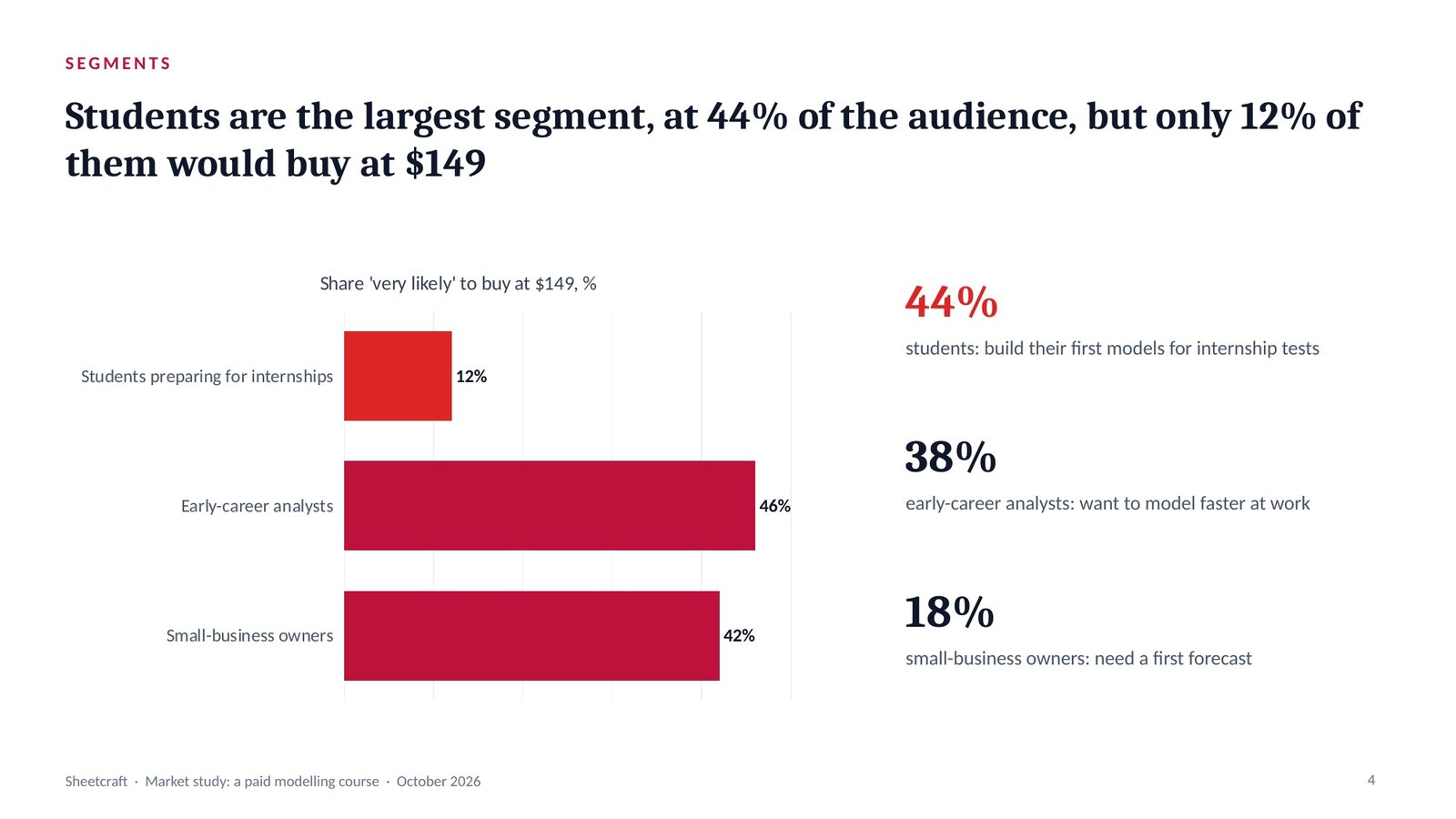
Uncomfortable insight: students are the largest segment, at 44%, and at $149 most of them will not buy. Pauses.
Evidence grading labels every finding: Evidence (in the material or a cited source), Inference (reasoned from evidence, saying from what) or Assumption (neither, with what would confirm it).
Takeaway: students are 44% of the audience, so a single $149 price leaves the largest segment out.
One governing thought, stated as the answer, with three MECE arguments beneath it.
The graded findings.
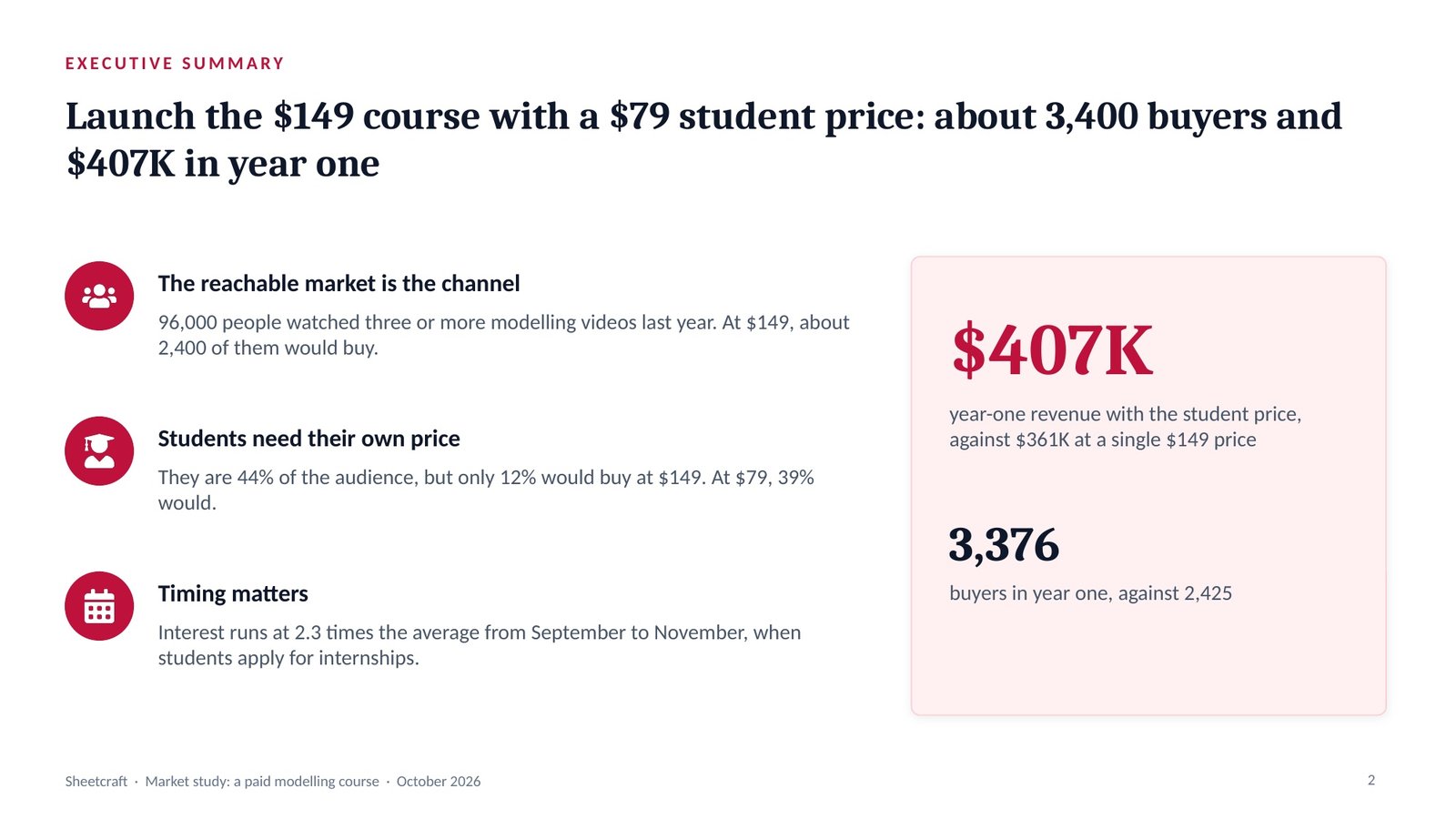
“Launch the $149 course with a $79 student price: about 3,400 buyers and $407K in year one.”
Three arguments: the reachable market is the channel, students need their own price, and timing sets the launch date. Pauses.
The governing thought is the one sentence the whole deck proves, stated as the answer. Beneath it, the Pyramid Principle groups the arguments so they are MECE: mutually exclusive (no overlaps) and collectively exhaustive (no gaps).
Takeaway: launch the $149 course with a $79 student price: about 3,400 buyers and $407K in year one.
Lays out the slide-by-slide skeleton, then recomputes every total before a slide is drawn.
The storyline.
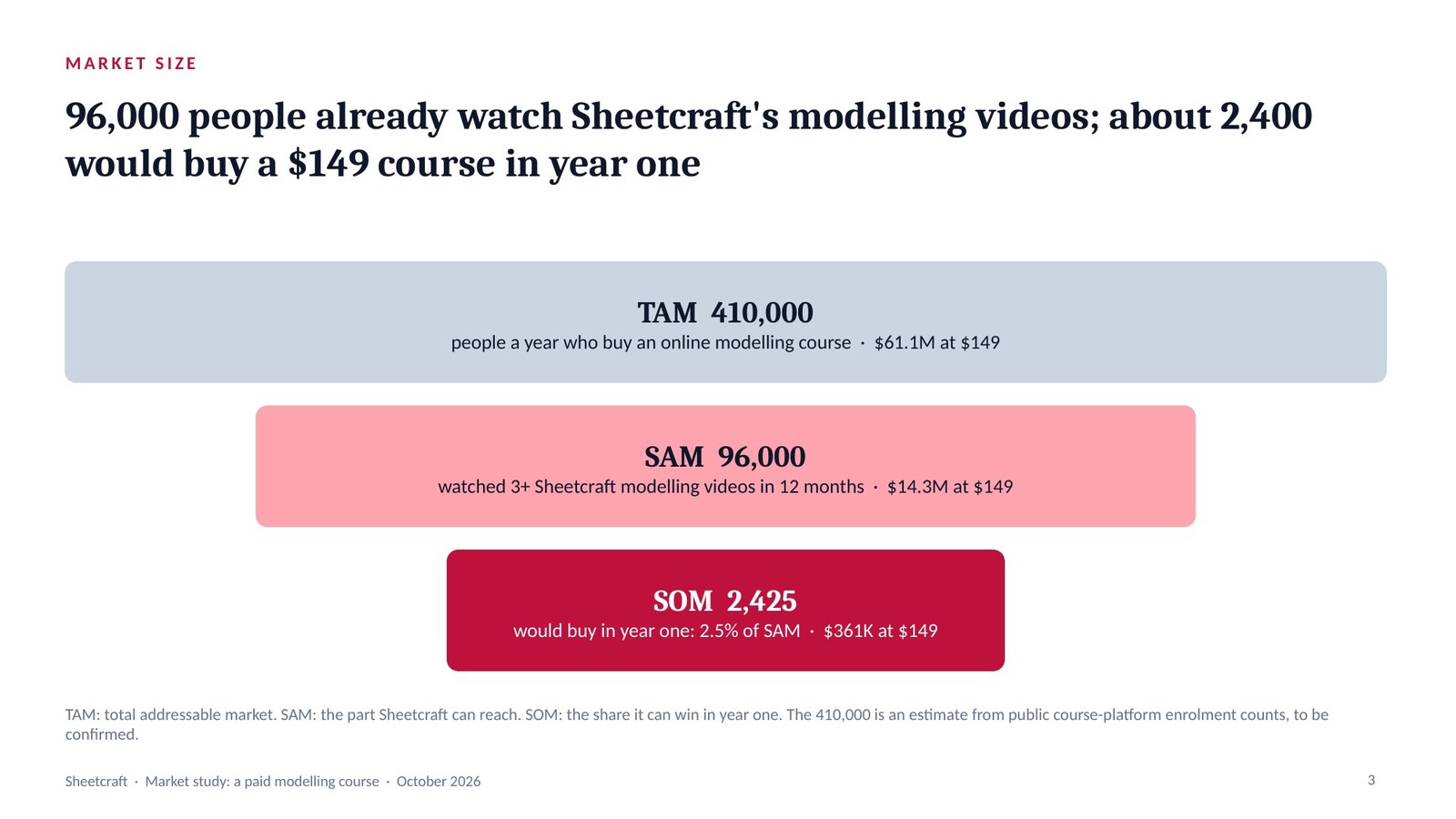
TAM (total addressable market) is all possible demand; SAM (serviceable available market) is the part the product can reach; SOM (serviceable obtainable market) is the share it can win in year one.
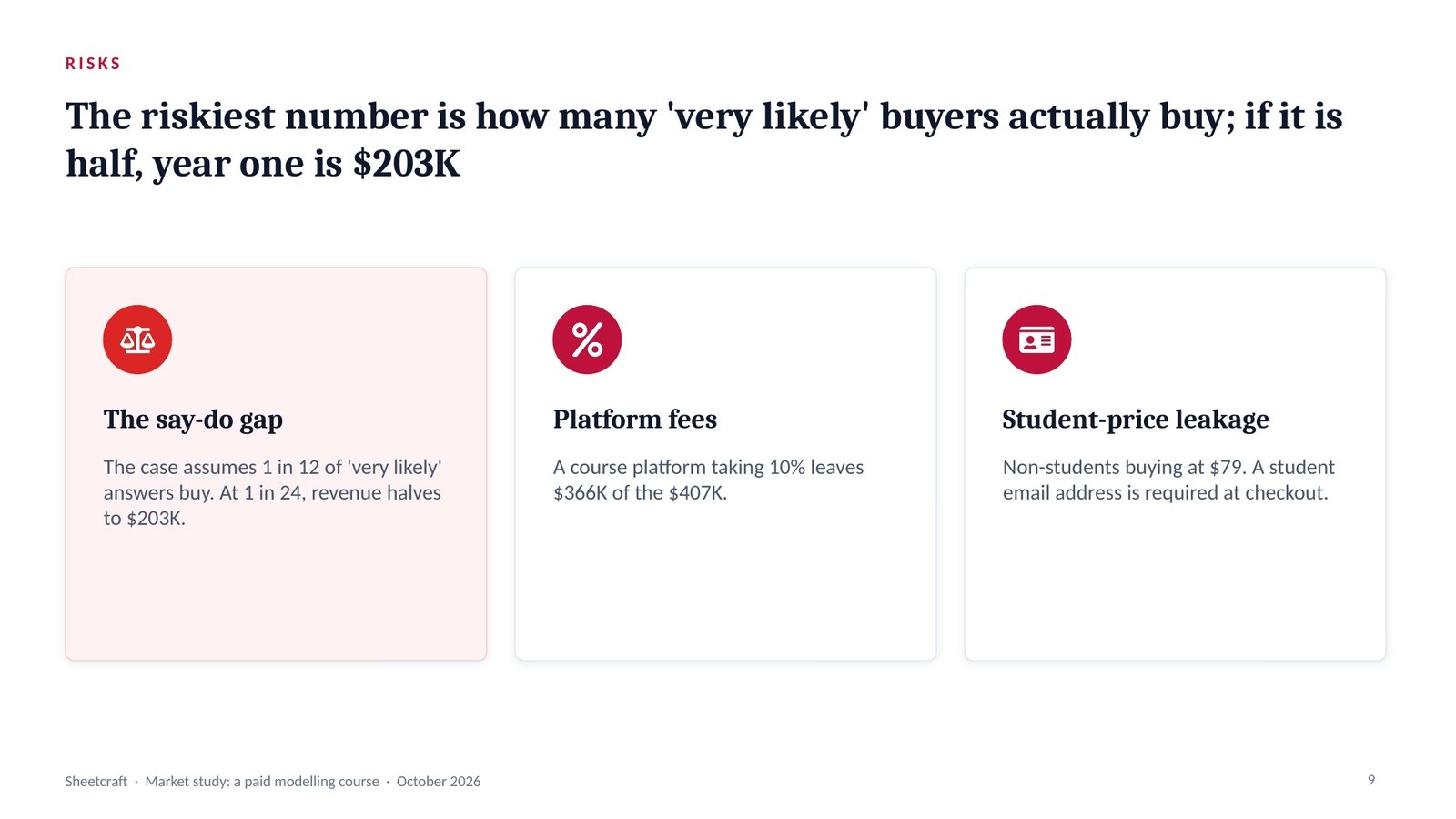
Takeaway: if only one in 24 actually buys, year one halves to $203K, and the deck says so.
Locks the action title and the right chart for every slide, in the house style or your brand.
The blueprint.
An action title states the slide’s conclusion as a full sentence; a topic label only names the subject. The chart selector then picks the one chart that proves that sentence.
Takeaway: the client reads the answer in the title of every slide.
Runs eleven quality gates, slide by slide, and fixes every failure.
The drafted deck.
Caught: the 410,000 total-market figure shown as a fact — now tagged ASSUMPTION with [CONFIRM] — and a topic-label title (“Competition”).
The quality gates are eleven checks run on every slide and reported PASS or FAIL; each failure is fixed and the gates are run again before handover.
Takeaway: the client can see which number is measured and which is estimated.
Builds the .pptx with native, editable charts, then opens it to check.
The checked deck.
Then: paste it into the Script Generator for a YouTube explainer read by an AI avatar.
A native chart is an editable PowerPoint chart with its data inside it, not a picture, so the numbers can be updated in the file. Speaker notes carry what to say and the source of every number.
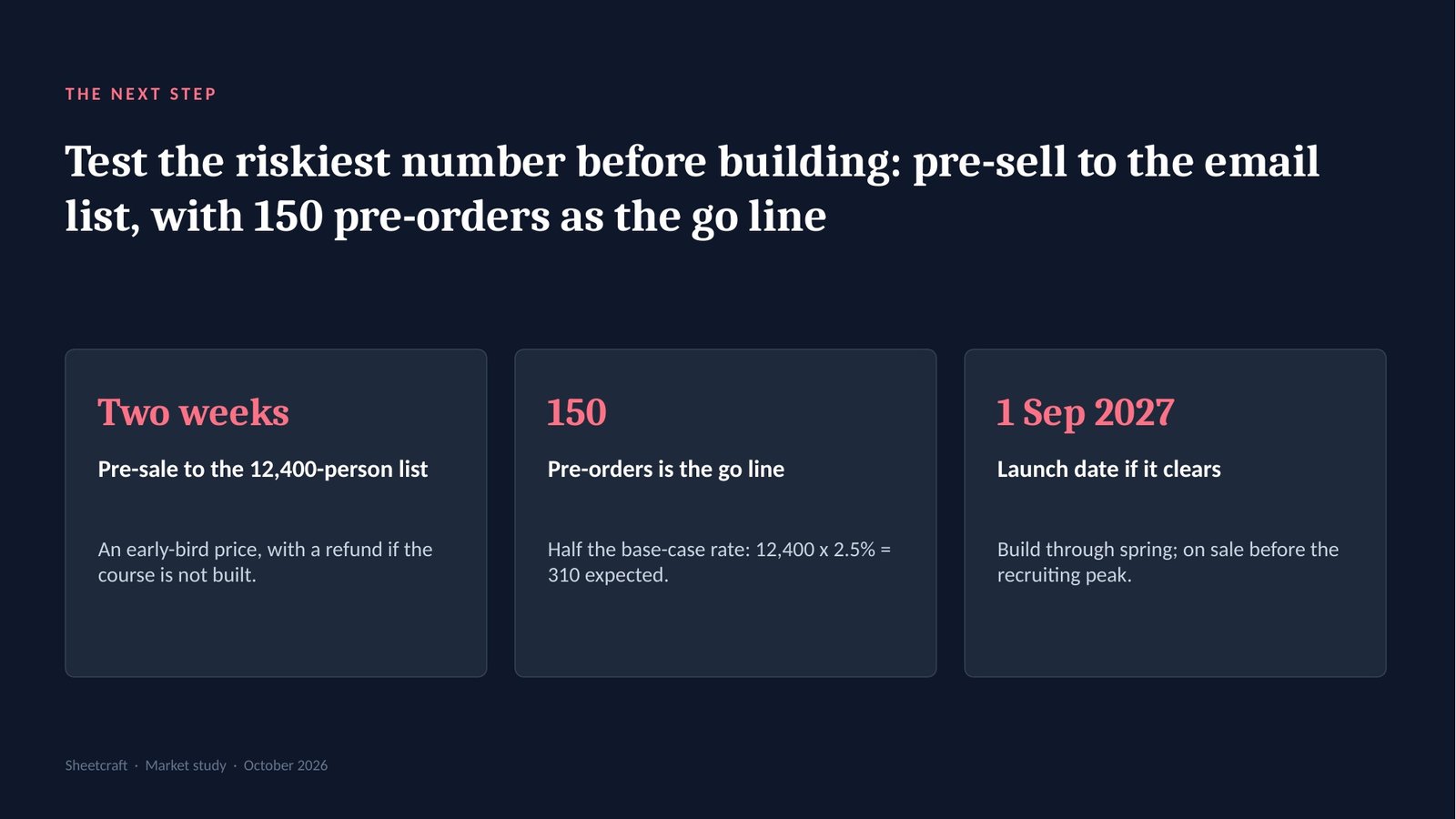
Takeaway: if the pre-sale falls short, the client learns it for the cost of an email, not a finished course.
The deck it builds
The real slides from this run, exported from the .pptx. Click a title, or swipe through them.
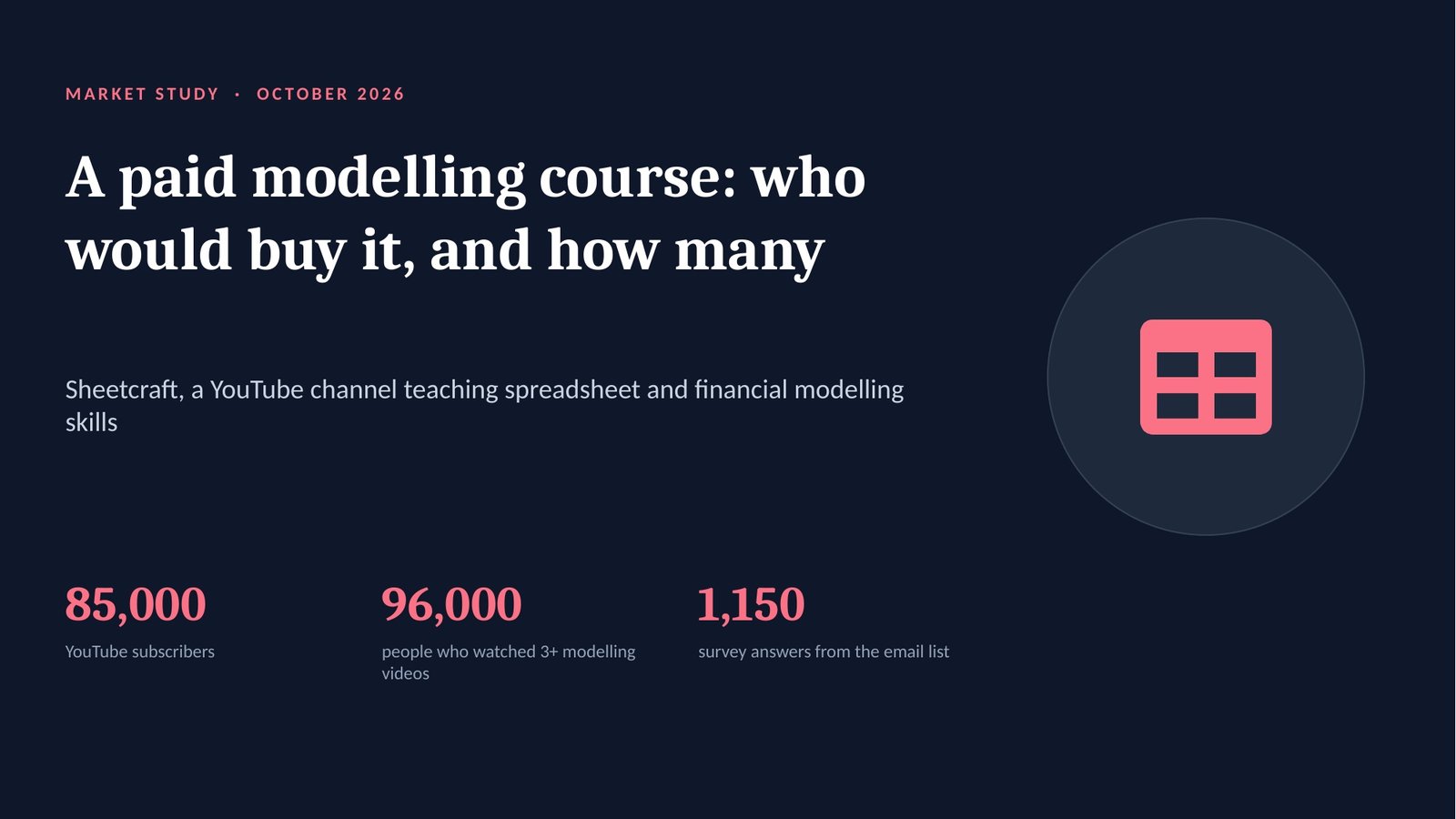
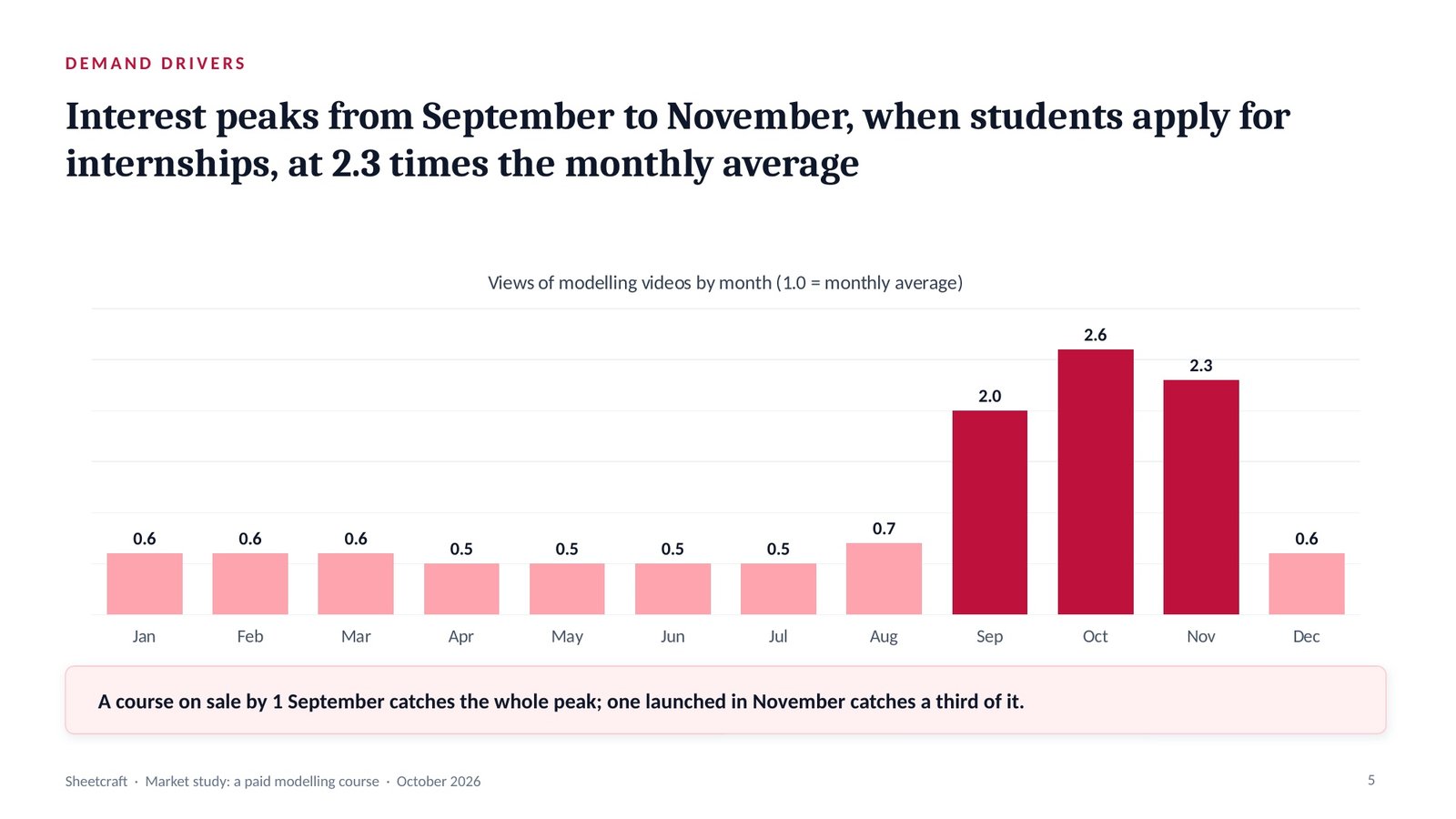
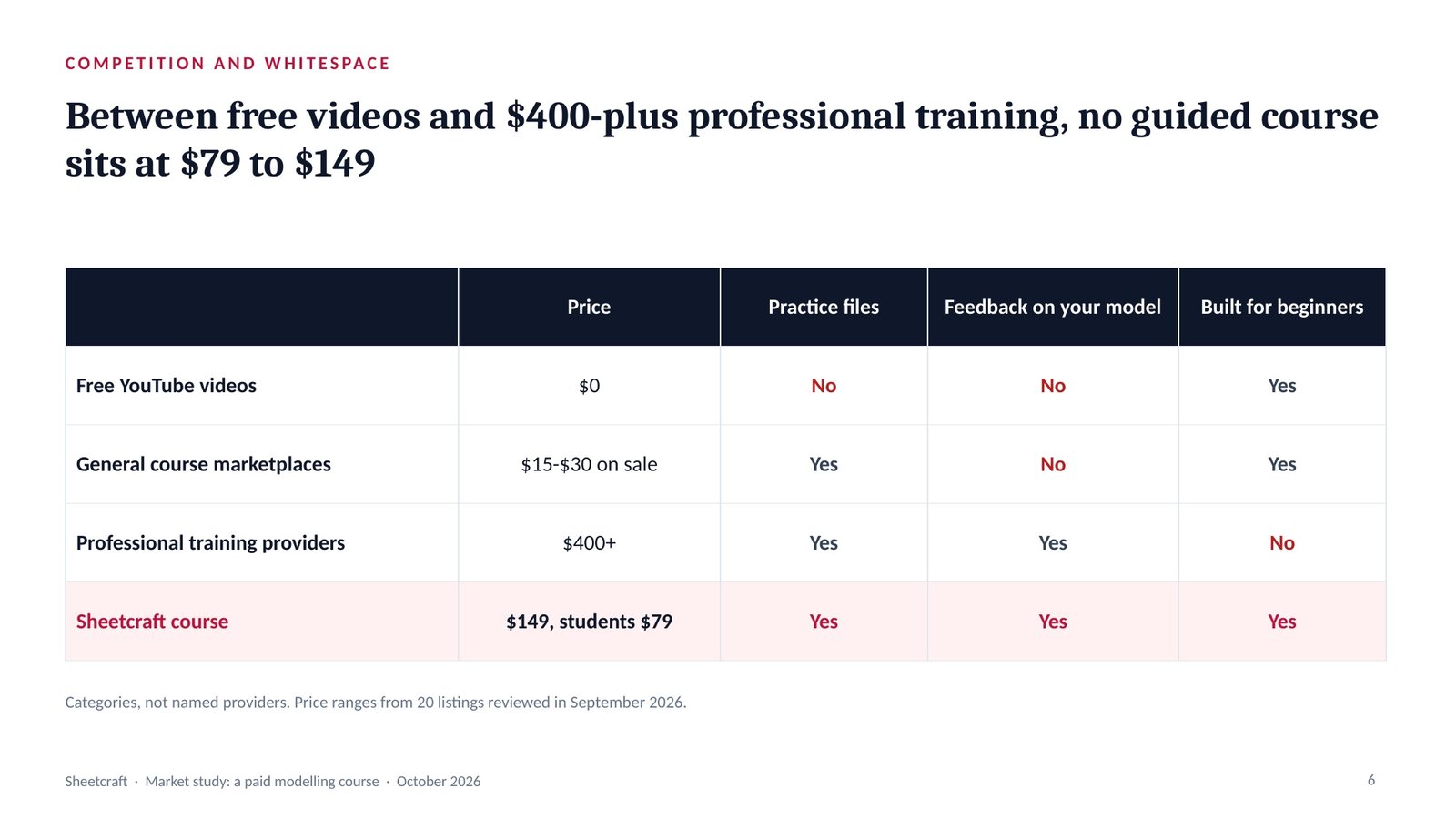
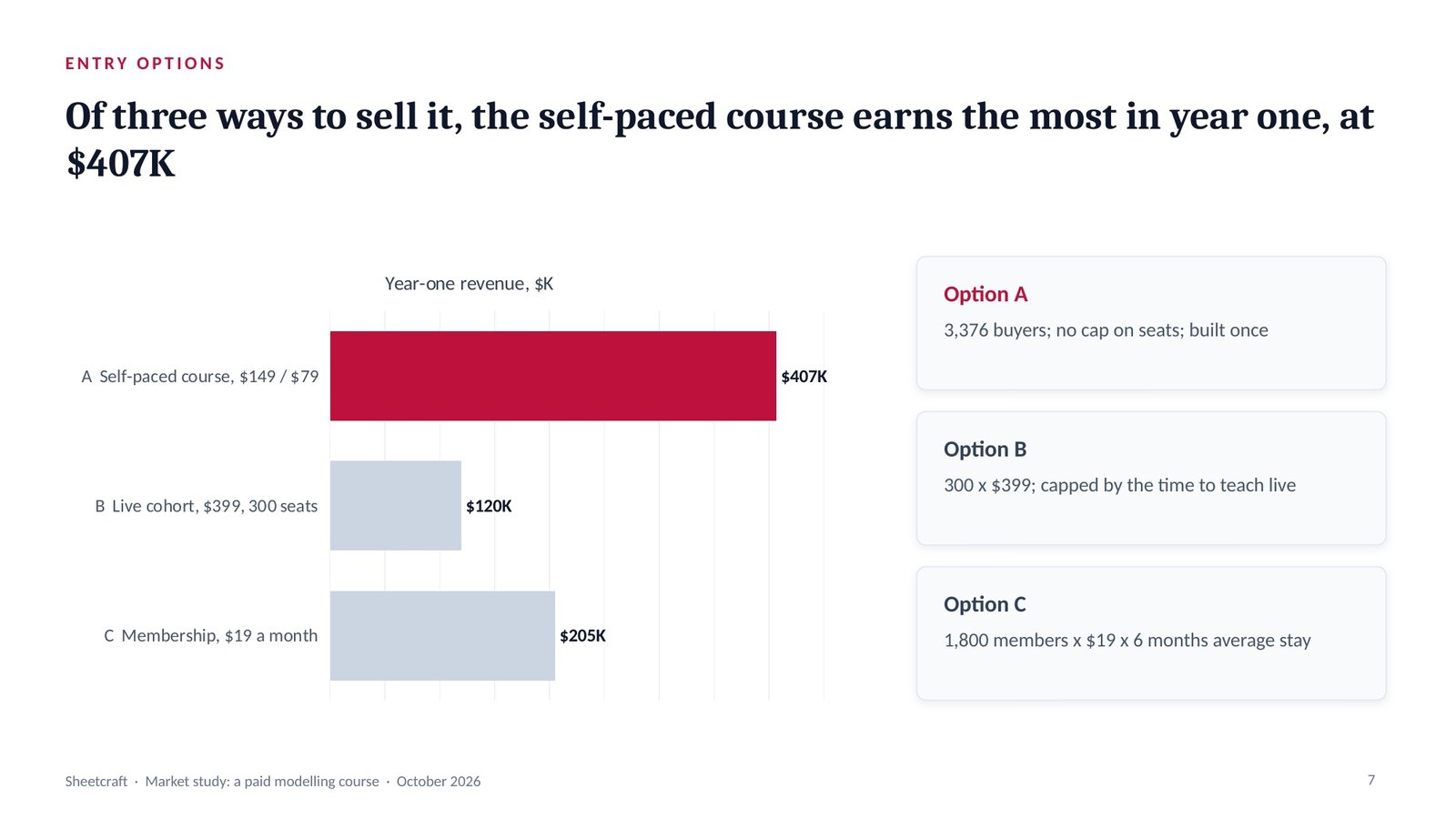
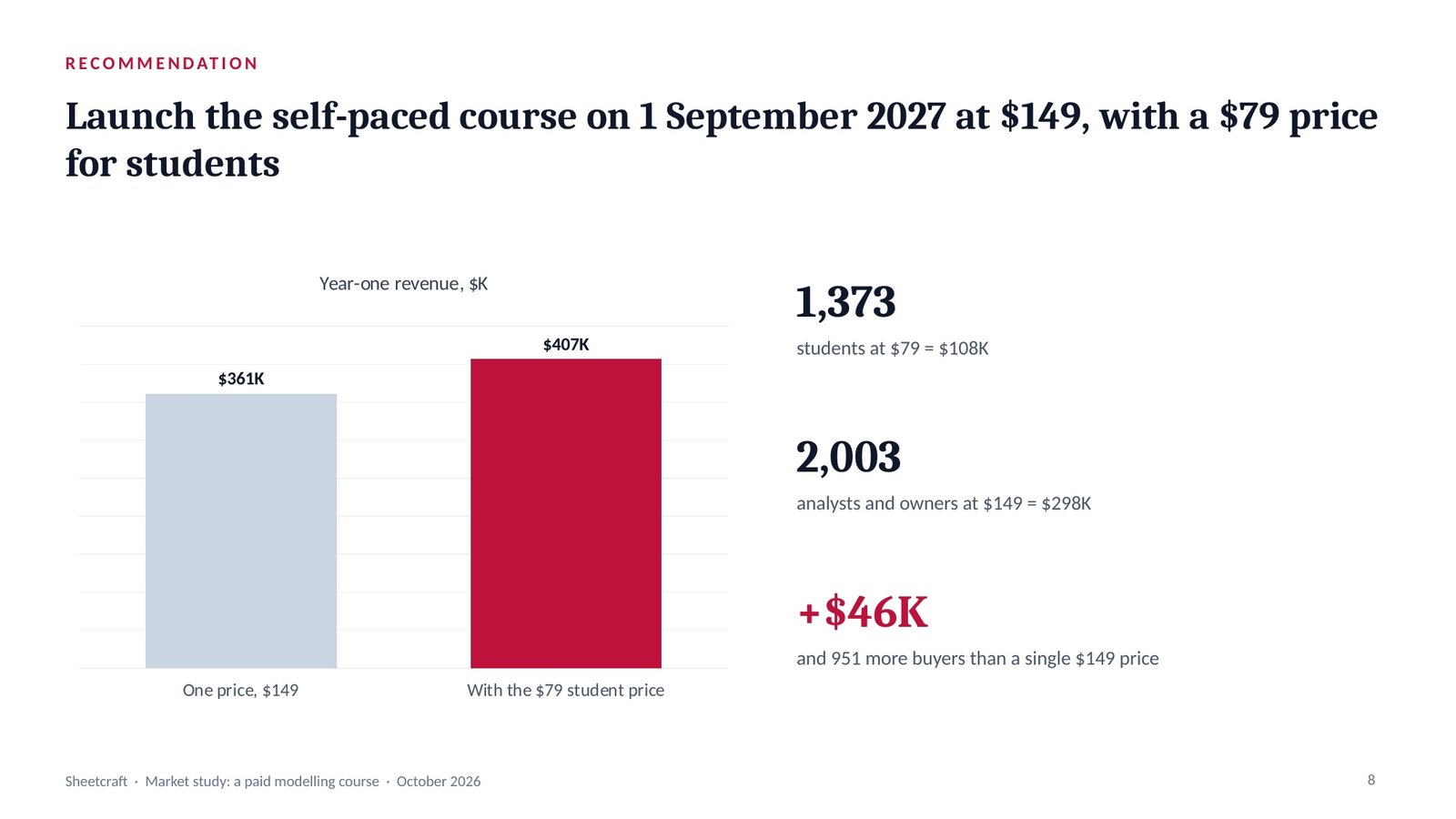
Slide 1 · Cover: a paid modelling course
“Pitch Paytrellis to Halden Foods’ CFO and controller. They process 38,000 invoices a year by hand.” With Halden’s accounts payable data and one reference customer’s results, that is the whole input. Answered 3 and 5 — sales pitch, customer — the one prompt builds a nine-slide pitch that opens on the buyer’s problem, not the seller’s story.
The pipeline · in → out
Opens with the two menus, then asks only what is missing.
“Pitch Paytrellis to Halden Foods’ CFO and controller. 38,000 invoices a year by hand.” + Halden’s AP data + a reference customer’s results.
Answered with two numbers, then restated in 7 lines. It pauses for your confirmation.
The deck type sets the storyline and the slides; the audience sets what the deck leads with and what it cuts. For a customer, it leads with their problem, their outcome and proof, and cuts the seller’s company history.
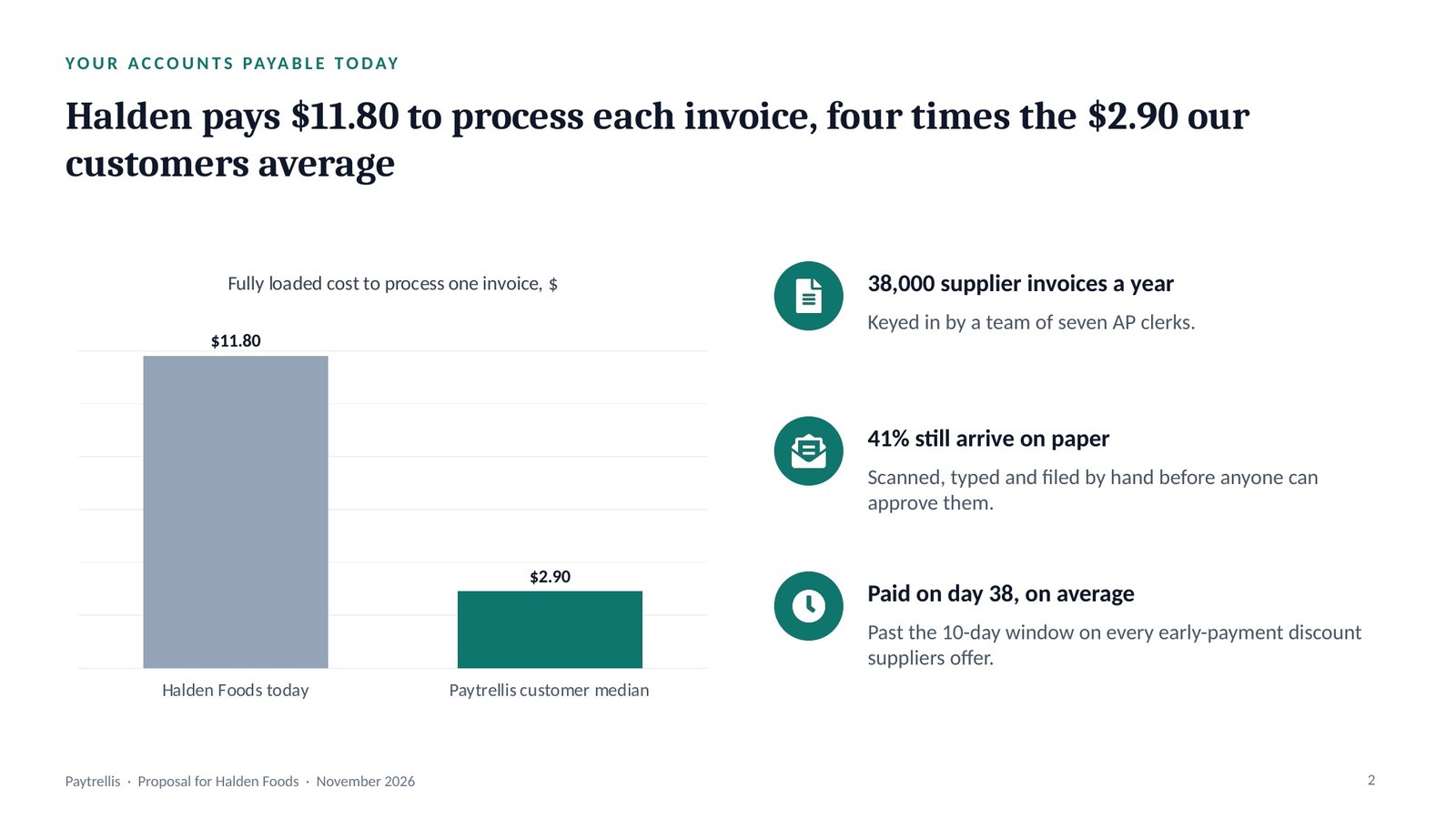
Takeaway: every number in the deck comes from Halden’s own data, so the CFO is weighing his own figures.
Picks the spine, the analyses and the slide blueprint for the deck type, and applies the audience overlay.
The restated brief.
Edge cases checked: none apply. Pauses for your OK.
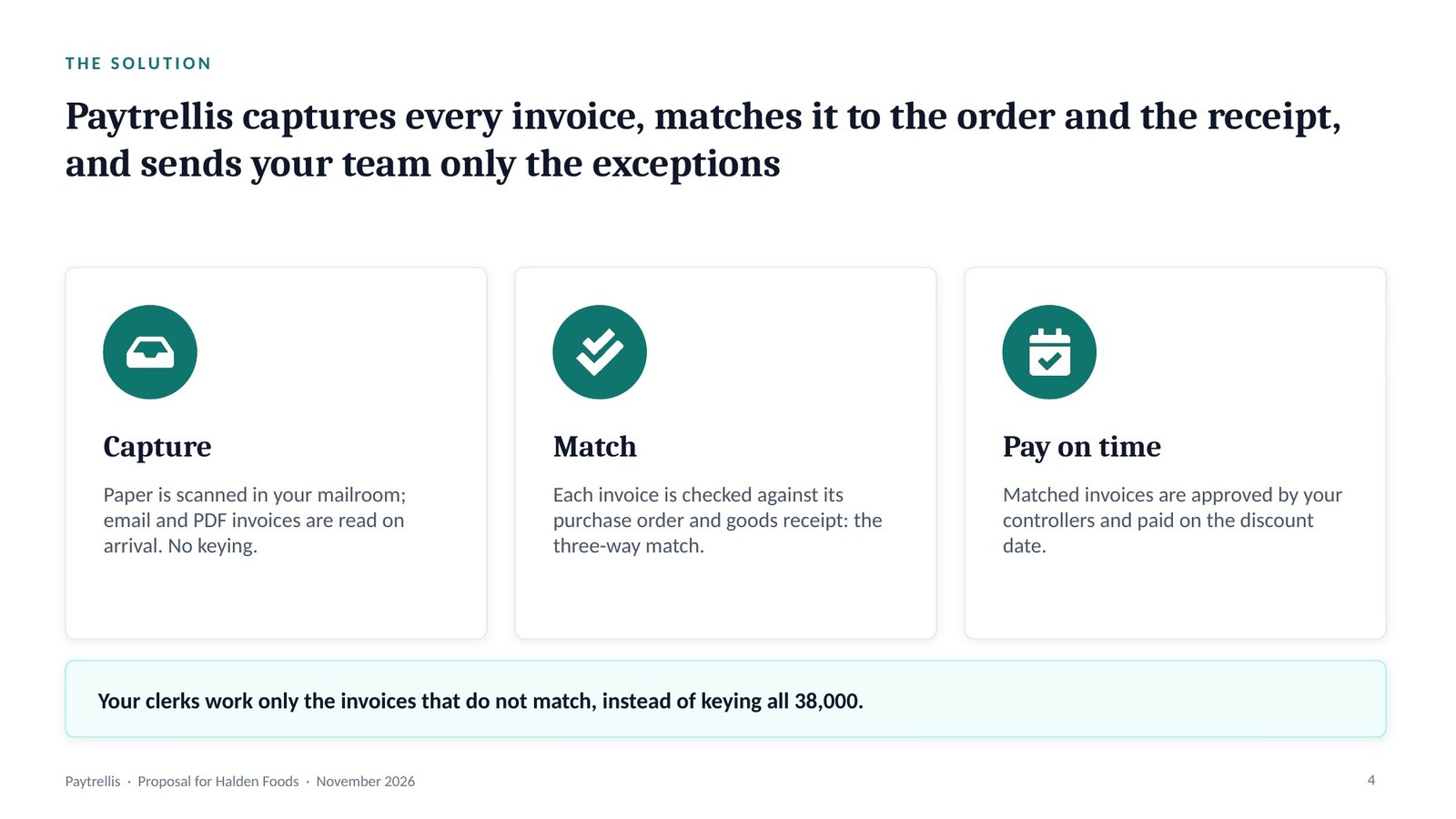
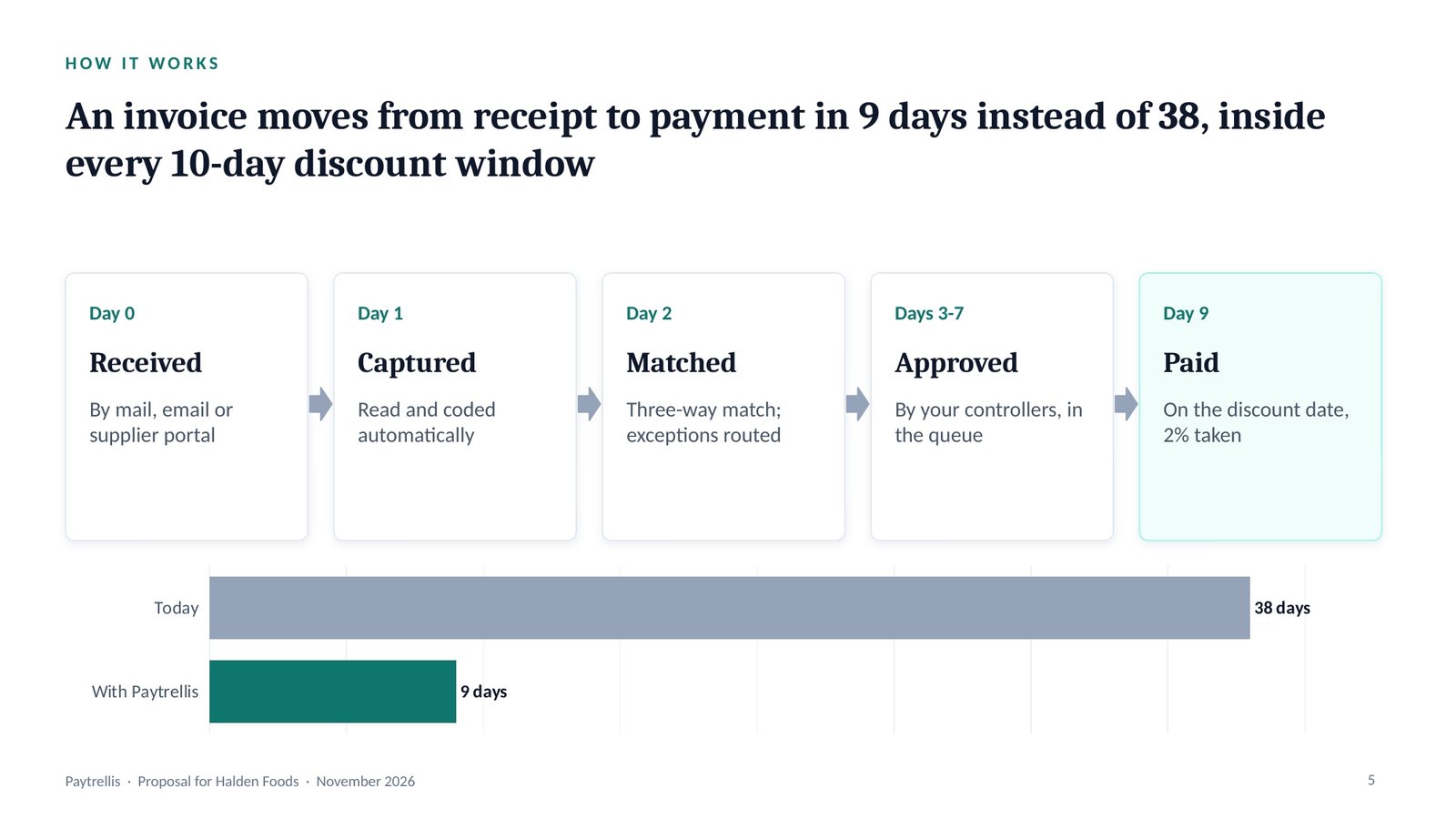
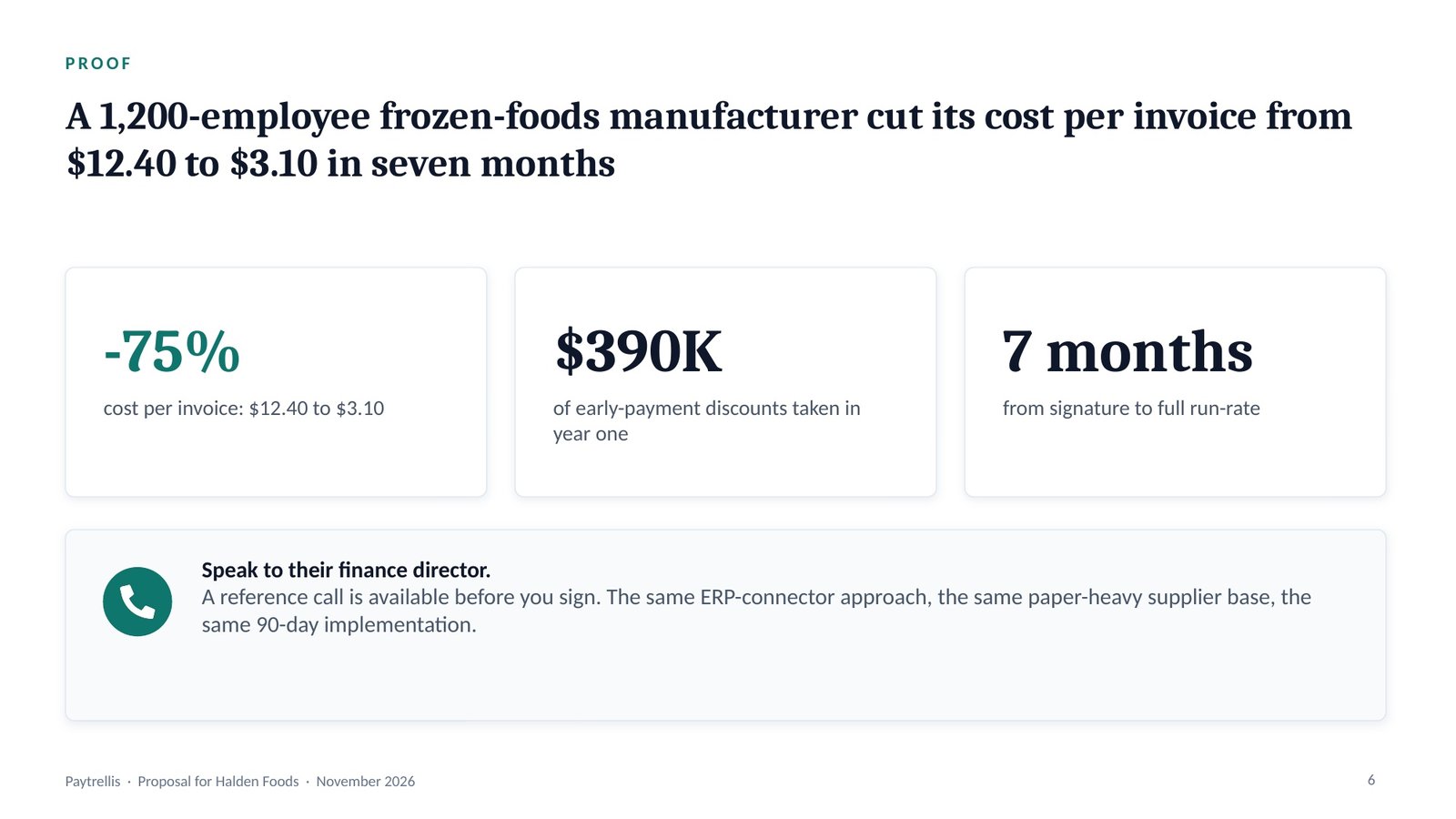
The sales spine runs Problem, Solution, Proof, Ask: what the buyer is losing, how it stops, who else has done it, and the next step with its date.
Takeaway: the buyer meets the price only after seeing the cost of not acting.
Runs only the analyses the route names, grades every finding, and finds one uncomfortable insight.
Halden’s AP data.
Uncomfortable insight: taking the discounts means paying $23M of invoices 28 days earlier, which ties up about $1.8M of Halden’s cash. Pauses.
Evidence grading labels every finding: Evidence (in the material or a cited source), Inference (reasoned from evidence, saying from what) or Assumption (neither, with what would confirm it).
Takeaway: a 2/10 net 30 term means 2% off for paying within 10 days. Paying $23M of invoices 28 days earlier ties up $1.8M, and the 2% earns an annualised 26% on it.
One governing thought, stated as the answer, with three MECE arguments beneath it.
The graded findings.
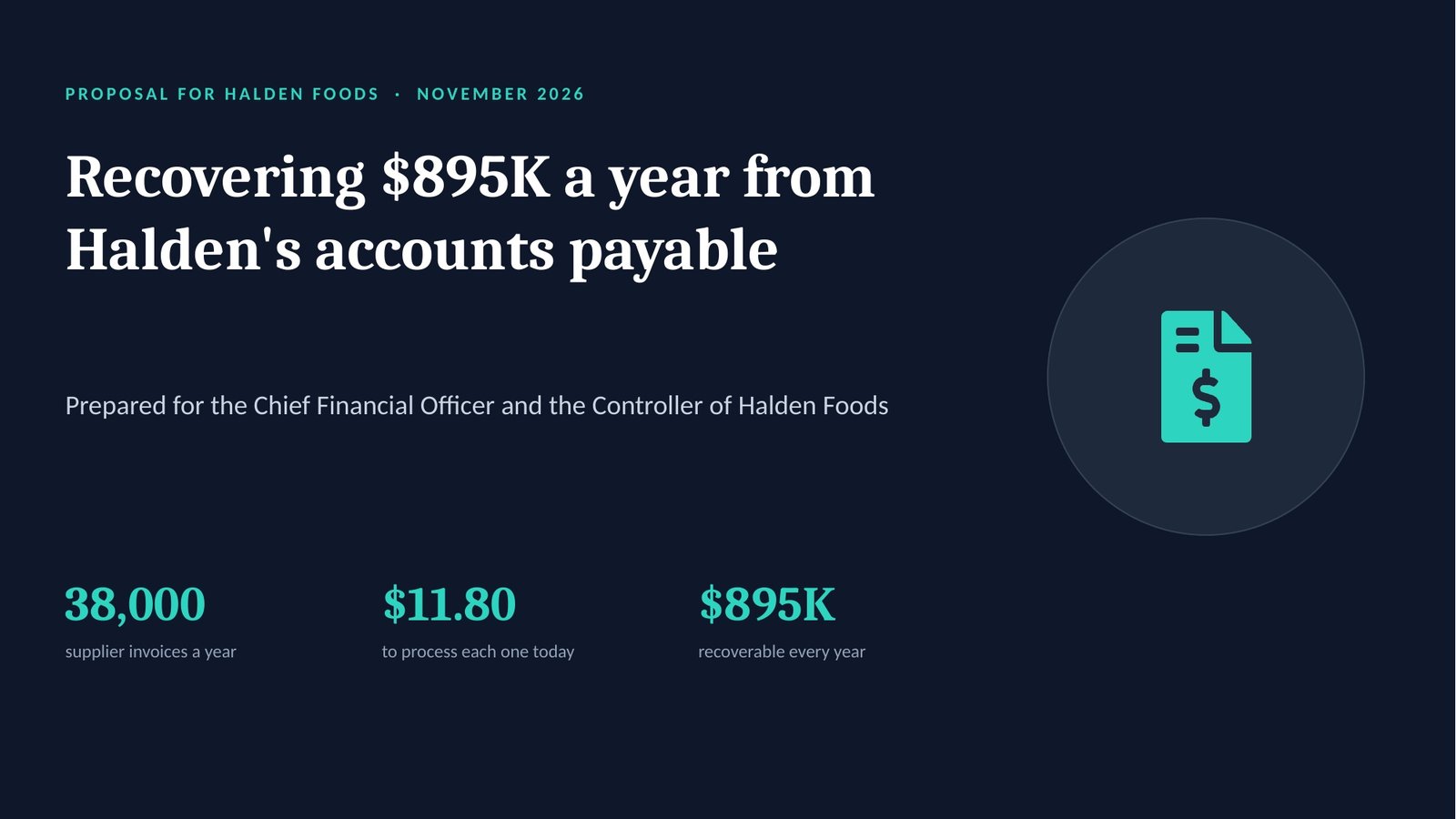
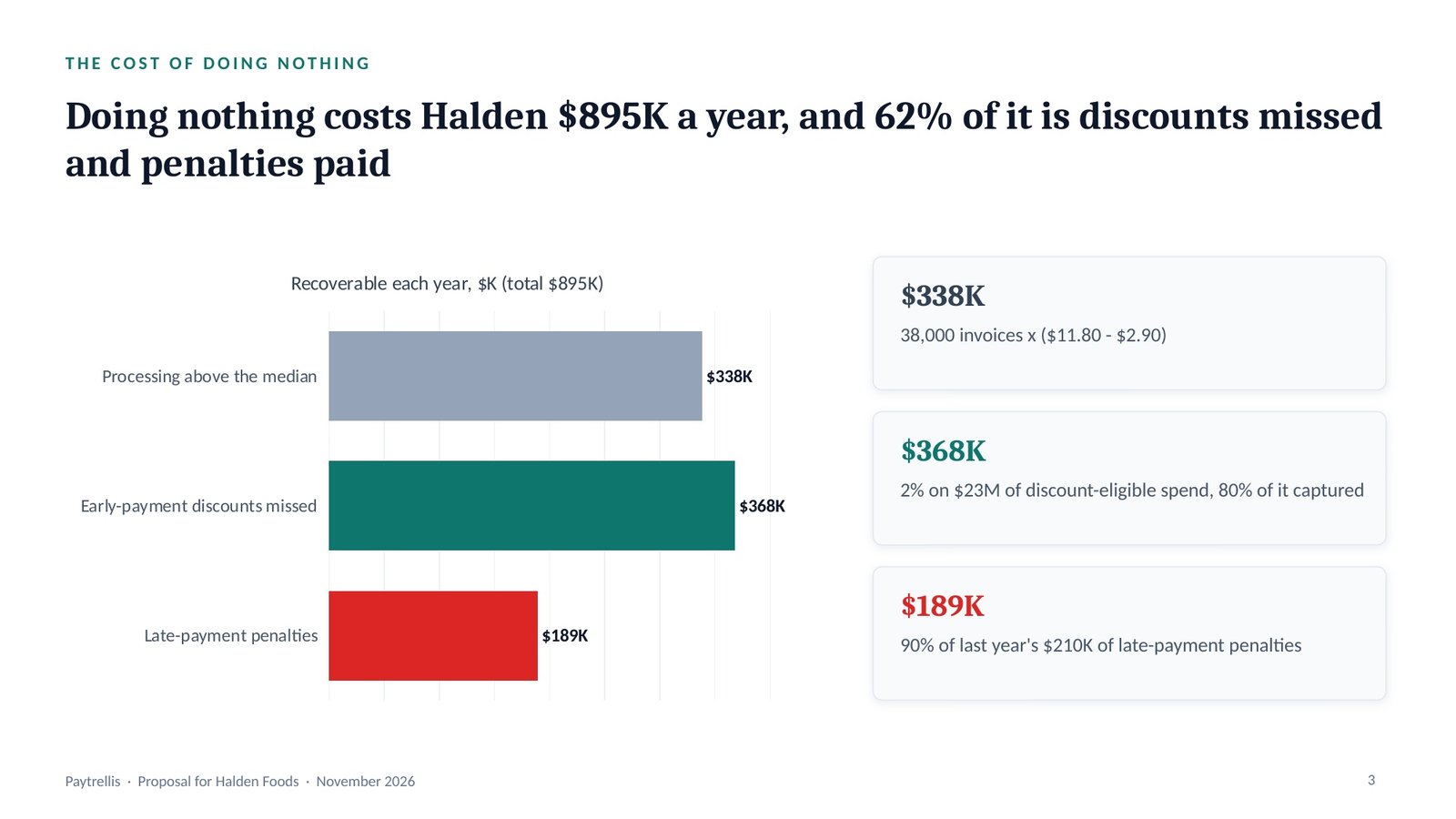
“Paytrellis cuts Halden’s cost per invoice from $11.80 to $2.90 and recovers $895K a year, for $136K in year one.”
Three arguments: the cost is theirs and measurable, the mechanism is proven, and the payback is fast. Pauses.
The governing thought is the one sentence the whole deck proves, stated as the answer. Beneath it, the Pyramid Principle groups the arguments so they are MECE: mutually exclusive (no overlaps) and collectively exhaustive (no gaps).
Takeaway: Paytrellis cuts Halden’s cost per invoice from $11.80 to $2.90 and recovers $895K a year, for $136K in year one.
Lays out the slide-by-slide skeleton, then recomputes every total before a slide is drawn.
The storyline.
The number check lists every figure the deck will show, with its source, and recomputes every total, bridge and percentage before a single slide is drawn.
Takeaway: every part of the headline number recomputes from Halden’s own data.
Locks the action title and the right chart for every slide, in the house style or your brand.
The blueprint.
An action title states the slide’s conclusion as a full sentence; a topic label only names the subject. The chart selector then picks the one chart that proves that sentence.
Takeaway: the price slide reads as a return, which is how a CFO judges a purchase.
Runs eleven quality gates, slide by slide, and fixes every failure.
The drafted deck.
Caught: a topic-label title (“Pricing”), and the payback shown without arithmetic — now $136K / $74.6K a month, after the 90-day go-live, in the note.
The quality gates are eleven checks run on every slide and reported PASS or FAIL; each failure is fixed and the gates are run again before handover.
Takeaway: a payback claim without its arithmetic is the first thing a CFO’s team challenges.
Builds the .pptx with native, editable charts, then opens it to check.
The checked deck.
Then: paste it into the Script Generator for a 6-minute proposal script.
A native chart is an editable PowerPoint chart with its data inside it, not a picture, so the numbers can be updated in the file. Speaker notes carry what to say and the source of every number.
Takeaway: the meeting ends with a date in both diaries rather than a promise to follow up.
The deck it builds
The real slides from this run, exported from the .pptx. Click a title, or swipe through them.
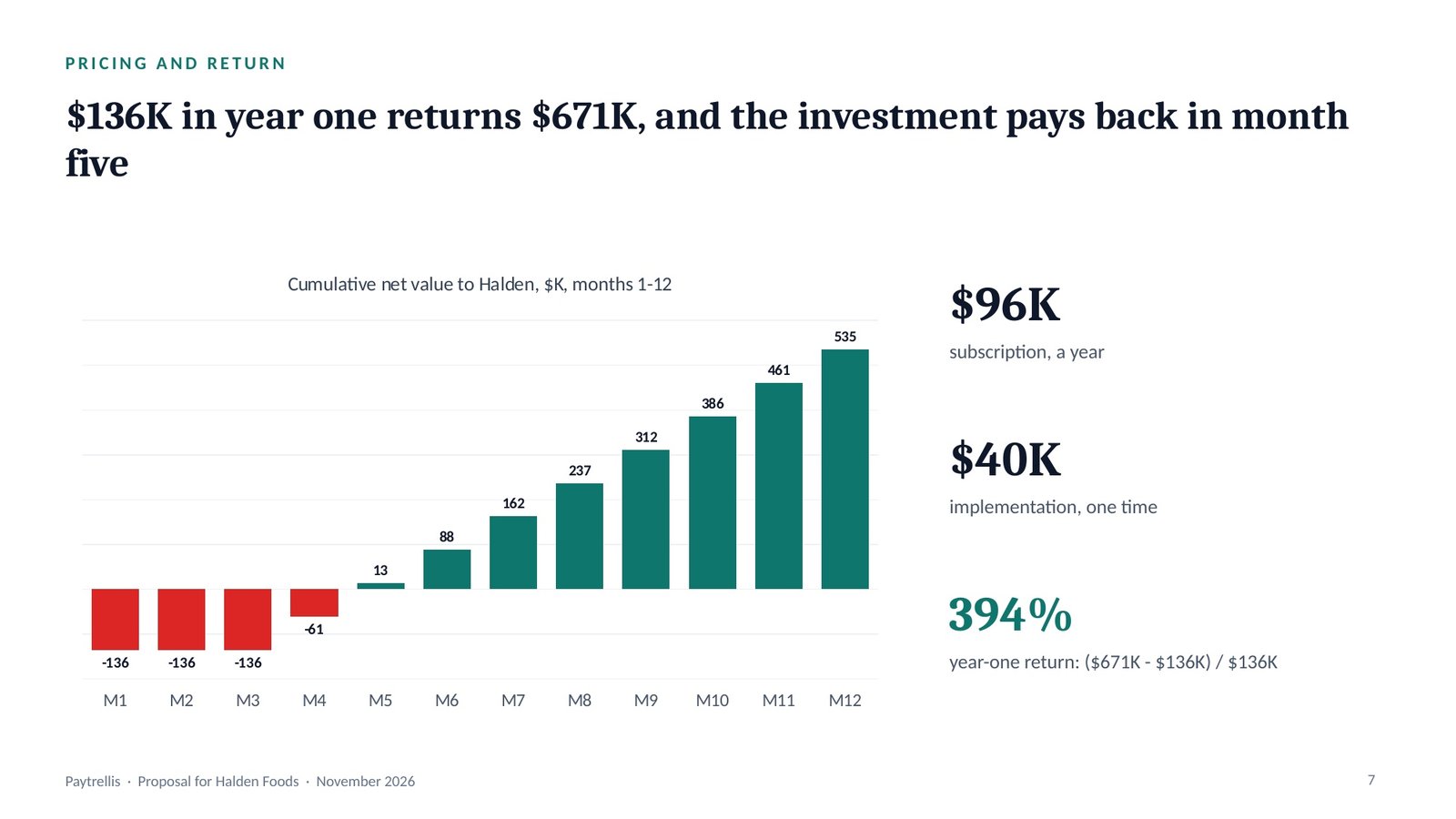
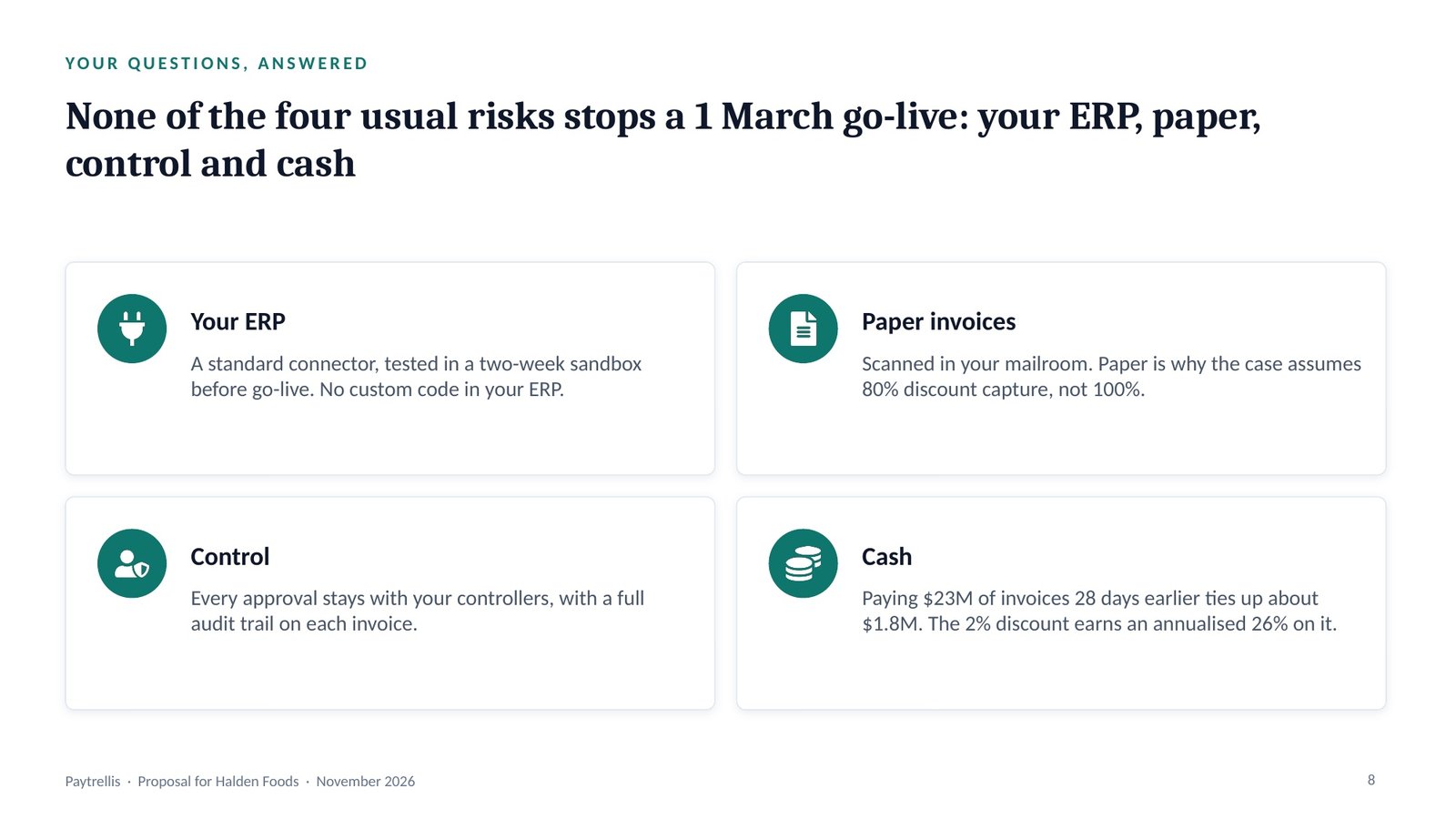
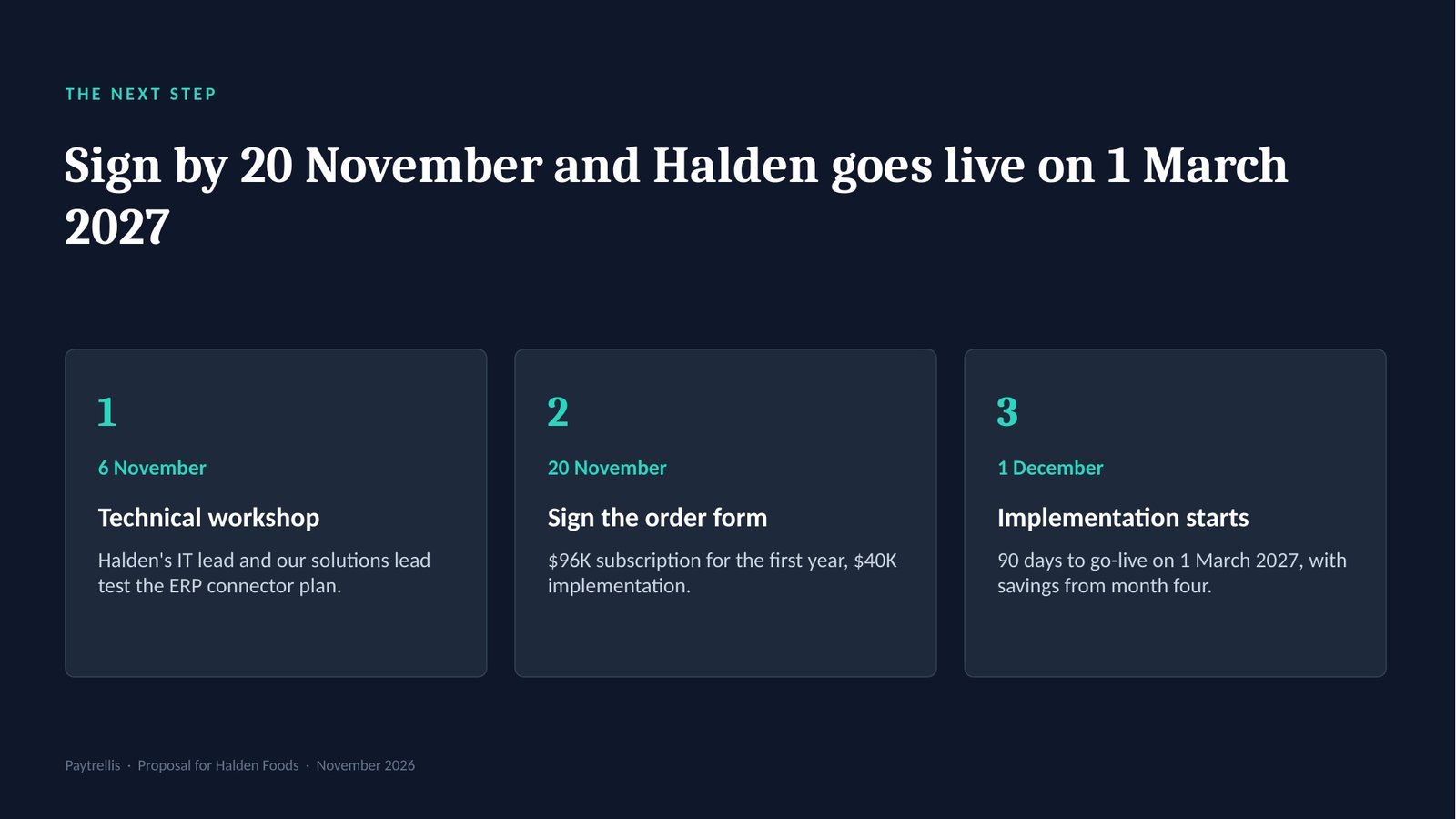
Slide 1 · Cover: recovering $895K a year
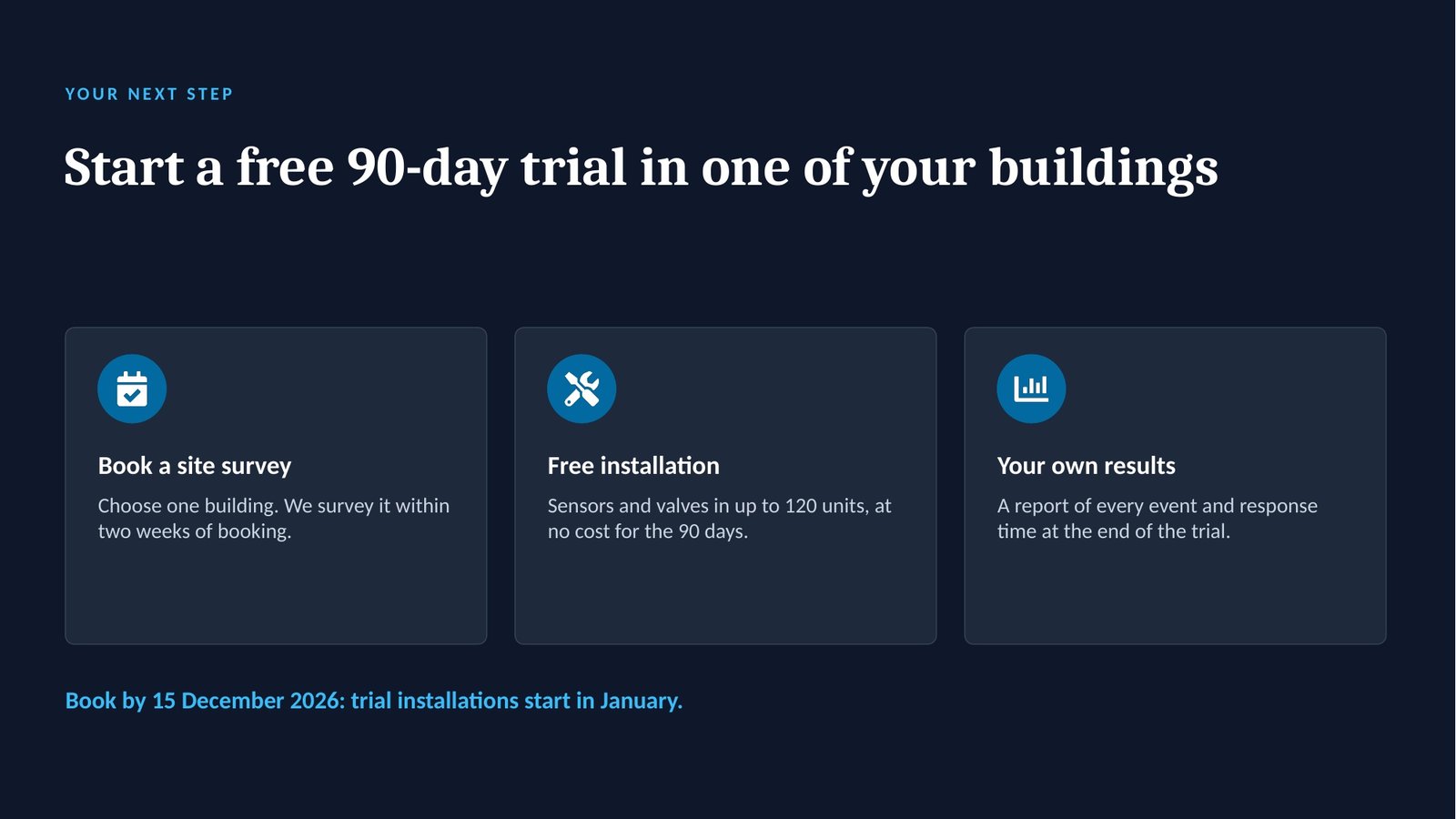
“We launch Tidewell Sense on a webinar for property managers on 12 November. Here are the pilot results from 14 buildings. The goal is trial sign-ups.” With the pilot data and the price, that is the whole input. Answered 5 and 5 — product launch, customer — the one prompt builds a ten-slide launch deck that leads with the buyer’s problem and the pilot’s proof.
The pipeline · in → out
Opens with the two menus, then asks only what is missing.
“We launch Tidewell Sense on a webinar for property managers. Here are the pilot results. The goal is trial sign-ups.” + pilot data + price.
Answered with two numbers, then restated in 7 lines. It pauses for your confirmation.
A product launch deck positions a new product. For a customer audience it leads with their problem, their outcome and proof, and drops the internal go-to-market detail a launch team would want.
Takeaway: the deck is judged by bookings, so it ends on one next step.
Picks the spine, the analyses and the slide blueprint for the deck type, and applies the audience overlay.
The restated brief.
For a customer audience, the internal GTM and metrics slides become pilot results and the trial offer. Pauses for your OK.
The launch spine runs Context, Insight, Product, Go-to-market, Plan. For customers, the go-to-market and metrics slides become pilot results and the trial offer.
Takeaway: the customer sees why the product exists before seeing what it is.
Runs only the analyses the route names, grades every finding, and finds one uncomfortable insight.
The pilot data.
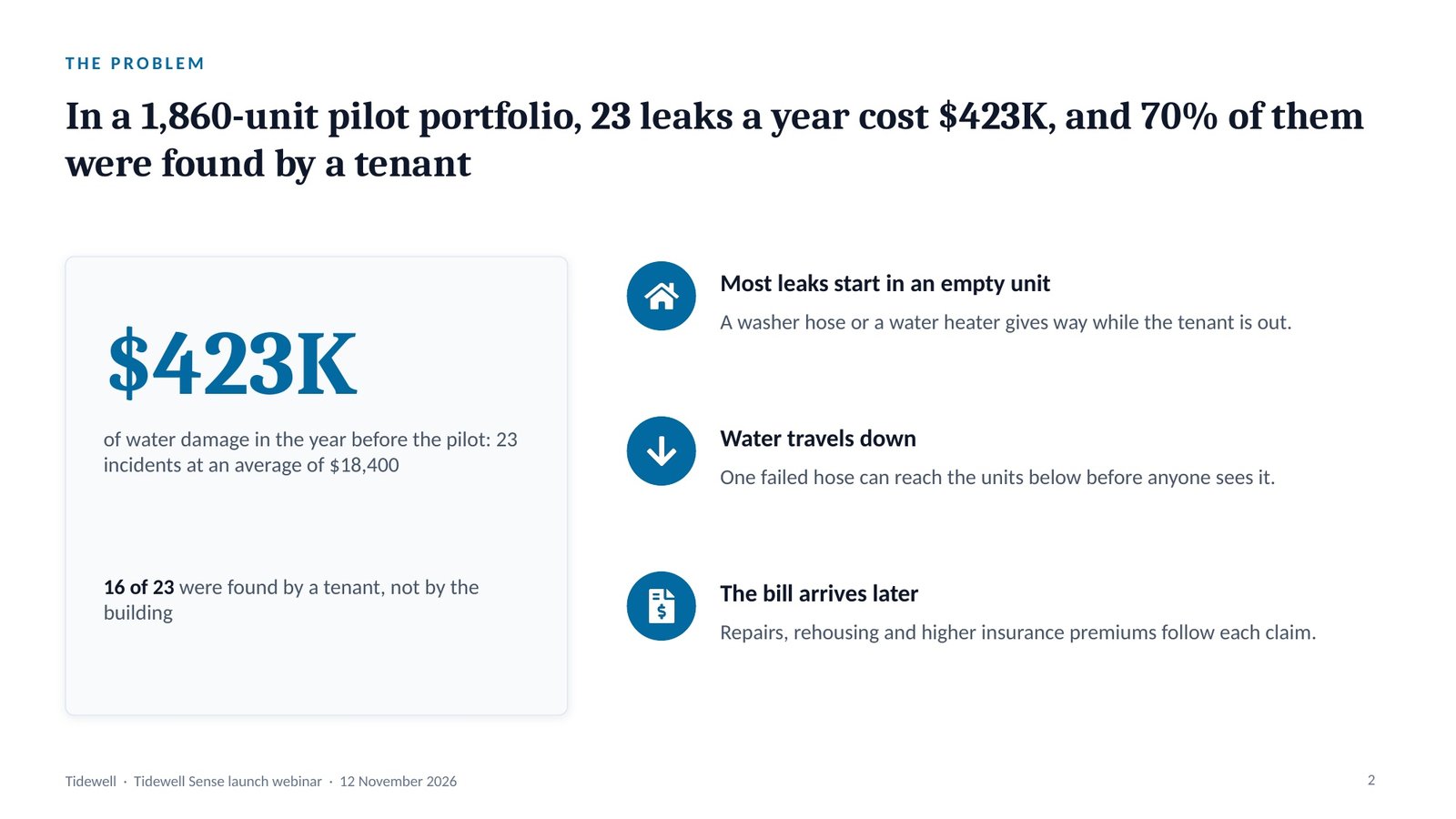
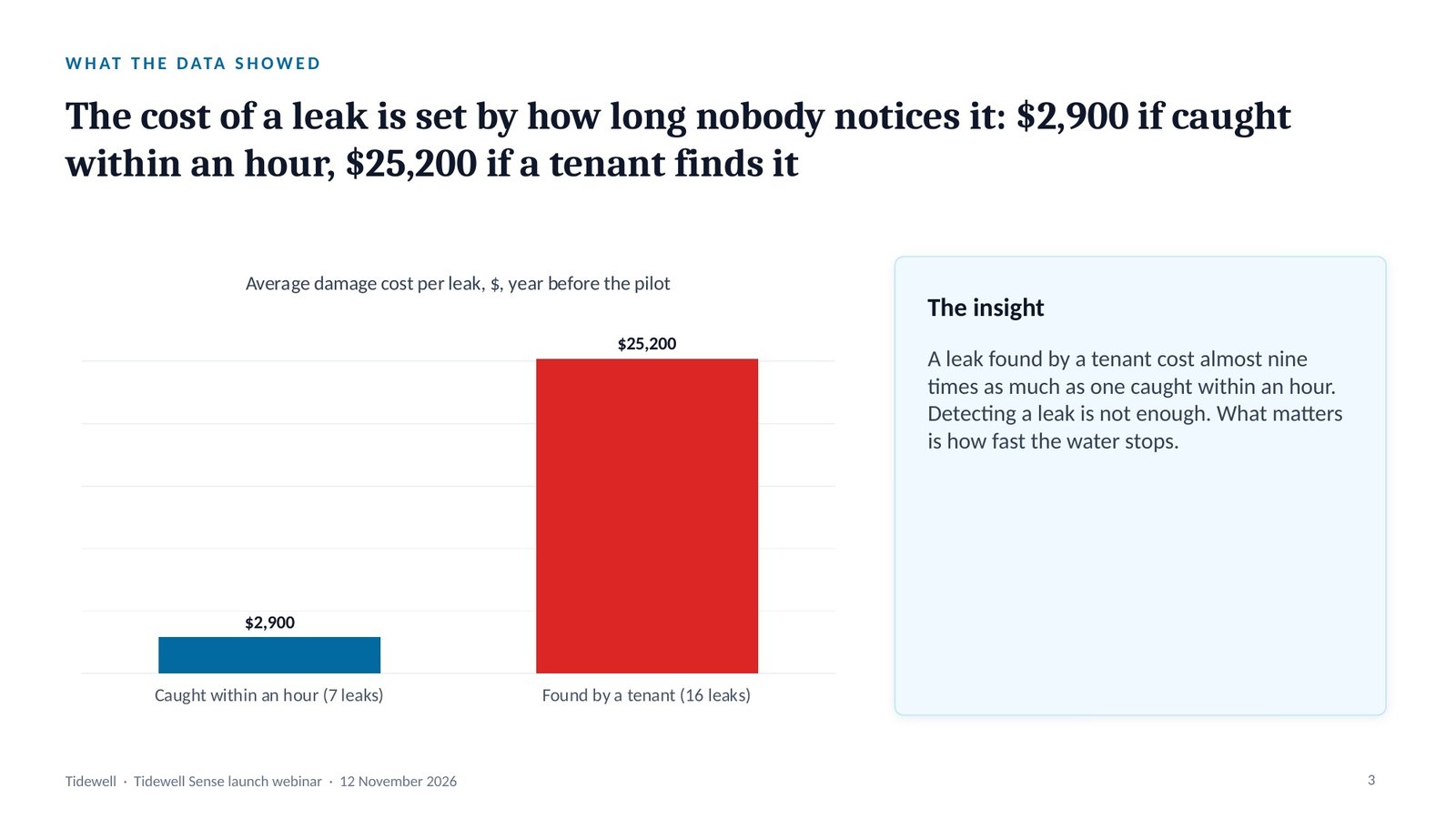
Uncomfortable insight: detection alone does not cut the cost. A leak found by a tenant cost $25,200, one caught within an hour $2,900, so the product must stop the water. Pauses.
Evidence grading labels every finding: Evidence (in the material or a cited source), Inference (reasoned from evidence, saying from what) or Assumption (neither, with what would confirm it).
Takeaway: a leak a tenant found cost $25,200 on average, against $2,900 for one caught within an hour, 8.7 times as much.
One governing thought, stated as the answer, with three MECE arguments beneath it.
The graded findings.
“Tidewell Sense cut a 1,860-unit portfolio’s leak damage from $423K to $19K in a year, for $134K.”
Context, insight, product, proof, and one next step for the viewer. Pauses.
The governing thought is the one sentence the whole deck proves, stated as the answer. Beneath it, the Pyramid Principle groups the arguments so they are MECE: mutually exclusive (no overlaps) and collectively exhaustive (no gaps).
Takeaway: Tidewell Sense cut a 1,860-unit portfolio’s leak damage from $423K to $19K in a year, for $134K.
Lays out the slide-by-slide skeleton, then recomputes every total before a slide is drawn.
The storyline.
The number check lists every figure the deck will show, with its source, and recomputes every total, bridge and percentage before a single slide is drawn.
Takeaway: the property manager can rebuild the 3.0x from the slide’s own figures.
Locks the action title and the right chart for every slide, in the house style or your brand.
The blueprint.
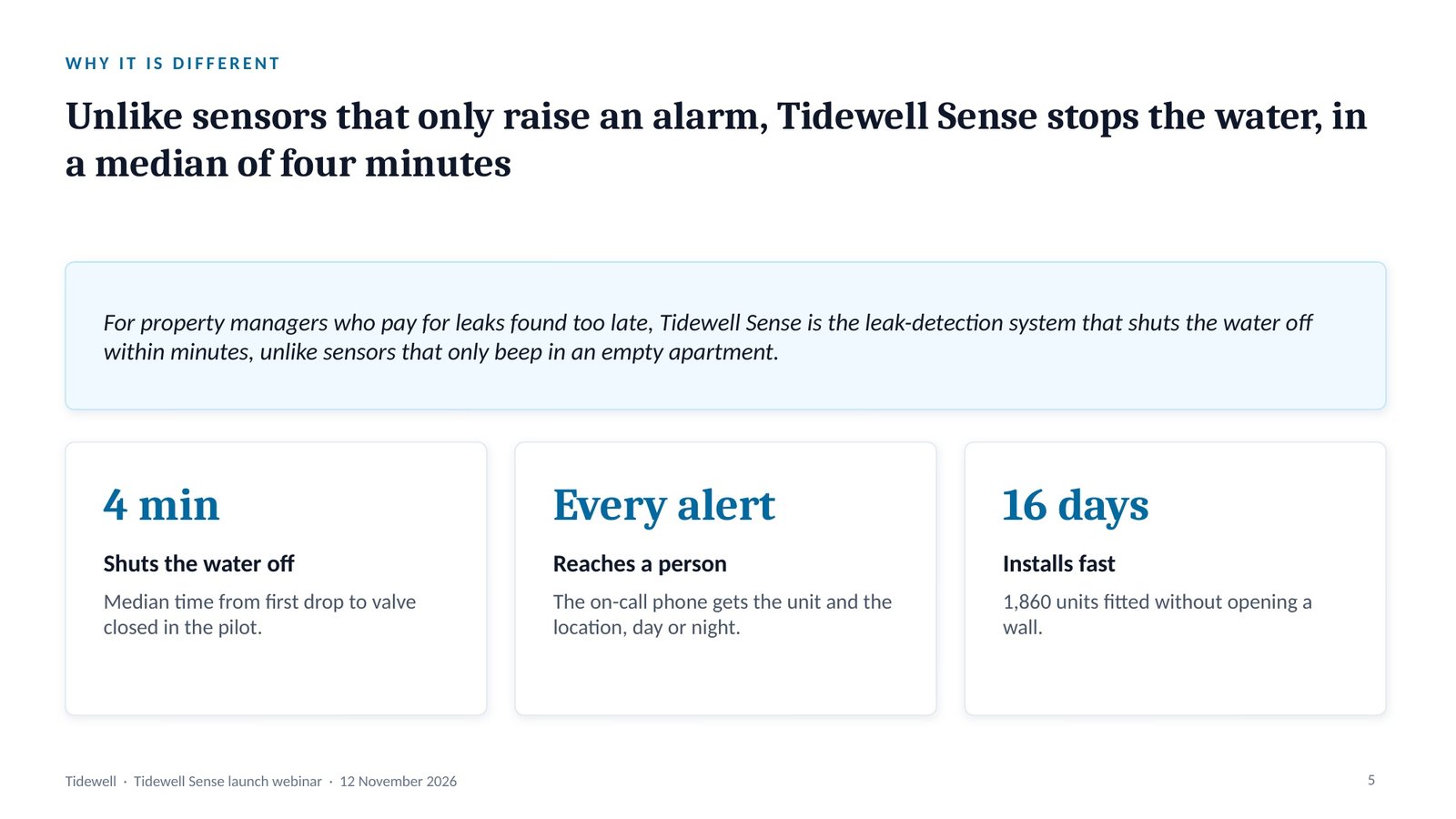
A positioning statement says who the product is for, the need, the category, the benefit and the alternative: “For [who] who [need], [product] is the [category] that [benefit], unlike [alternative].”
Takeaway: the difference from cheaper sensors is stated as a measured result, not an adjective.
Runs eleven quality gates, slide by slide, and fixes every failure.
The drafted deck.
Caught: “3.0x” shown without arithmetic — now $404,600 / (1,860 × $6 × 12 = $133,920) on the pricing slide.
The quality gates are eleven checks run on every slide and reported PASS or FAIL; each failure is fixed and the gates are run again before handover.
Takeaway: a return figure without its sums is the claim a property manager doubts first.
Builds the .pptx with native, editable charts, then opens it to check.
The checked deck.
Then: paste it into the Script Generator for the webinar script, in the Wide-Audience voice.
A native chart is an editable PowerPoint chart with its data inside it, not a picture, so the numbers can be updated in the file. Speaker notes carry what to say and the source of every number.
Takeaway: the webinar ends with a booking, not a brochure.
The deck it builds
The real slides from this run, exported from the .pptx. Click a title, or swipe through them.
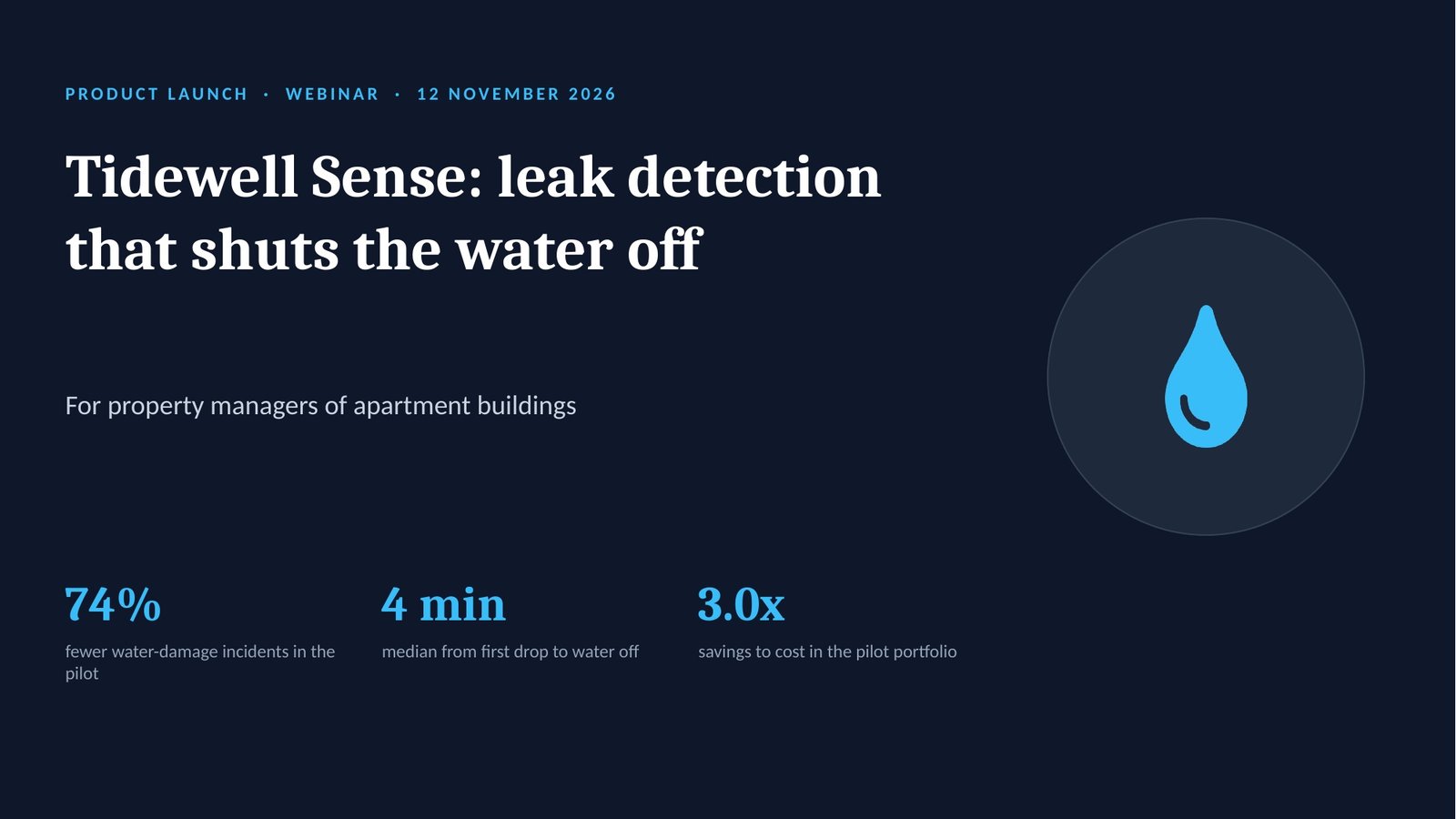
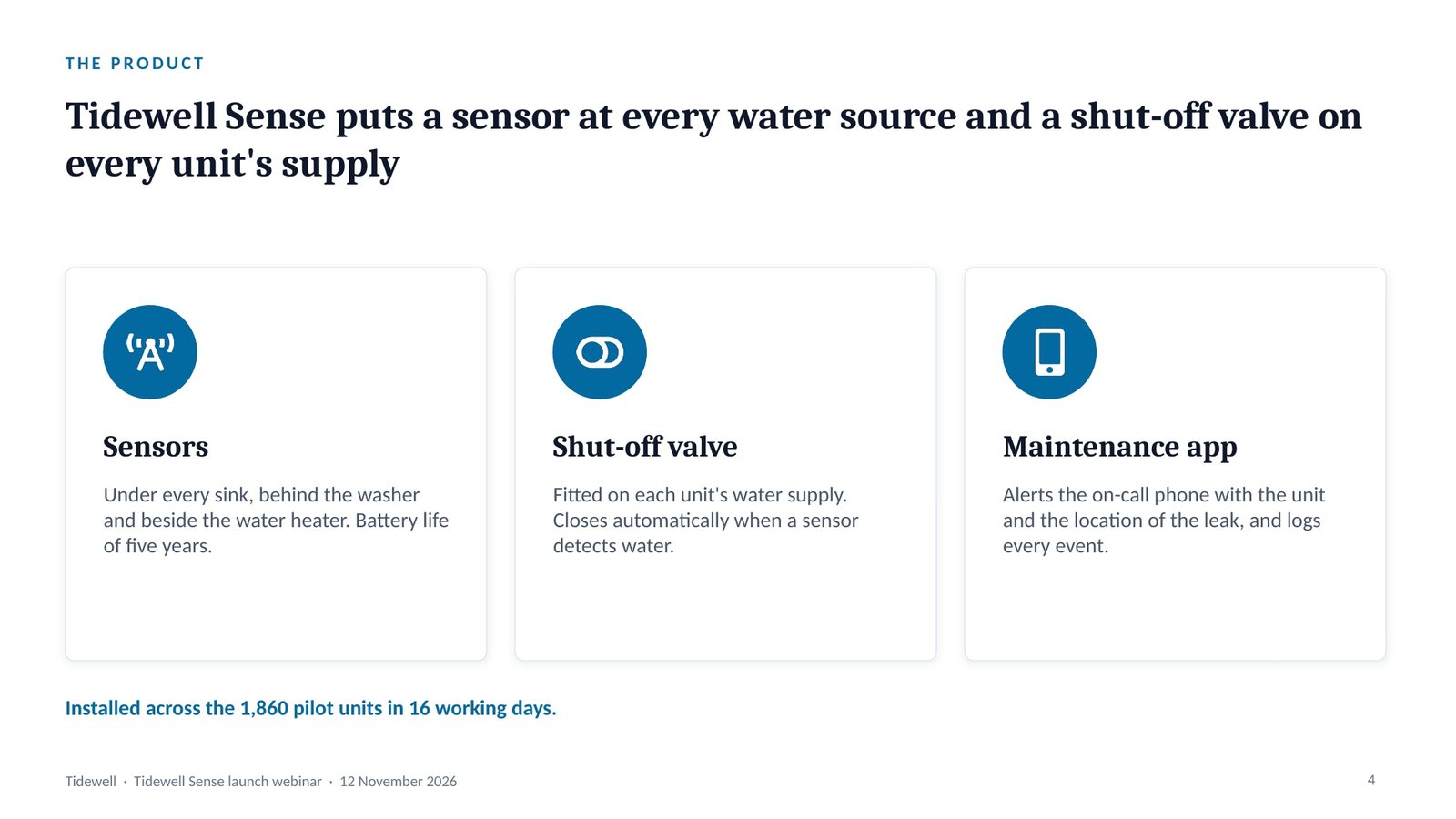
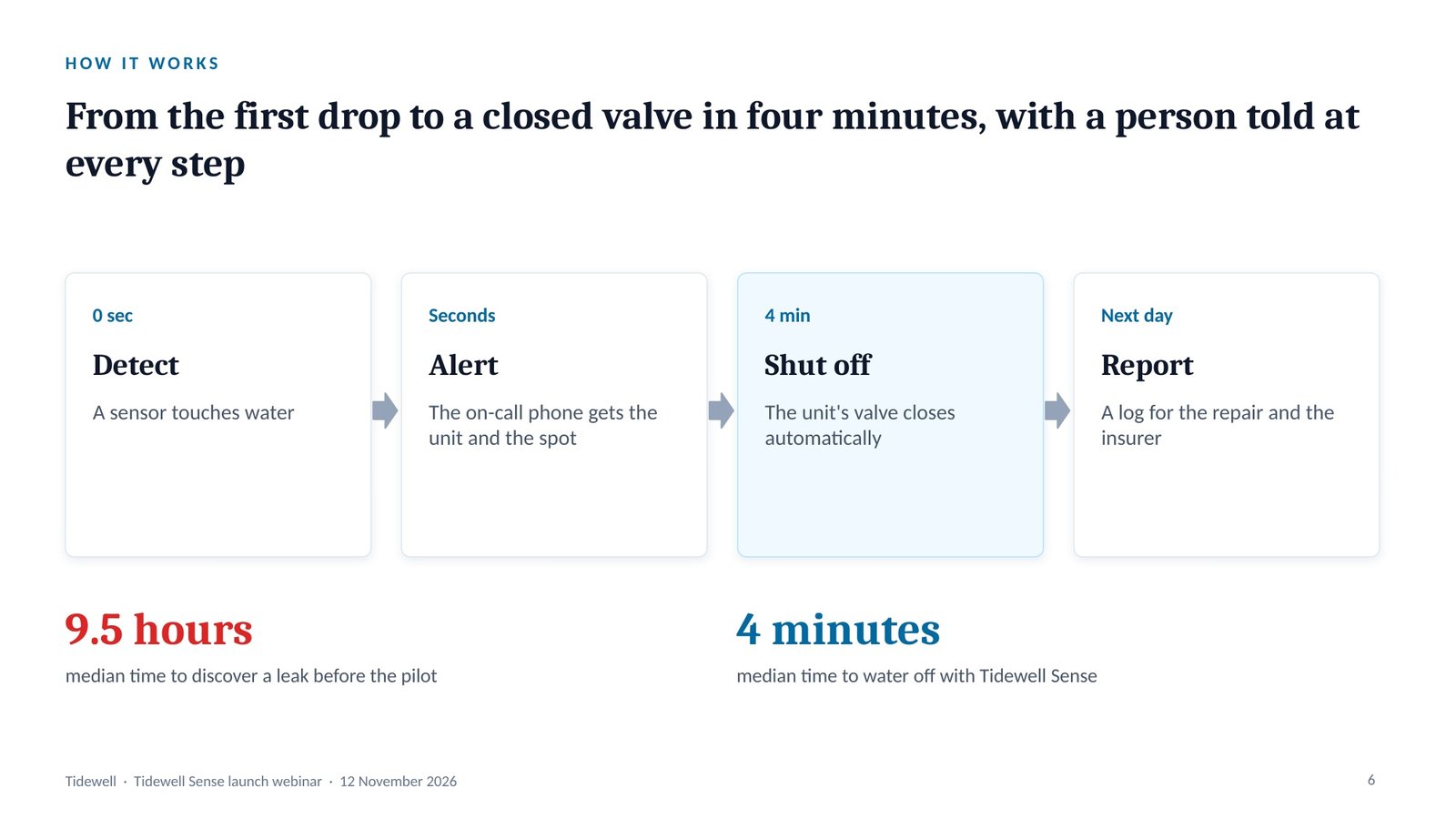
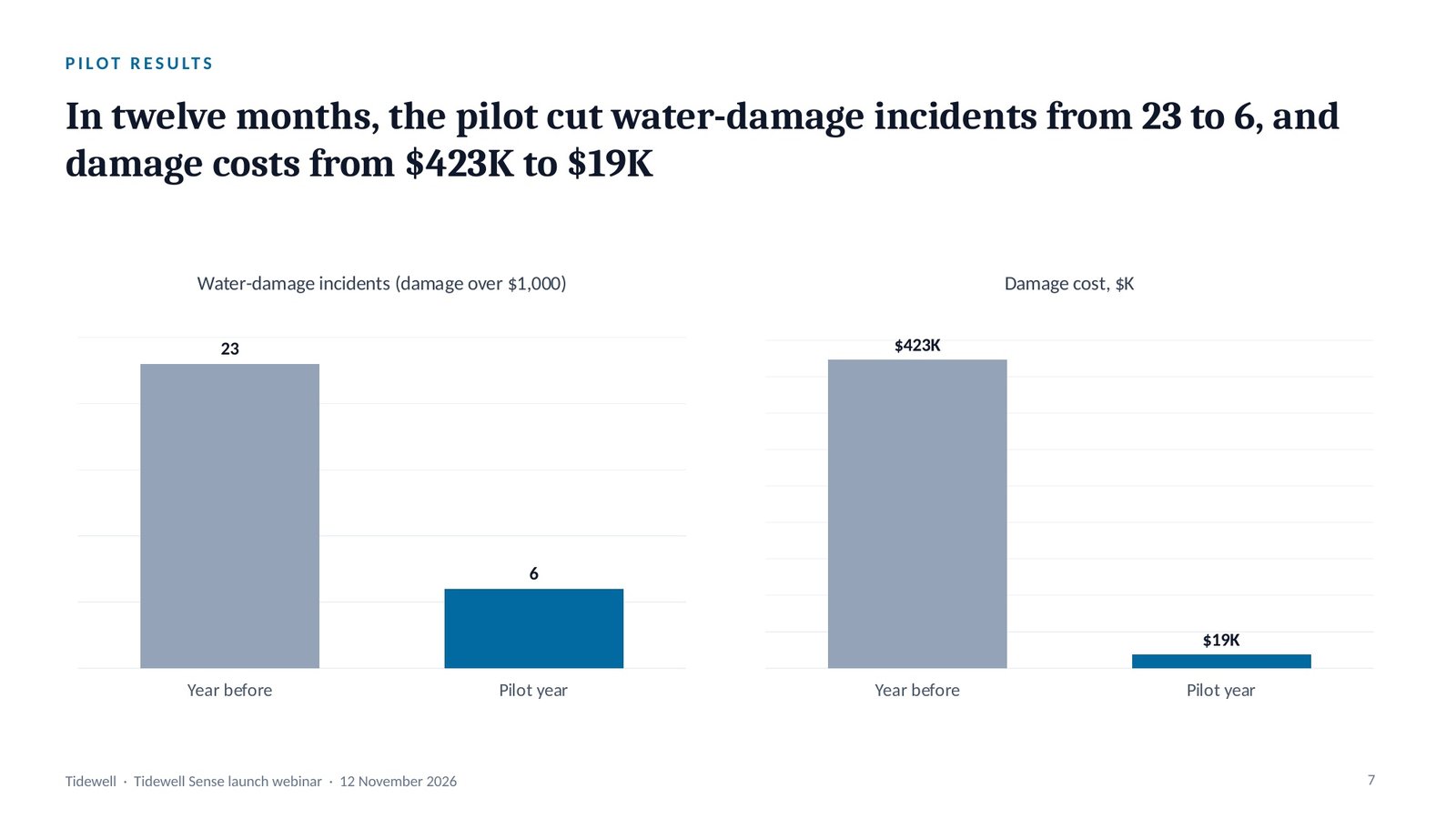
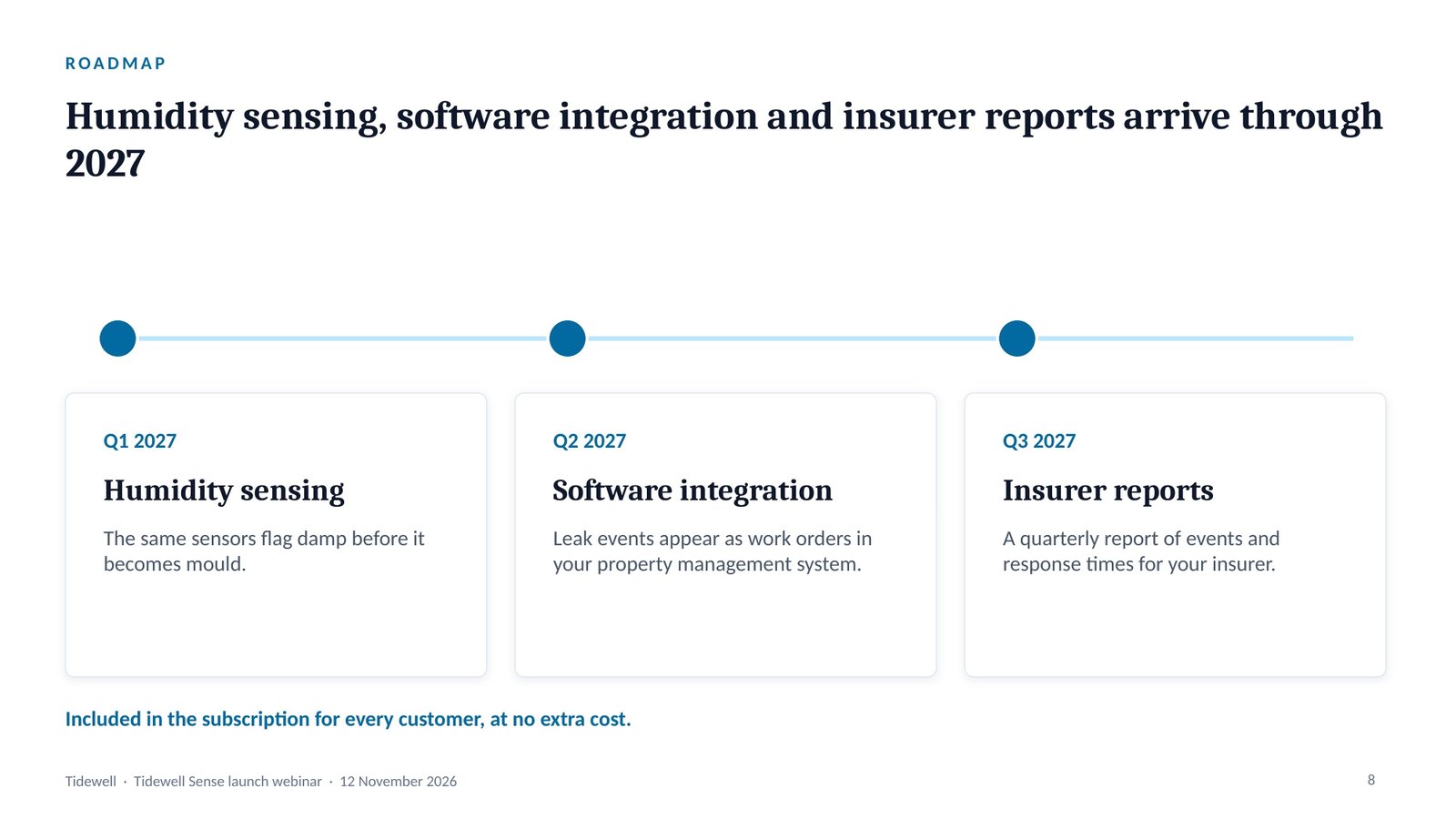
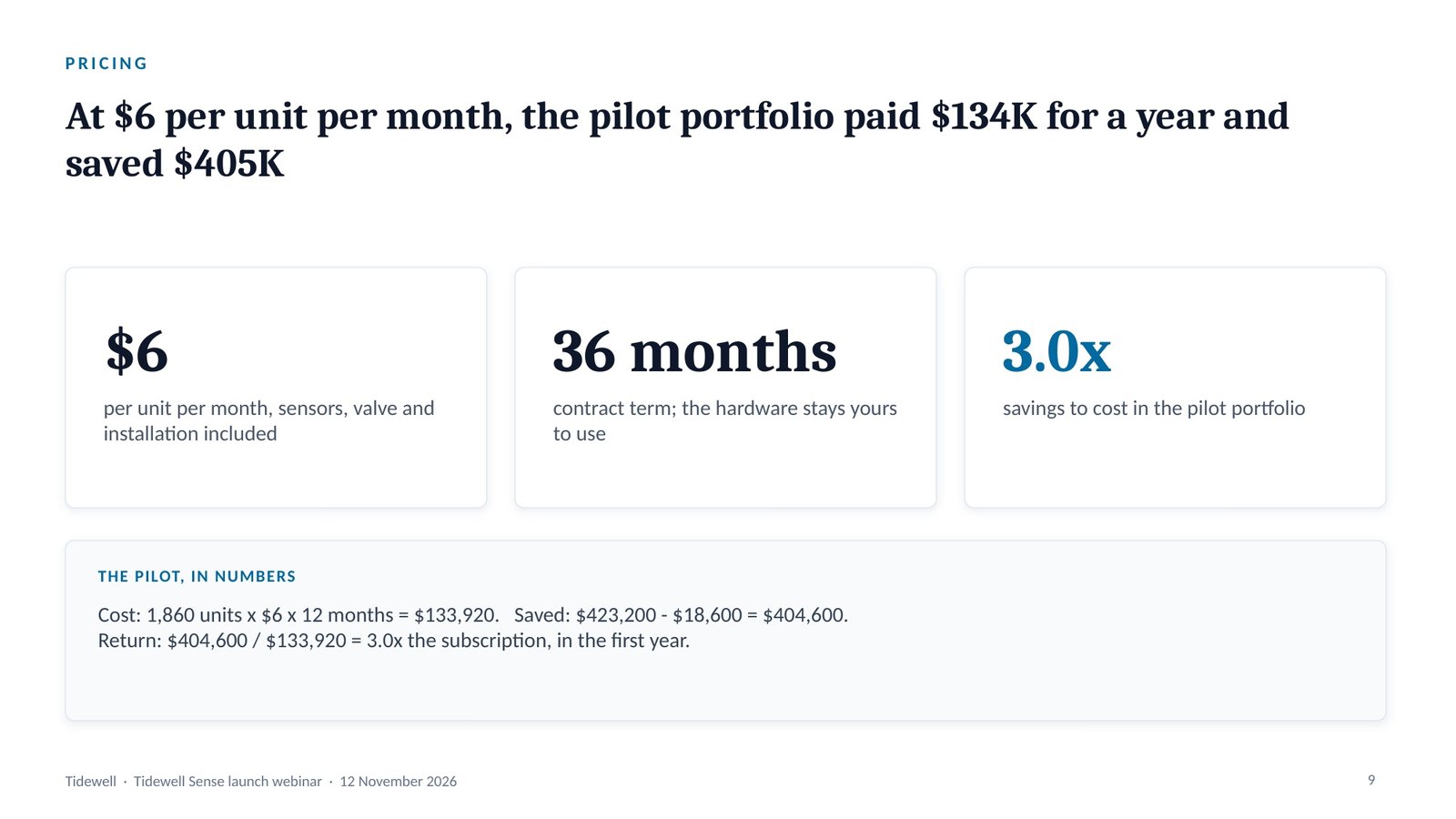
Slide 1 · Cover: Tidewell Sense
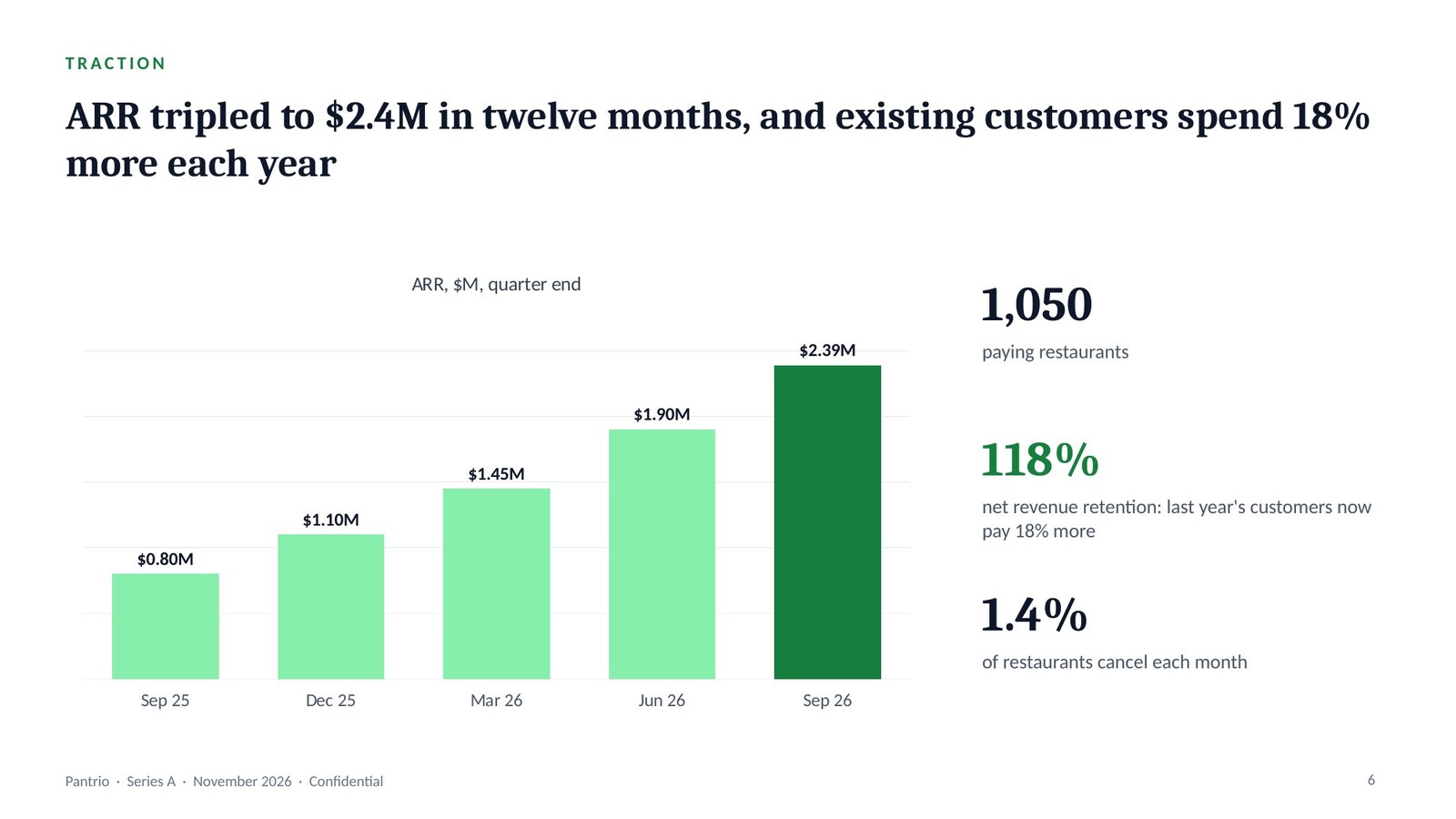
“Pantrio, restaurant ordering software. $2.4M ARR, growing 3x year on year. We’re raising an $8M Series A and pitching investors in two weeks.” With billing data, a 310-restaurant waste study, acquisition cost by channel and the cash position, that is the whole input. Answered 8 and 3 — investor deck, investors — the one prompt builds the eleven-slide pitch. ARR is annual recurring revenue: what customers pay each year on subscription.
The pipeline · in → out
Opens with the two menus, then asks only what is missing.
“Pantrio, restaurant ordering software. $2.4M ARR, growing 3x year on year. Raising an $8M Series A.” + billing data + the waste study + CAC by channel + cash.
Answered with two numbers, then restated in 7 lines. Market counts it cannot source are offered as estimates tagged ASSUMPTION. It pauses for your confirmation.
The deck type sets the storyline and the slides; the audience sets what the deck leads with and what it cuts. Investors lead with return, market size, defensibility and team, and cut internal process.
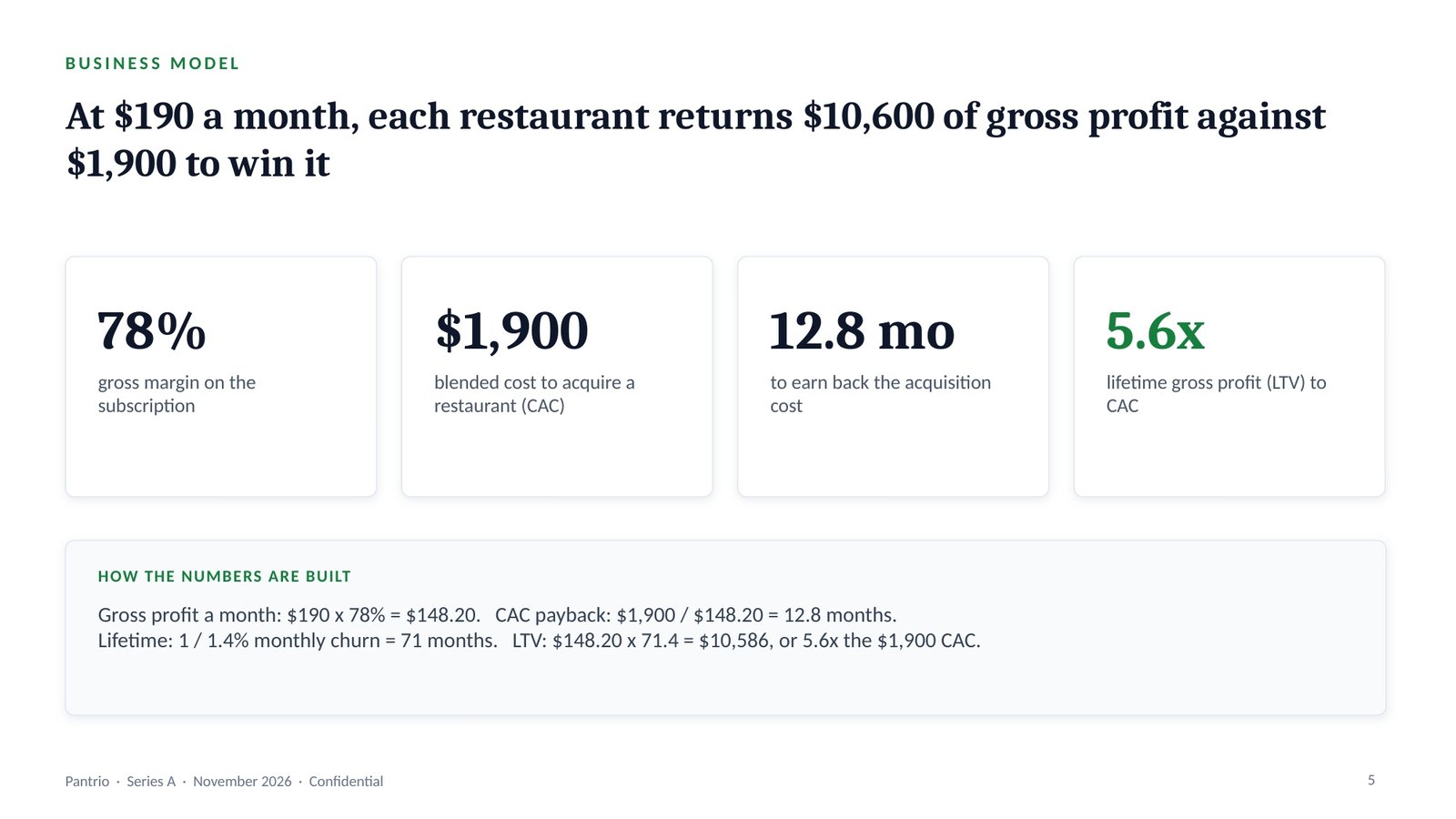
Takeaway: investors will test whether growth and unit economics can carry the plan for the next 24 months.
Picks the spine, the analyses and the slide blueprint for the deck type, and applies the audience overlay.
The restated brief.
Edge cases checked: none apply. Pauses for your OK.
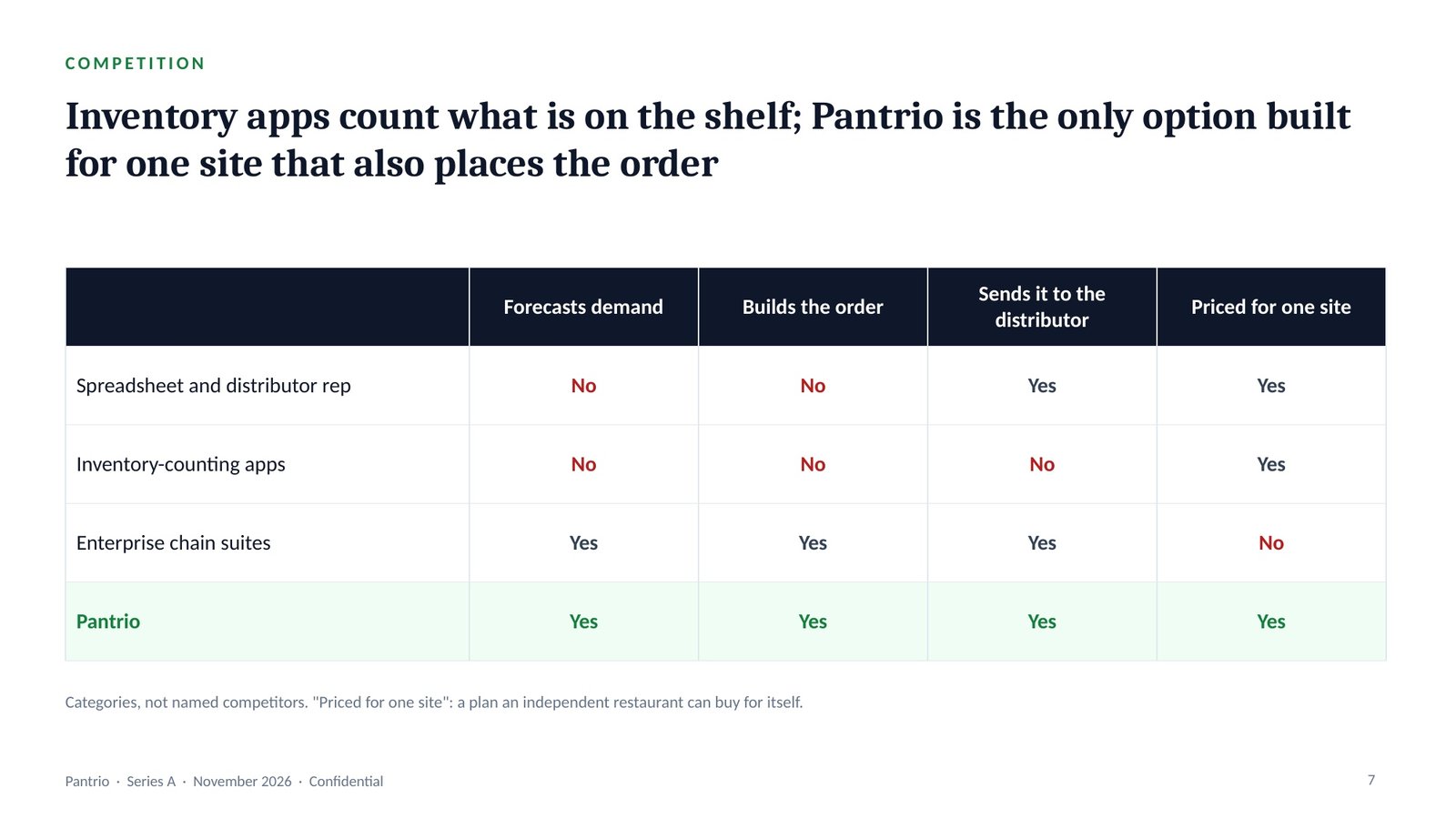
The investor spine runs Problem, Market, Product, Traction, Model, Ask: is the problem real, is the market big enough, does the product work, is it selling, do the economics hold, and what is needed.
Takeaway: each slide answers the question the previous one raises, so the partner never has to jump ahead.
Runs only the analyses the route names, grades every finding, and finds one uncomfortable insight.
Billing, cohort and channel data.
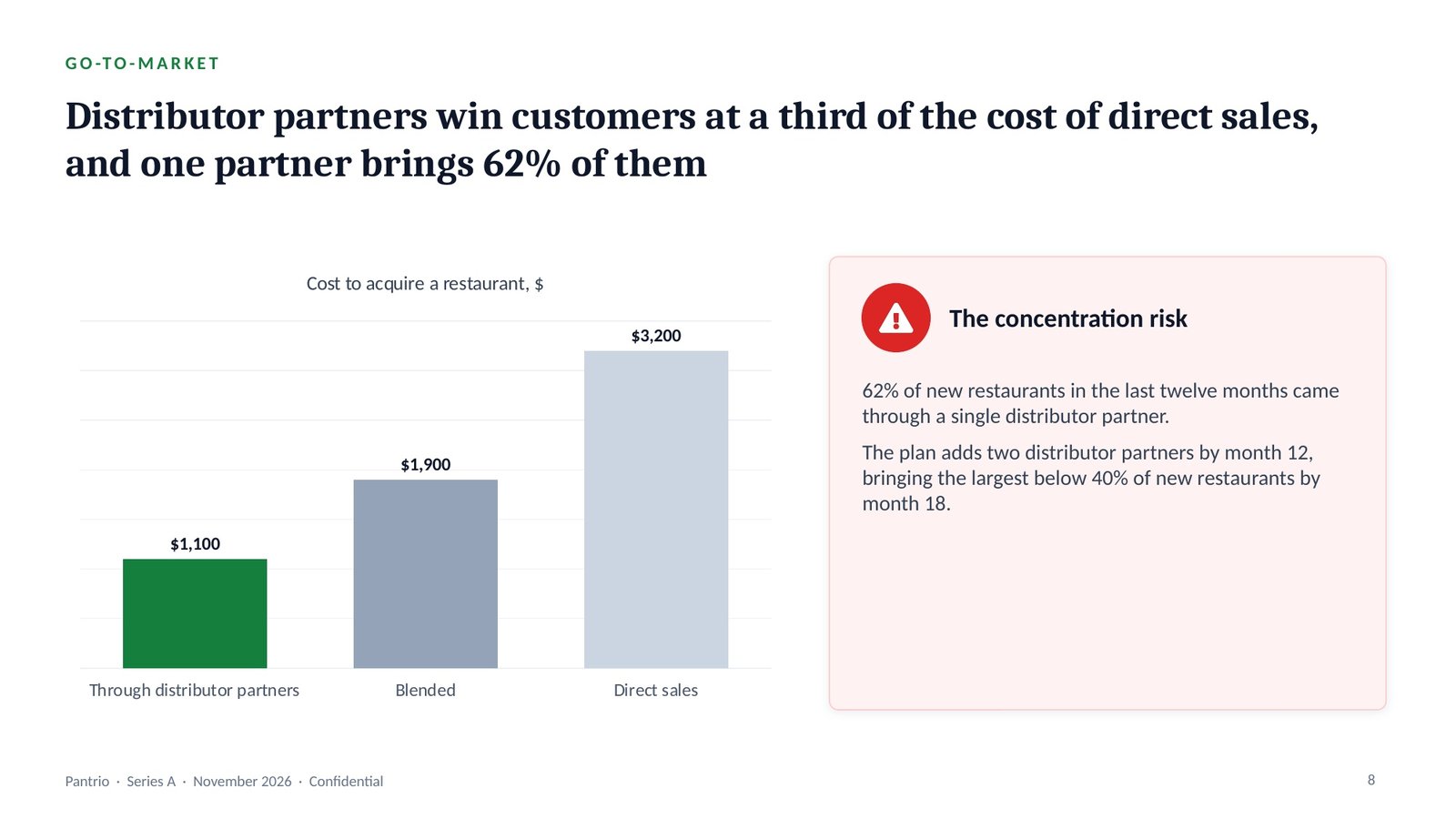
Uncomfortable insight: 62% of new restaurants came through one distributor partner. Investors will ask, so it goes on a slide. Pauses.
Evidence grading labels every finding: Evidence (in the material or a cited source), Inference (reasoned from evidence, saying from what) or Assumption (neither, with what would confirm it).
Takeaway: investors will find the 62% concentration in due diligence, so the deck shows it first, with the plan to bring it below 40%.
One governing thought, stated as the answer, with three MECE arguments beneath it.
The graded findings.
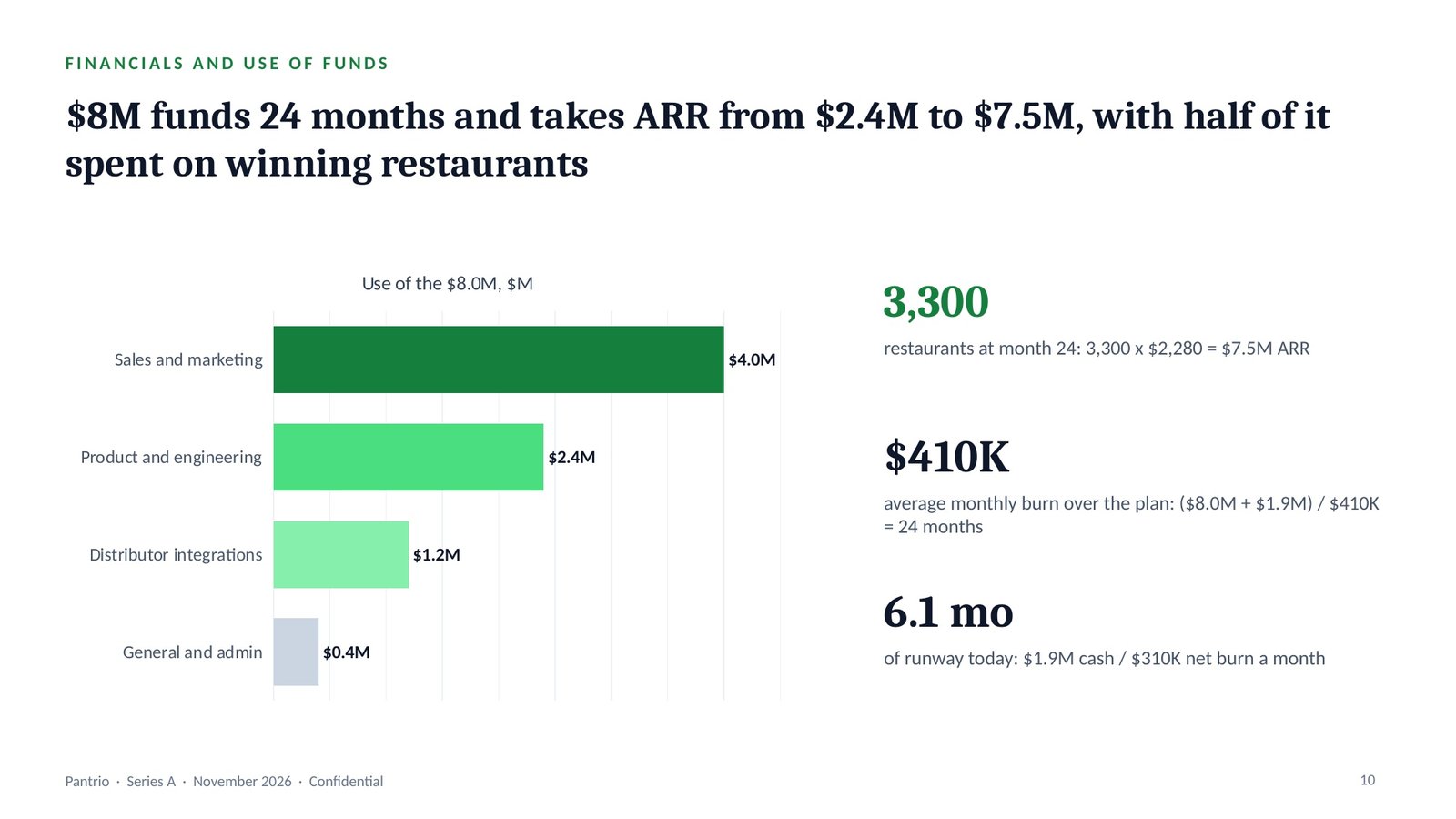
“Pantrio saves a restaurant six times what it costs, and $8M takes it from $2.4M to $7.5M of ARR in 24 months.”
Three arguments: the problem is costly and measurable, the unit economics work, and the money has a plan. Pauses.
The governing thought is the one sentence the whole deck proves, stated as the answer. Beneath it, the Pyramid Principle groups the arguments so they are MECE: mutually exclusive (no overlaps) and collectively exhaustive (no gaps).
Takeaway: Pantrio saves a restaurant six times what it costs, and $8M takes it from $2.4M to $7.5M of ARR.
Lays out the slide-by-slide skeleton, then recomputes every total before a slide is drawn.
The storyline.
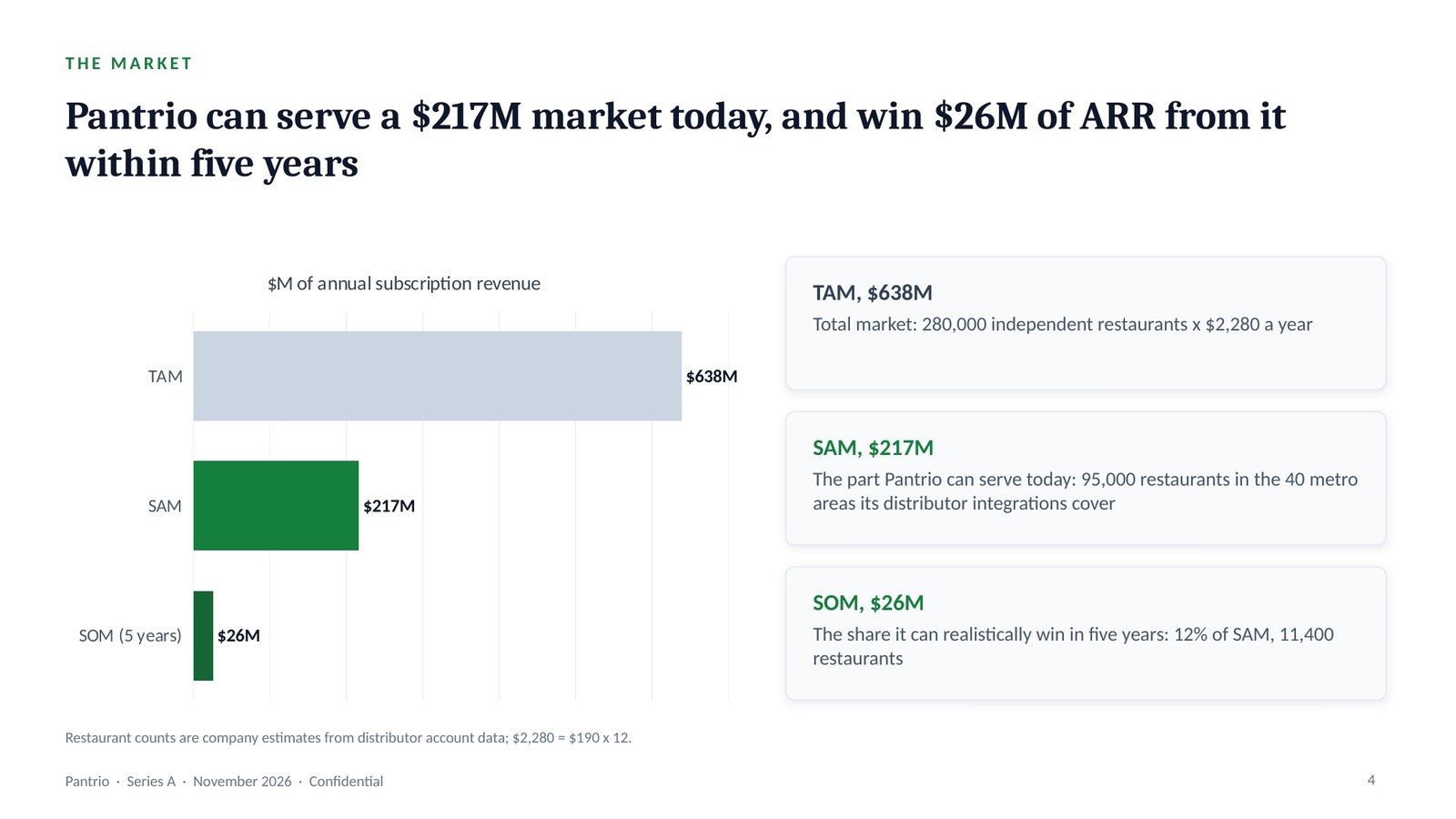
TAM (total addressable market) is all possible demand; SAM (serviceable available market) is the part the product can serve today; SOM (serviceable obtainable market) is the share it can realistically win.
Takeaway: a partner who checks the market slide finds three multiplications, not three claims.
Locks the action title and the right chart for every slide, in the house style or your brand.
The blueprint.
An action title states the slide’s conclusion as a full sentence; a topic label only names the subject. The chart selector then picks the one chart that proves that sentence.
Takeaway: the title tells the investor the conclusion before they read the chart.
Runs eleven quality gates, slide by slide, and fixes every failure.
The drafted deck.
Caught: a topic-label title (“Market”), and SOM $26M shown without its arithmetic — now 11,400 restaurants × $2,280 = $26.0M in the note.
The quality gates are eleven checks run on every slide and reported PASS or FAIL; each failure is fixed and the gates are run again before handover.
Takeaway: the market slide is the one investors challenge most, so its arithmetic sits in the notes.
Builds the .pptx with native, editable charts, then opens it to check.
The checked deck.
Then: paste it into the Script Generator for a 7-minute pitch script.
A native chart is an editable PowerPoint chart with its data inside it, not a picture, so the numbers can be updated in the file. Speaker notes carry what to say and the source of every number.
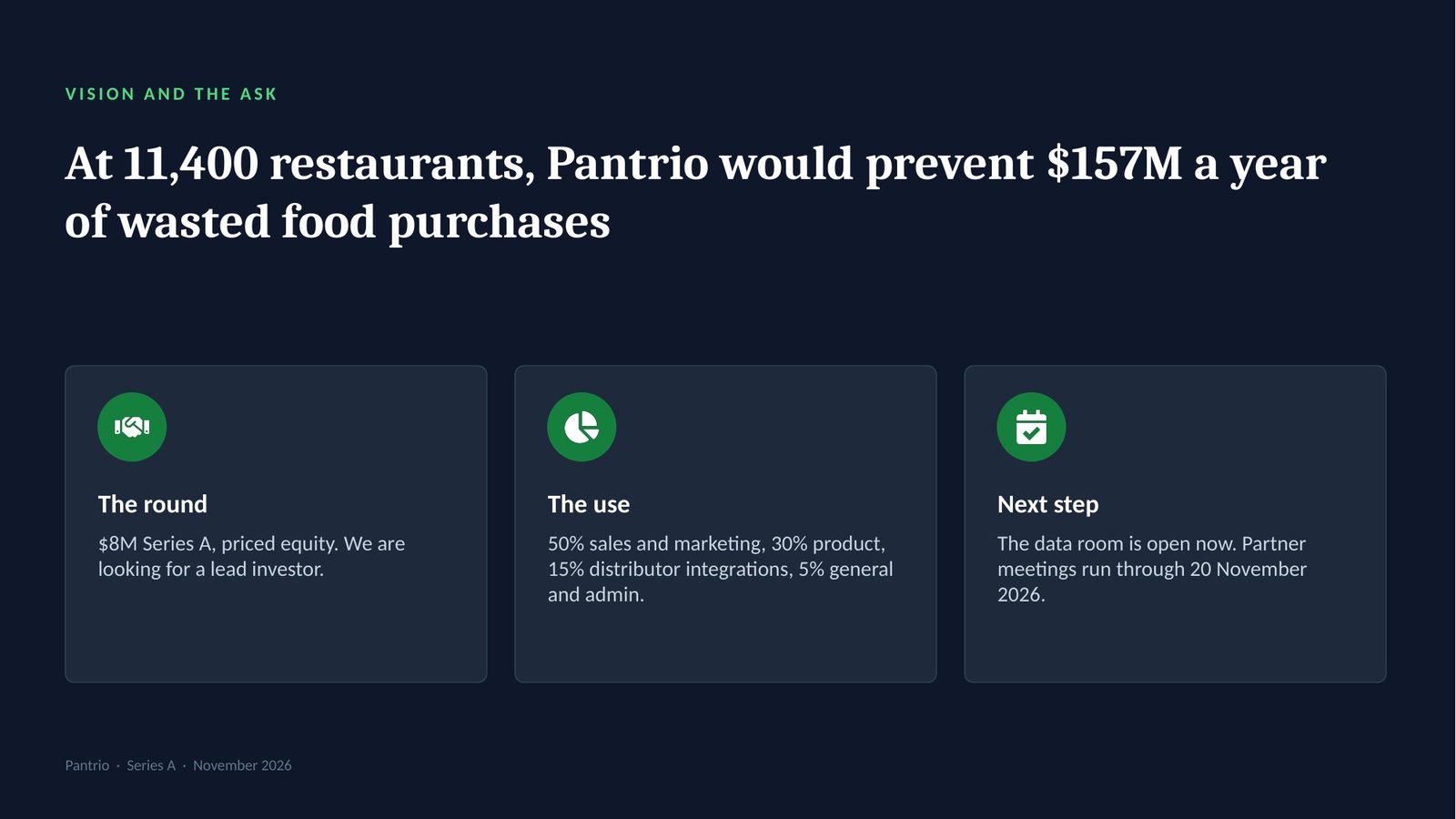
Takeaway: with 6.1 months of cash left, the deck ends on a dated next step, not a general invitation.
The deck it builds
The real slides from this run, exported from the .pptx. Click a title, or swipe through them.
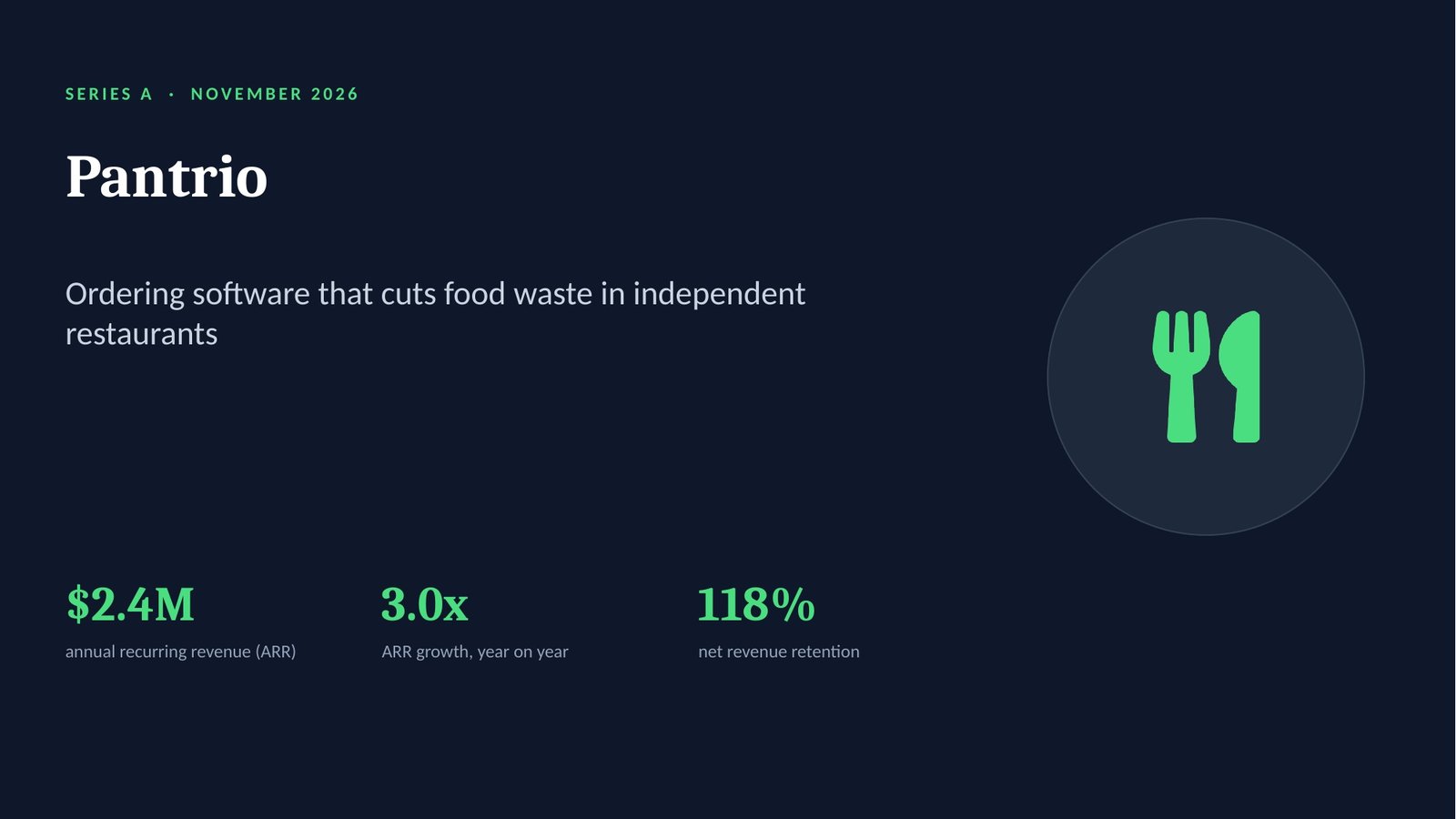
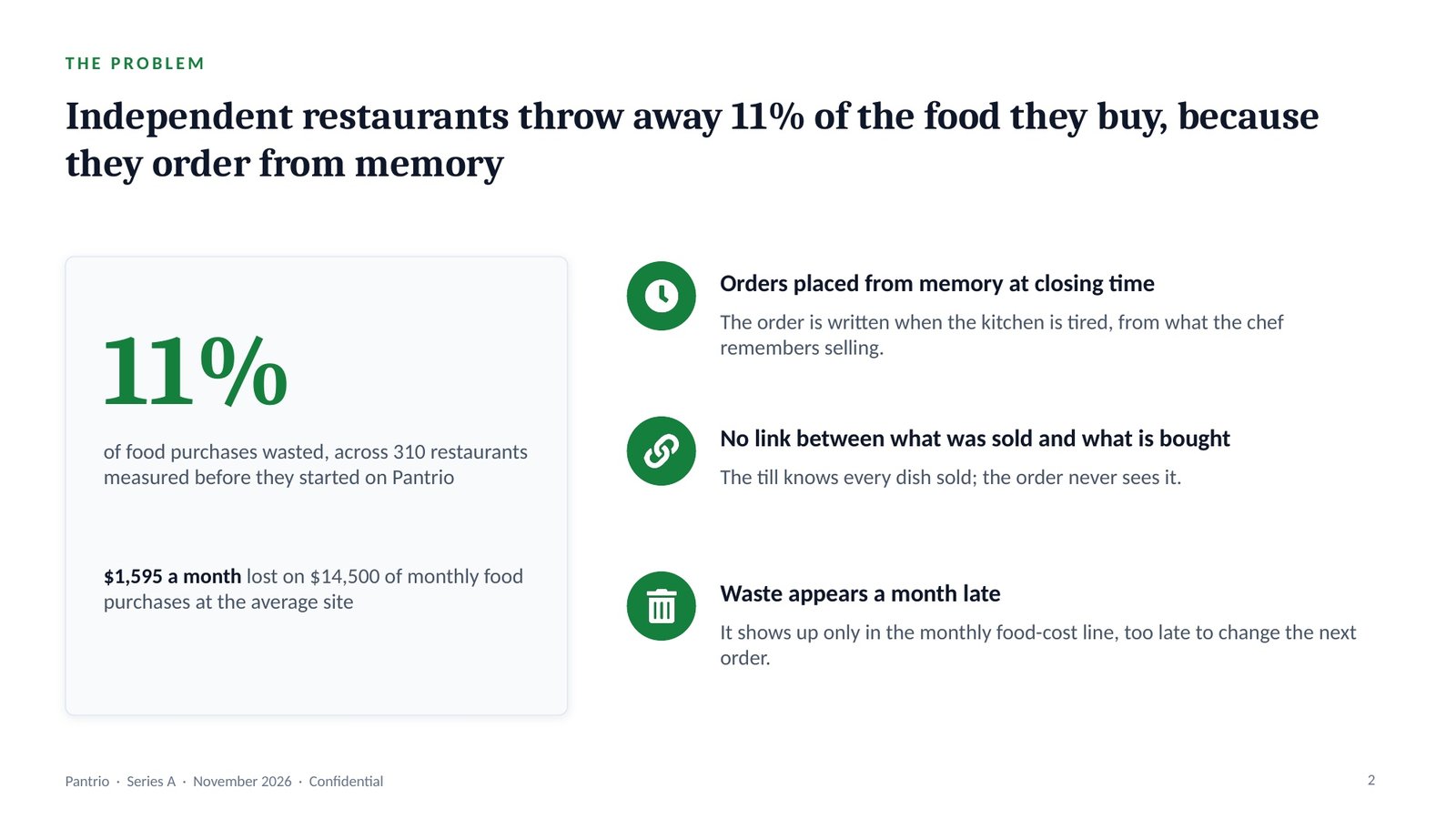
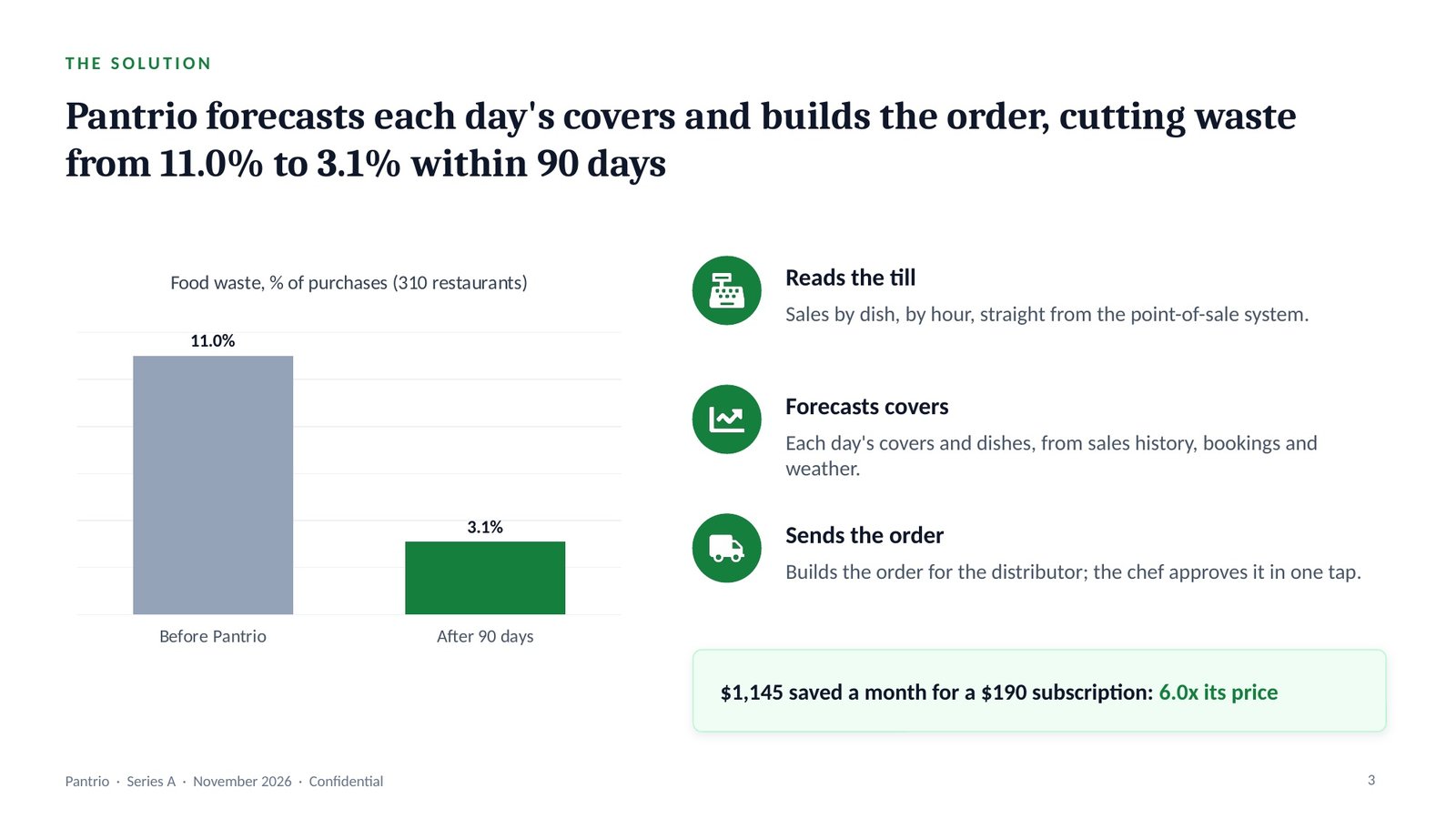
Slide 1 · Cover: Pantrio, Series A
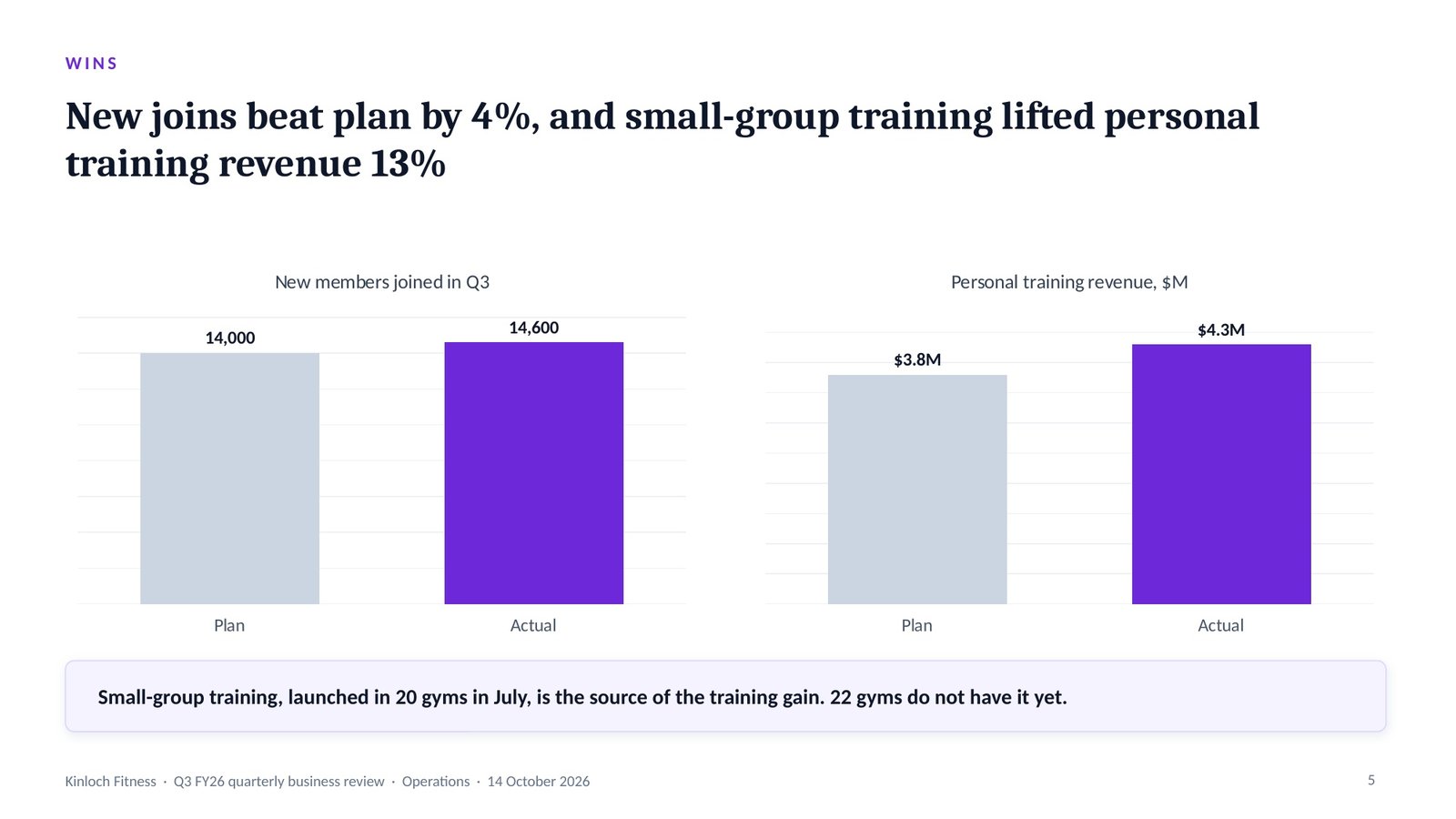
“Q3 QBR for the CEO and ExCo next week. Revenue missed plan, churn is up, and I think the flex contract is why. I need two decisions out of the meeting.” With the Q3 accounts, the membership report and churn by gym, that is the whole input. Answered 9 and 1 — QBR, CEO — the one prompt builds a nine-slide quarterly business review, red items first. Churn is the share of members who leave each month.
The pipeline · in → out
Opens with the two menus, then asks only what is missing.
“Q3 QBR for the CEO and ExCo. Revenue missed plan, churn is up. I need two decisions.” + Q3 accounts + membership report + churn by gym.
Answered with two numbers, then restated in 7 lines. It pauses for your confirmation.
A QBR, quarterly business review, compares results with the plan and asks for the decisions needed to get back on it. The CEO overlay leads with bottom-line impact and the one trade-off, and cuts operational detail.
Takeaway: the deck must end on two decisions, not on a status report.
Picks the spine, the analyses and the slide blueprint for the deck type, and applies the audience overlay.
The restated brief.
Edge cases checked: none apply. Pauses for your OK.
The QBR spine runs Status, Variance, Actions. Variance is the gap between actual and plan. RAG status marks each measure red, amber or green, and red items come first.
Takeaway: the committee sees the problem in the first minute, not after the good news.
Runs only the analyses the route names, grades every finding, and finds one uncomfortable insight.
The accounts and churn by gym.
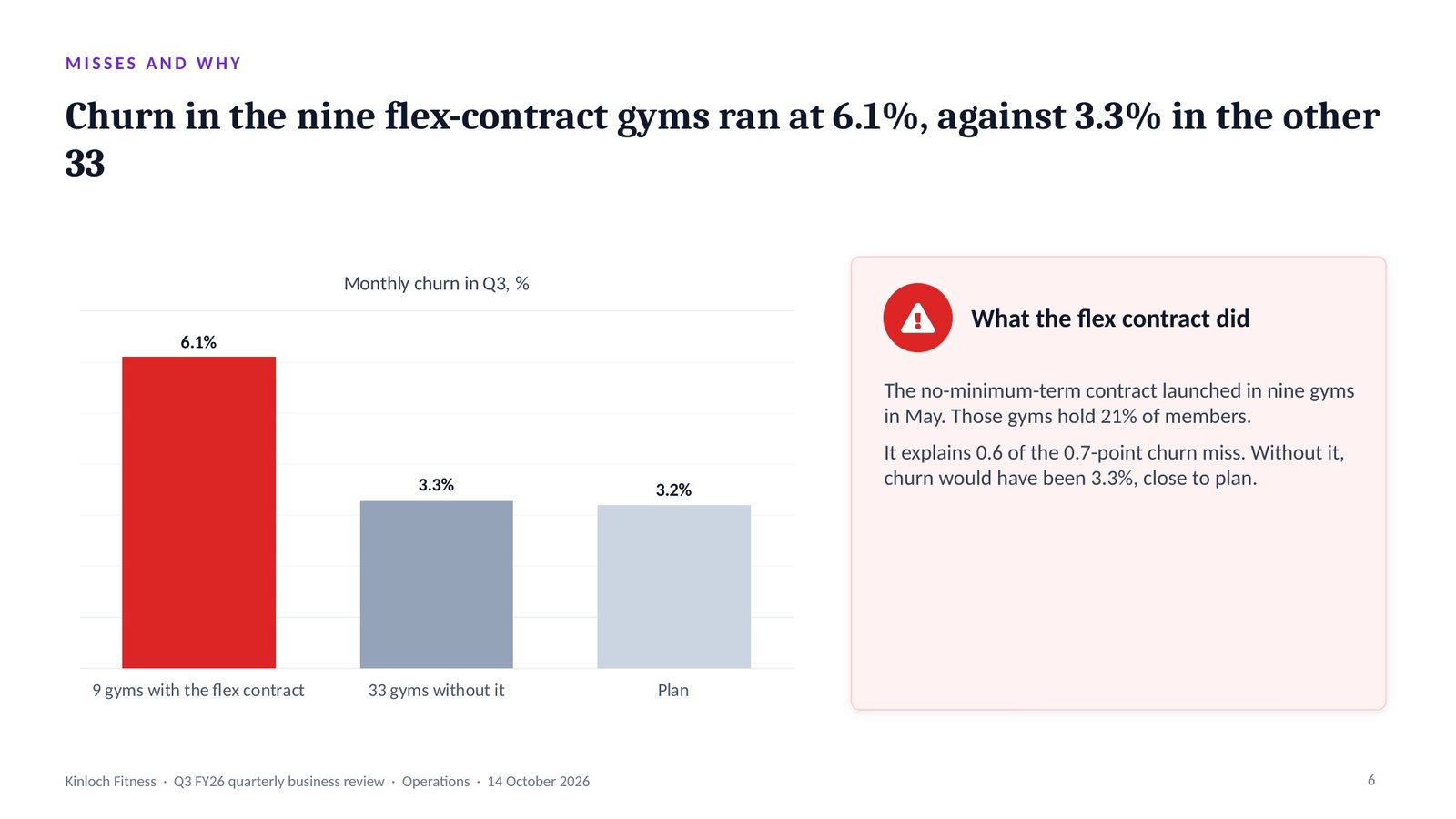
Uncomfortable insight: this committee approved the flex contract in April, and it is the main reason the quarter is red. The deck says so. Pauses.
Evidence grading labels every finding: Evidence (in the material or a cited source), Inference (reasoned from evidence, saying from what) or Assumption (neither, with what would confirm it).
Takeaway: the deck names the committee’s own April decision as the main cause, because the fix depends on reversing it.
One governing thought, stated as the answer, with three MECE arguments beneath it.
The graded findings.
“Q3 revenue was $0.6M below plan because churn rose to 3.9%, and the flex contract caused most of the rise.”
Status first, red items first, then the variance, then the actions and the two decisions. Pauses.
The governing thought is the one sentence the whole deck proves, stated as the answer. Beneath it, the Pyramid Principle groups the arguments so they are MECE: mutually exclusive (no overlaps) and collectively exhaustive (no gaps).
Takeaway: Q3 revenue was $0.6M below plan because churn rose to 3.9%, and the flex contract caused most of the rise.
Lays out the slide-by-slide skeleton, then recomputes every total before a slide is drawn.
The storyline.
The number check lists every figure the deck will show, with its source, and recomputes every total, bridge and percentage before a single slide is drawn.
Takeaway: the finance director can reconcile every line of the deck to the Q3 accounts.
Locks the action title and the right chart for every slide, in the house style or your brand.
The blueprint.
An action title states the slide’s conclusion as a full sentence; a topic label only names the subject. The chart selector then picks the one chart that proves that sentence.
Takeaway: the committee reads the cause in the title before it reads the chart.
Runs eleven quality gates, slide by slide, and fixes every failure.
The drafted deck.
Caught: the $0.9M dues shortfall shown without arithmetic — now 3,800 fewer average members × $78 × 3 months in the note.
The quality gates are eleven checks run on every slide and reported PASS or FAIL; each failure is fixed and the gates are run again before handover.
Takeaway: the one number that drives the decision is the one a committee member checks.
Builds the .pptx with native, editable charts, then opens it to check.
The checked deck.
Then: paste it into the Script Generator for a 6-minute update script.
A native chart is an editable PowerPoint chart with its data inside it, not a picture, so the numbers can be updated in the file. Speaker notes carry what to say and the source of every number.
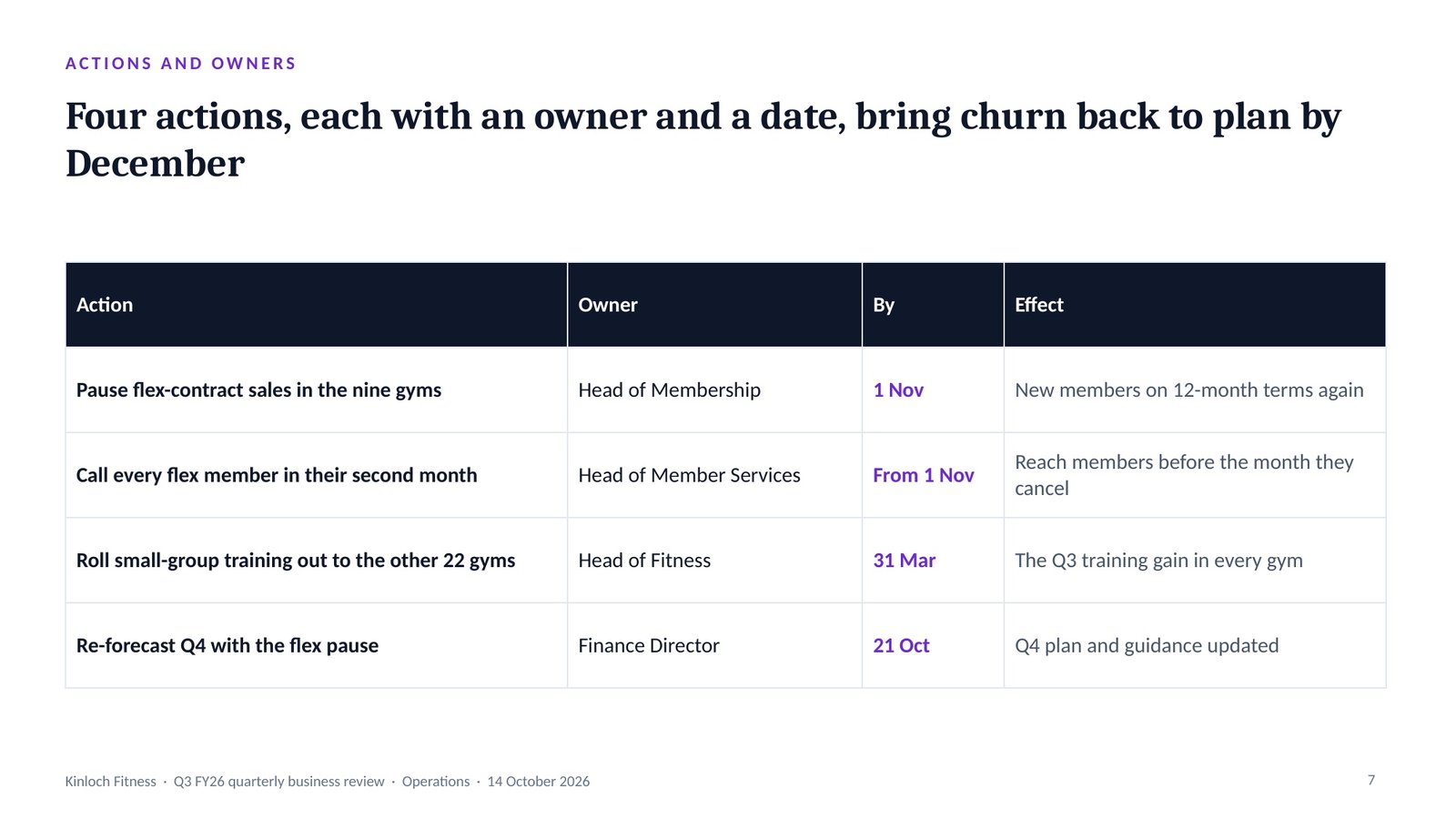
Takeaway: the meeting ends with two approvals and named owners, reviewed again at the Q4 review.
The deck it builds
The real slides from this run, exported from the .pptx. Click a title, or swipe through them.
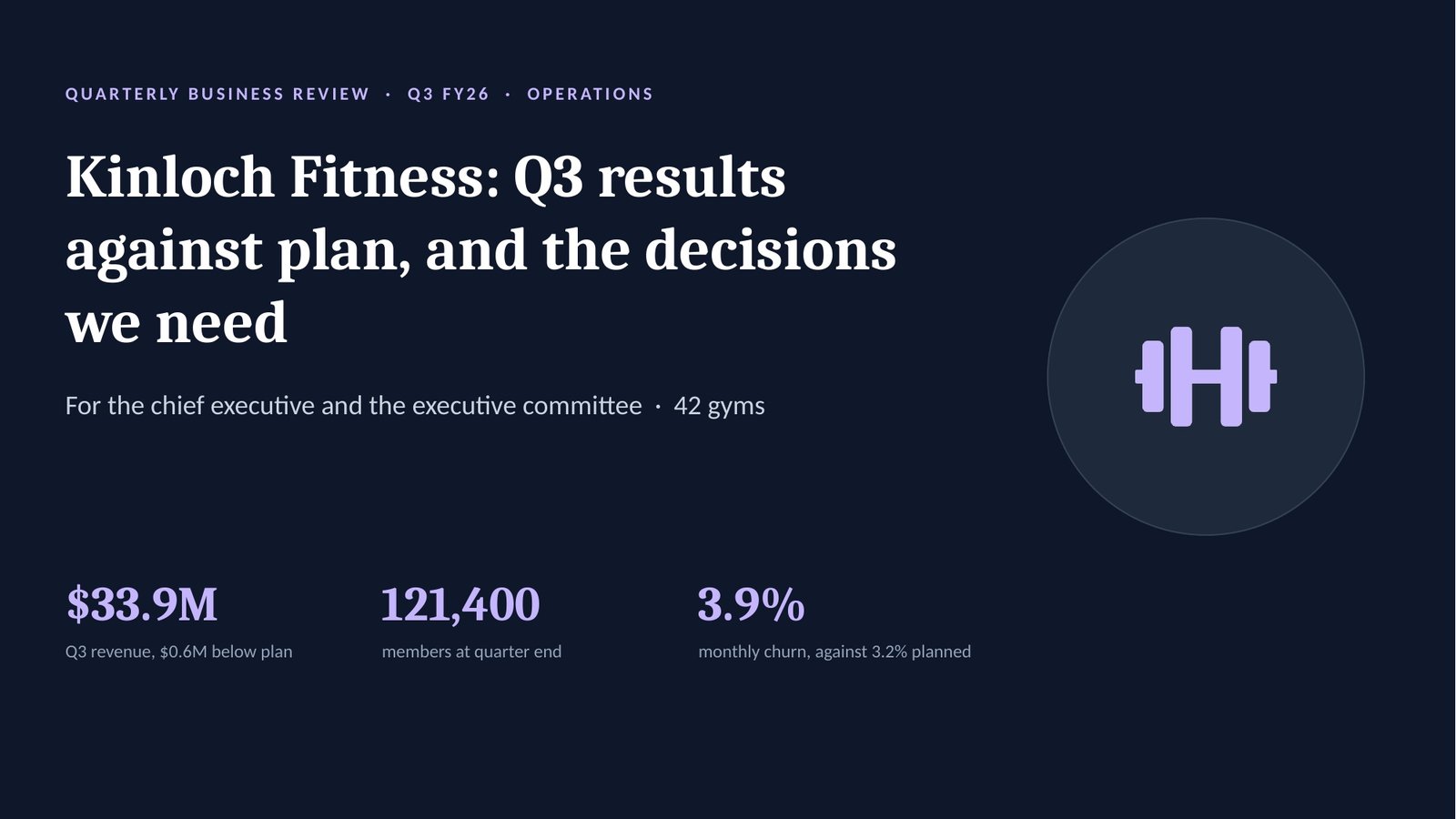
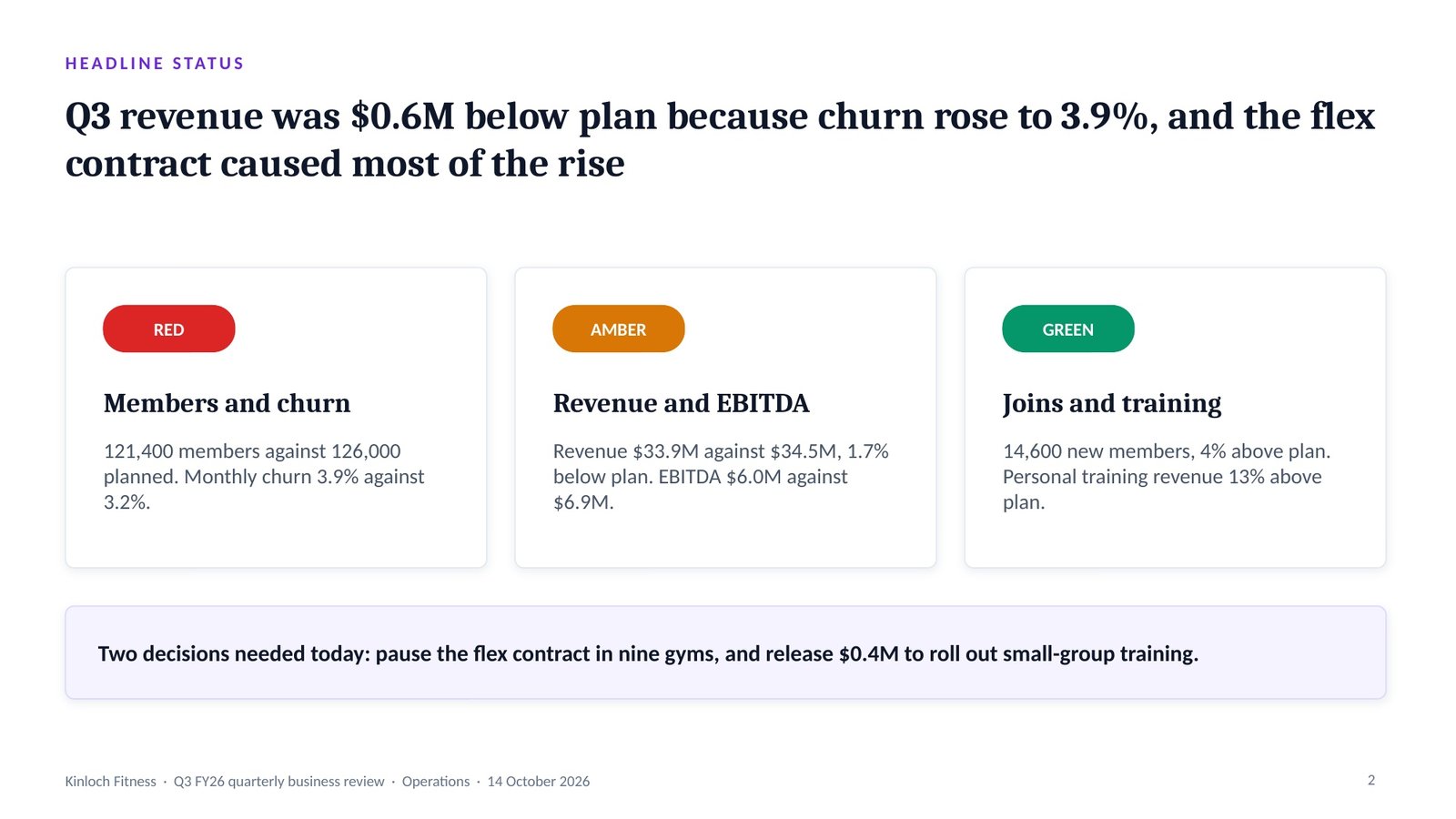
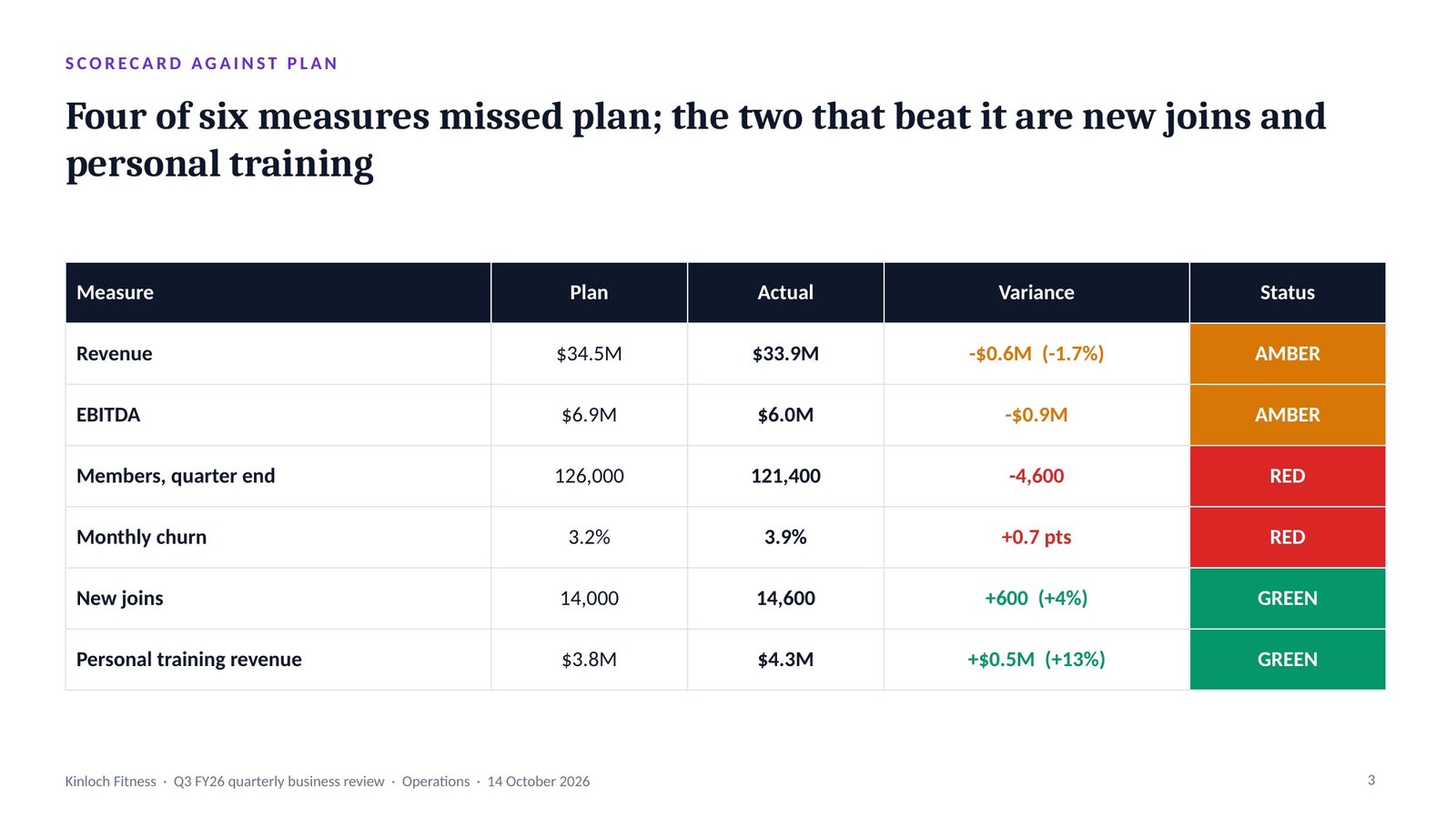
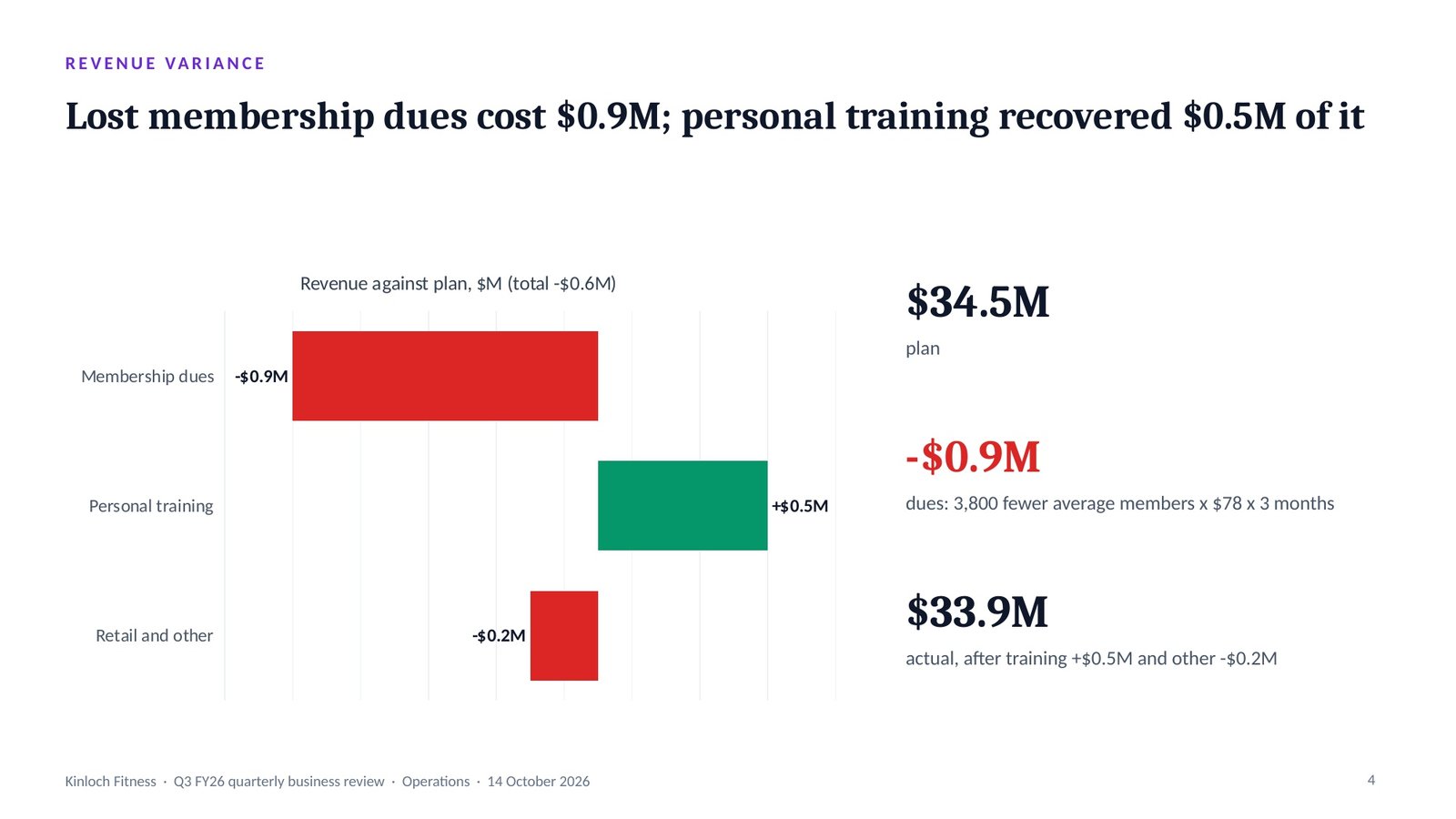
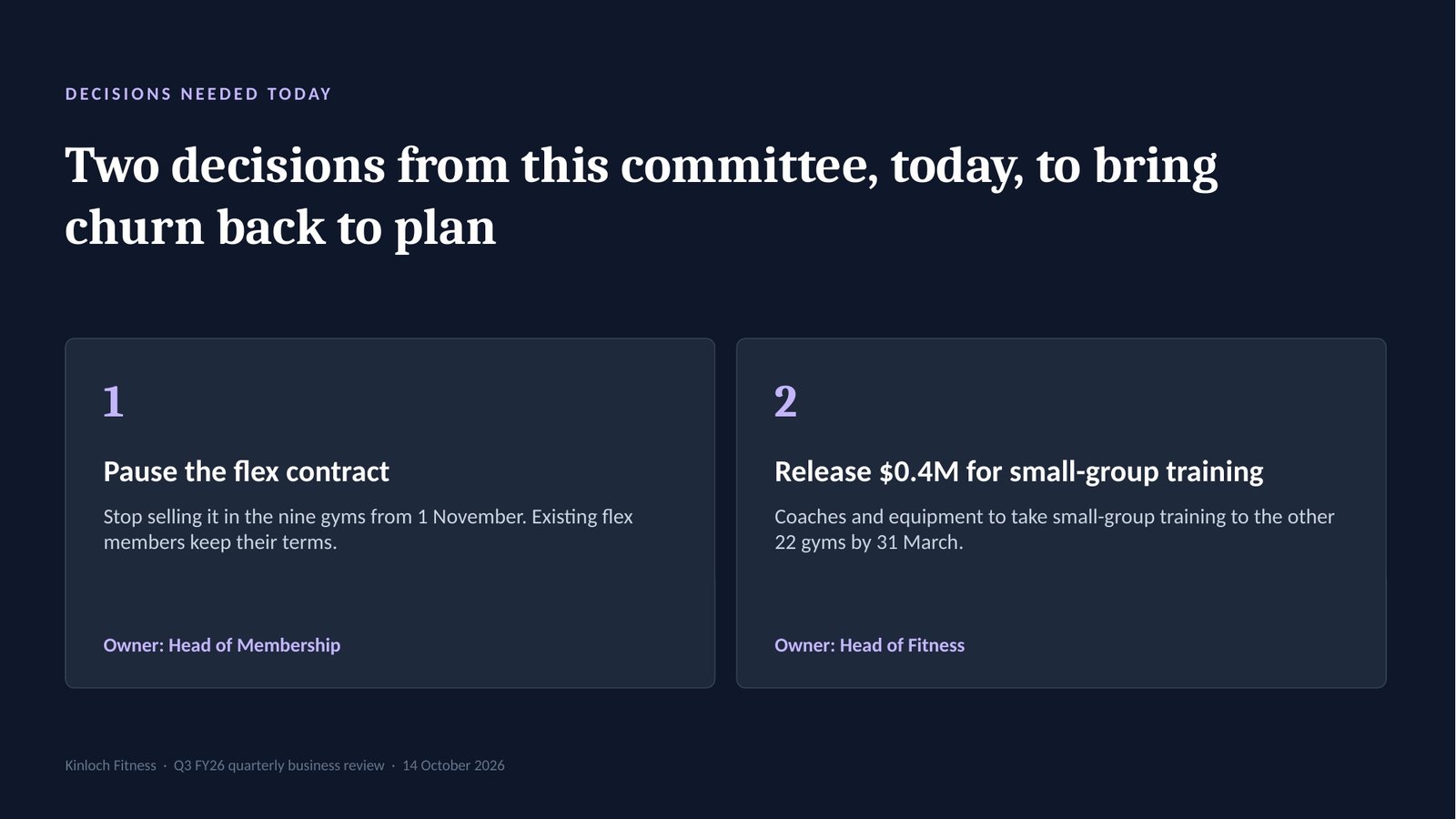
Slide 1 · Cover: Q3 against plan
Which AI tool to run it in
— because Claude builds the fileRun the whole prompt in Claude and it returns a finished .pptx with native, editable charts — real chart objects and real text boxes you can edit in PowerPoint, not a picture of a chart.

Runs the full pipeline and builds the PowerPoint file at the end. This is the path the prompt was written for.
Runs the same pipeline. Returns a build-ready spec, and a file only where code execution is available to it.
Runs the pipeline and returns the build-ready spec: titles, bodies, visuals, speaker notes and the colour tokens.
Do not split it across tools. Running the analysis in one tool and pasting the spec into Claude gives you a much weaker deck. The spec is a summary; the detail that makes the deck good — the evidence grades, the chart encodings, the reasoning behind every action title — lives in the conversation, not the summary. Run all eight steps in one place.
How to get the file
Getting a real PowerPoint out of

Paste the whole prompt into Claude. All of it, in one message. It is self-contained by design — the router, the spines, the blueprints and the QA gates travel with it.
Answer the two menus with two numbers. The deck type and the audience. Then it asks only for what is missing — objective, length, raw material, brand — and you paste your material and let it run.
Stay in the same conversation to the end. The prompt pauses between steps so you can steer. At the final step, Build, it offers the .pptx — take it there, while it still has the whole analysis in front of it.
Open it in PowerPoint and edit anything. The house style specifies native, editable charts rather than images, so the series, the labels and the colours are all yours to change.
Yes. Claude can build a real .pptx file in the chat. Paste the generator, answer its two menus, approve its three stops, and Claude hands you the finished deck, ready to open and edit in PowerPoint, Keynote or Google Slides.
Yes, as a specification. ChatGPT and Gemini run the same routing, analysis and storyline, and return the content of every slide, with its title and chart, as text to build in your own template. The finished .pptx file is built in Claude.
Yes. In Claude the charts are built as native PowerPoint charts, so you can change the figures, labels and colours in PowerPoint. They are not pictures.
It is a prompt you buy once, not a subscription. It runs in your own Claude account, routes your deck to one of ten deck types with its own storyline before any slide is drawn, marks every missing figure instead of inventing one, and hands you a .pptx file you own.
The complete self-contained prompt with the full how-to and a worked example — a downloadable PDF plus a plain-text copy file. Lifetime updates.
standalone flagship
also in the Complete Presentation Bundle with the Script Generator, $25