Ten prompts that take raw findings to an approved presentation: set the communication strategy, structure the storyline, write the slides, and prepare for board questions. Below, the workflow is applied to one board deck.
What’s inside
Every prompt runs on its own: it asks for what it needs and returns a finished Word document. Run the one you need, or run all ten in order.
Structure
02Storyline DevelopmentPicks the storyline and states the one governing thought.03Slide OutlineTurns the story into a slide-by-slide skeleton.Slides
04Slide Headlines (Action Titles)Rewrites every topic label into an action title that states the takeaway.05Data Visualisation & Chart SelectionPicks the right chart for each point and the number to emphasize.Summary
06Executive Summary & One-PagerCompresses the deck into the one page a CEO actually reads.07Board & Investor UpdateThe written board update, with bad news stated first.The scenario
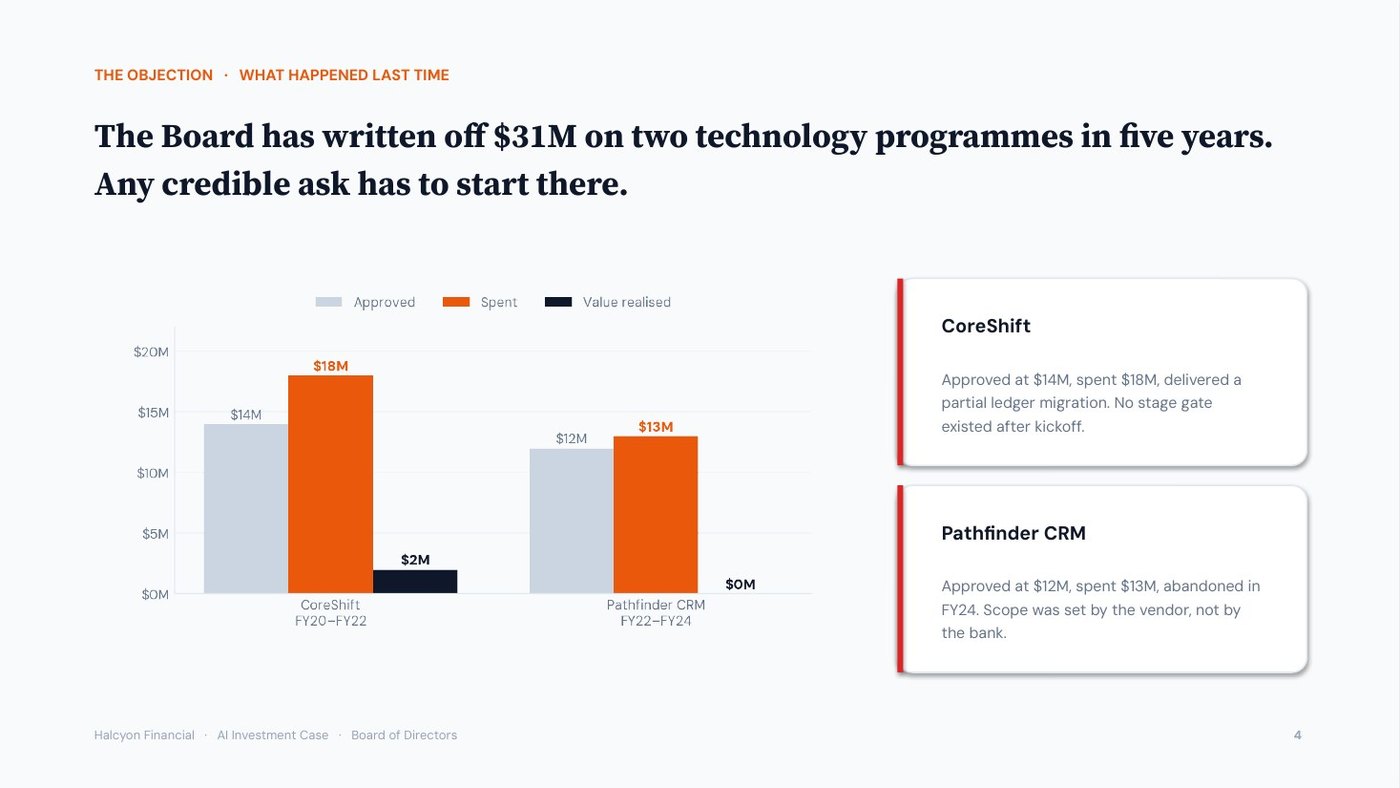
You are COO of a $9B-asset regional bank. You have 40 pages of AI findings, 20 minutes on the agenda, and a $24M ask. The complication: the board has written off $31M on two technology programmes in five years, and two directors sat through both. Here is how the ten prompts turn that into a presentation plan and the board documents at the end of this page, one step at a time.
This is a simplified view of how a top consultant builds a board deck.
Each step below is condensed to a single highlight. In reality every prompt returns far more — full slide specs, speaker notes, chart encodings, and QA — not the one-line outputs shown here.
Step by step · 10 prompts
Each step names the presentation craft it runs — the same moves a top consultant makes. Run them in sequence, or pull any single skill on its own.
Defines the objective, the audience’s current beliefs, and the core message before any slide exists.
Objective + 40 pages of findings + “20 minutes, board, Thursday.”
“Get $24M approved. The board’s real question is not the return. It is why this will not be a third write-off.”
The strategy brief: the one objective, what the board believes today versus what it must believe, the core message stated as the answer, and the obstacles to a yes — here, CoreShift and Pathfinder.
An audience read identifies what the audience believes today and what it must believe to approve the objective. The objective is $24M approved; the core message is whatever produces that approval from a board that has written off two programmes.
Takeaway: build the deck around the board’s main concern, the risk of a third write-off, before presenting the opportunity.
Picks the storyline and states the one governing thought.
Findings with no through-line.
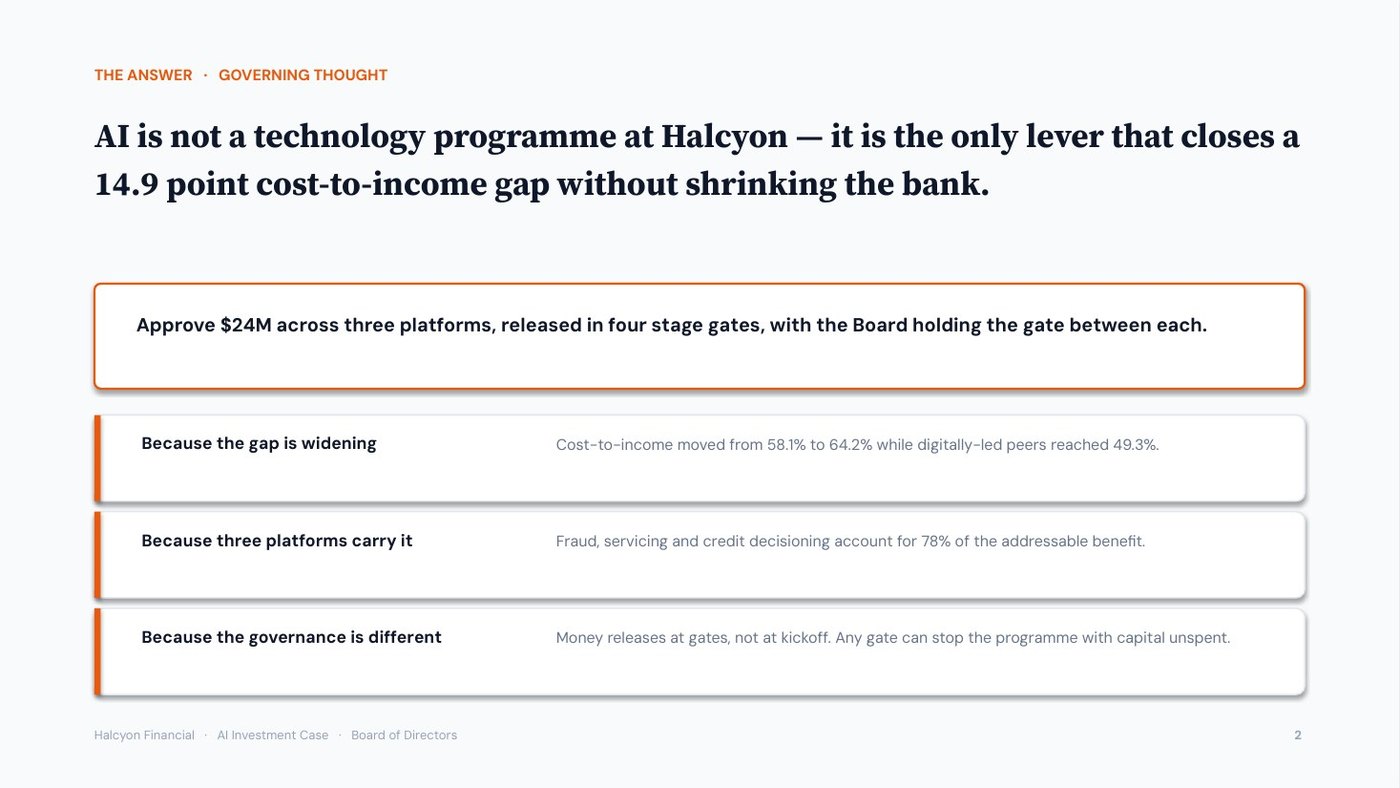
Governing thought: “AI is not a technology programme — it is the only lever that closes a 14.9 point cost-to-income gap without shrinking the bank.”
Stated as the answer up front, never a slow reveal — plus the 60-second spoken version.
The governing thought is the single sentence the whole presentation proves, and the Pyramid Principle states it first, with the supporting arguments beneath. The prompt compares four storylines: SCR (Situation, Complication, Resolution), Pyramid (answer first), PSPA (Problem, Solution, Proof, Action) and CAR (Context, Action, Result).
Takeaway: state the governing thought on slide two, with its number, and prepare a 60-second version in case time is cut.
Turns the story into a slide-by-slide skeleton.
The chosen storyline.
One message per slide, recommendation by slide 2, MECE across the deck — no orphan data.
A slide outline assigns one message to each slide and checks the deck is MECE (mutually exclusive, collectively exhaustive), with no orphan data: data that supports no message. The first draft placed CoreShift and Pathfinder on slide nine, under governance.
Takeaway: present bad news early, directly before the plan that addresses it, and remove any slide without a clear message.
Rewrites every topic label into an action title that states the takeaway.
“AI Spend” · “Roadmap” · “Governance”
Read the new titles top to bottom and the whole argument is already there.
An action title is a slide headline written as a full-sentence conclusion rather than a topic label. The read-the-titles test strips the deck to its headlines: if they read as an argument the deck works; if they read as a table of contents, it does not.
Takeaway: write every slide title as the conclusion of that slide, so a reader of the titles alone understands the argument.
Picks the right chart for each point and the number to emphasize.
One slide carrying twelve metrics on AI benefit.
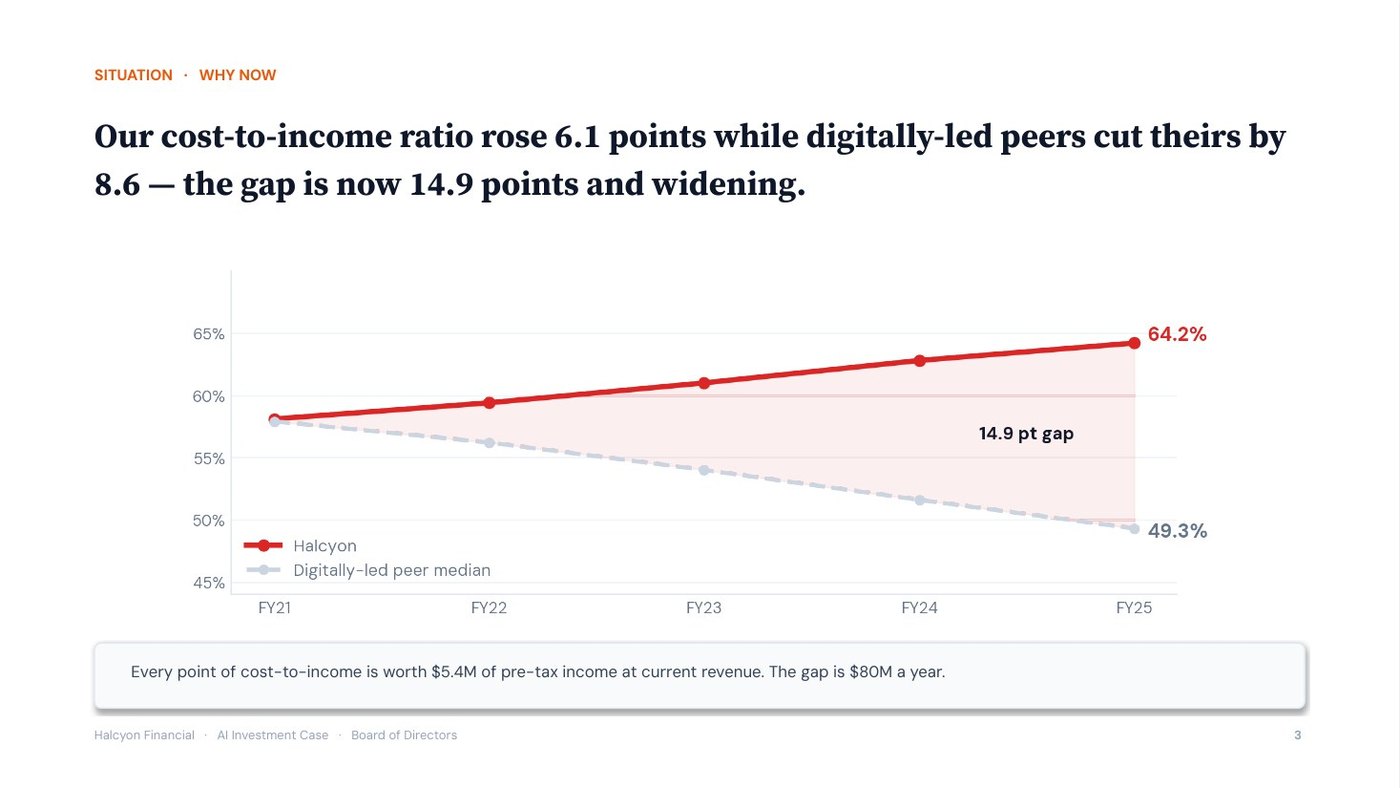
Cost-to-income becomes a two-line chart, the write-offs a three-bar comparison, the return a single cumulative curve. One takeaway per exhibit, and the number to say out loud.
A chart decision tree matches the chart to the point: a trend takes a line, a comparison takes bars, a single figure takes a big-number callout, and a point with no data story stays as text. One slide carried twelve metrics on AI benefit; the tree split it into three exhibits, each with one takeaway.
Takeaway: choose each chart for the one point the slide makes, and say the key number aloud.
Compresses the deck into the one page a CEO actually reads.
The full 12-slide deck.
One answer-first page a senior leader absorbs in under a minute — recommendation first.
An executive one-pager restates the argument for a reader who was not in the meeting, in answer-first order: headline, situation, three reasons, the ask and the risk. It is not a summary of the slides, because no presenter is there to explain it.
Takeaway: write the one-pager for a reader who missed the meeting: recommendation first, with the $6M risk stated.
The written board update, with bad news stated first.
The Gate 1 quarterly report.
The miss is up front, not buried — with the ask, owners, and the three hardest questions answered.
A recommendation-first update opens with the status and the decision needed, and bad-news-up-front means any miss is reported before the good news. At Gate 1, data remediation is behind schedule.
Takeaway: report delays in the first paragraph, with their size, impact, owner and the decision needed.
What the presenter says on each slide, beyond what the slide already shows.
The slide outline + your delivery style.
Presenter-facing, never a re-read of the slide — plus a 60-second version for when time is cut.
Speaker notes are the presenter’s script: the proof points, concessions and transitions behind each slide, never a reading of it. The board reads faster than the presenter speaks, so narrating the slide wastes its attention.
Takeaway: use speaker notes for what the slide does not show: the evidence, the concession and the pause after key numbers.
The pre-brief email to the board chair, short enough to read on a phone.
Pre-brief the board chair, two days out.
Bottom line first · the gate structure · the ask · the date.
One-line ask pulled out so it can’t be missed — with a high-commitment and a low-friction close.
A pre-brief is a short email sent to a key decision-maker before the meeting, written answer-first with the ask on its own line. It lets the chair raise objections privately, two days before the board meets.
Takeaway: send the chair a short pre-brief two days before the meeting, with the request on its own line and the main concern answered.
Quality-checks the deck and prepares answers to difficult board questions.
The near-final Halcyon board deck.
Caught: the write-offs buried at slide nine, three topic-label titles, and one slide of orphan data — plus 15 ranked board questions answered.
→ Now deliver the board deck below. ↓
Quality gates check the deck against defined standards and rate each slide RED, YELLOW or GREEN; the Q&A prep ranks fifteen difficult board questions by likelihood and damage. This deck returned 7 passes and 3 fails.
Takeaway: fix the RED slides first, including moving the write-offs forward, and rehearse answers to the three most likely questions.
Three documents from Halcyon’s ten prompts: the one-pager for directors who read before the meeting, the pre-brief email to the board chair, and the Q&A preparation from the final review.
Answer first: headline, situation, three reasons, the ask and the risk
Situation
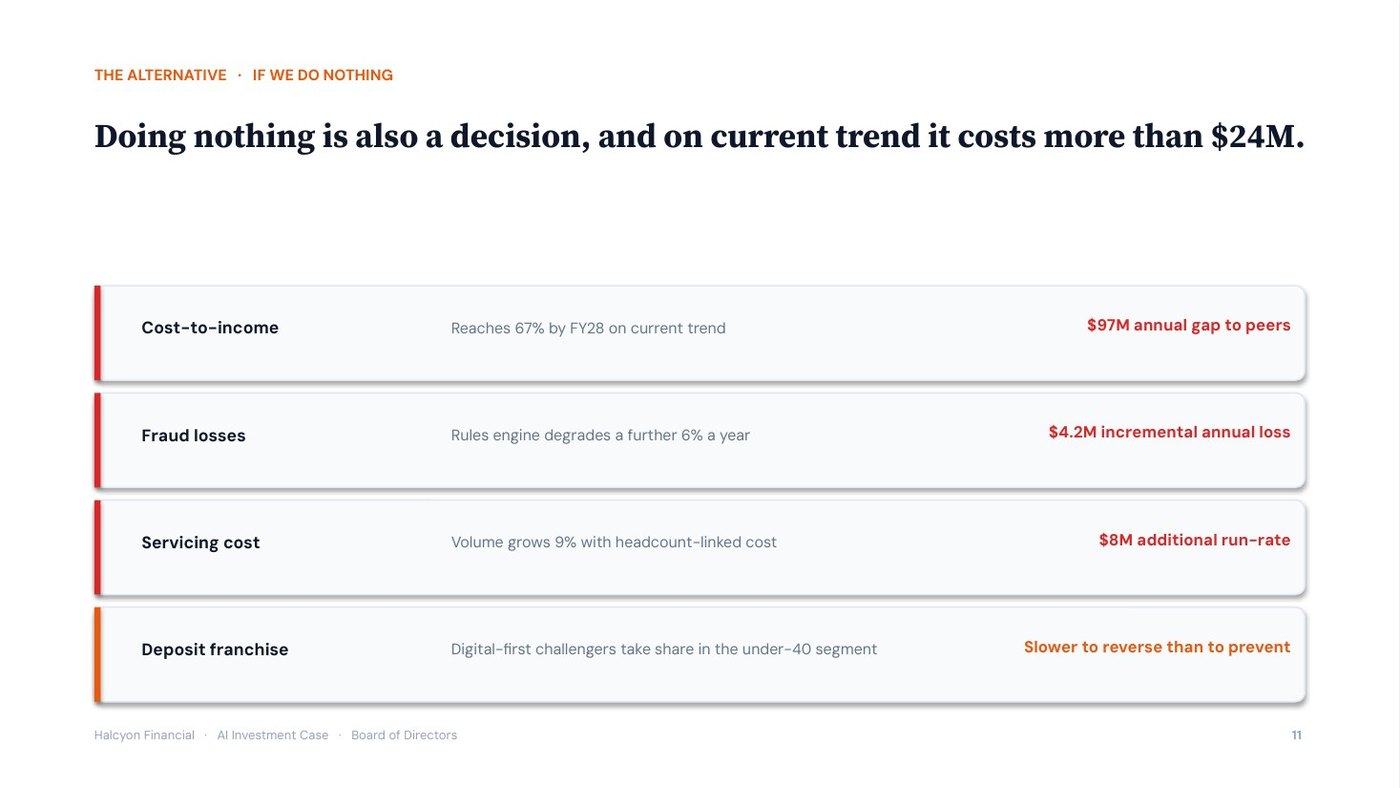
Our cost-to-income ratio rose 6.1 points while peers cut theirs by 8.6. The gap to peers is now 14.9 points.
The ask
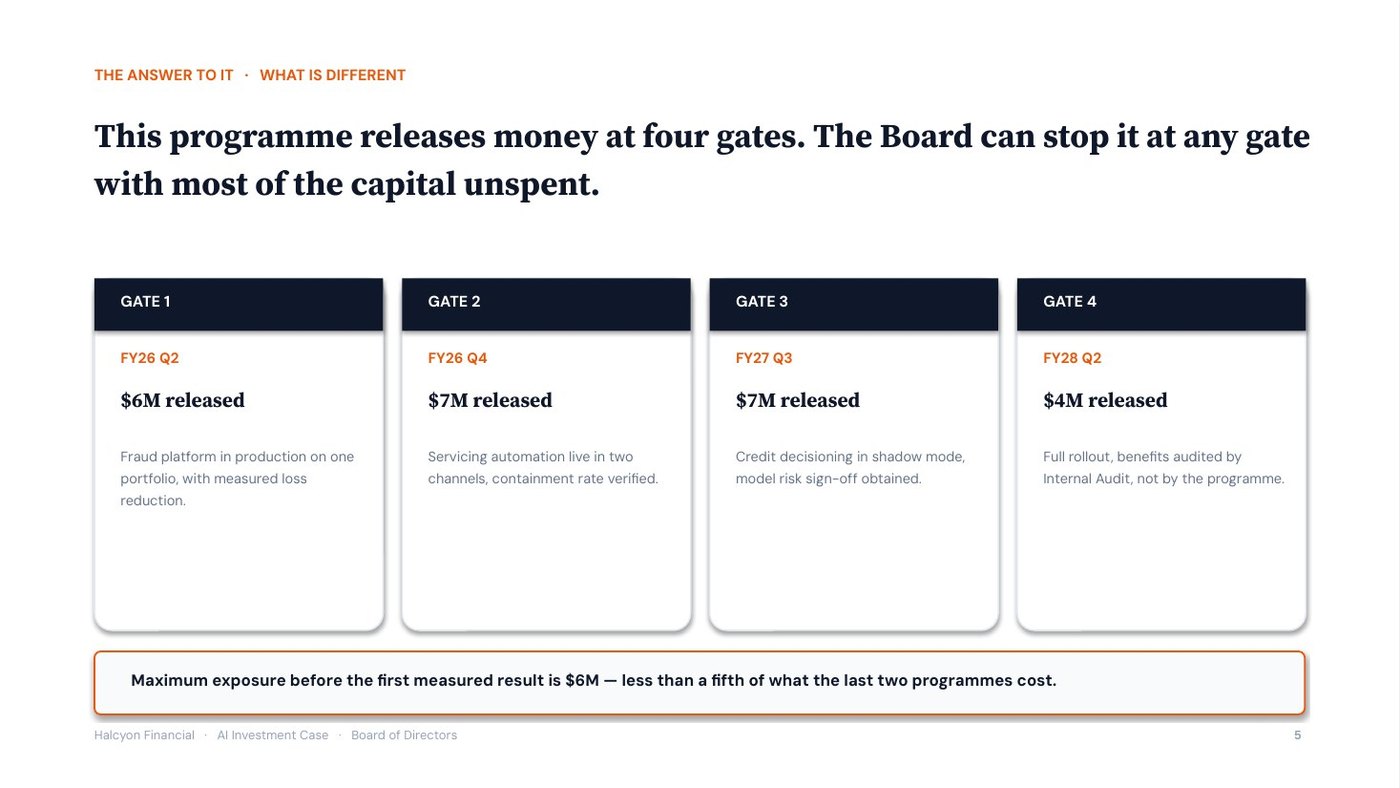
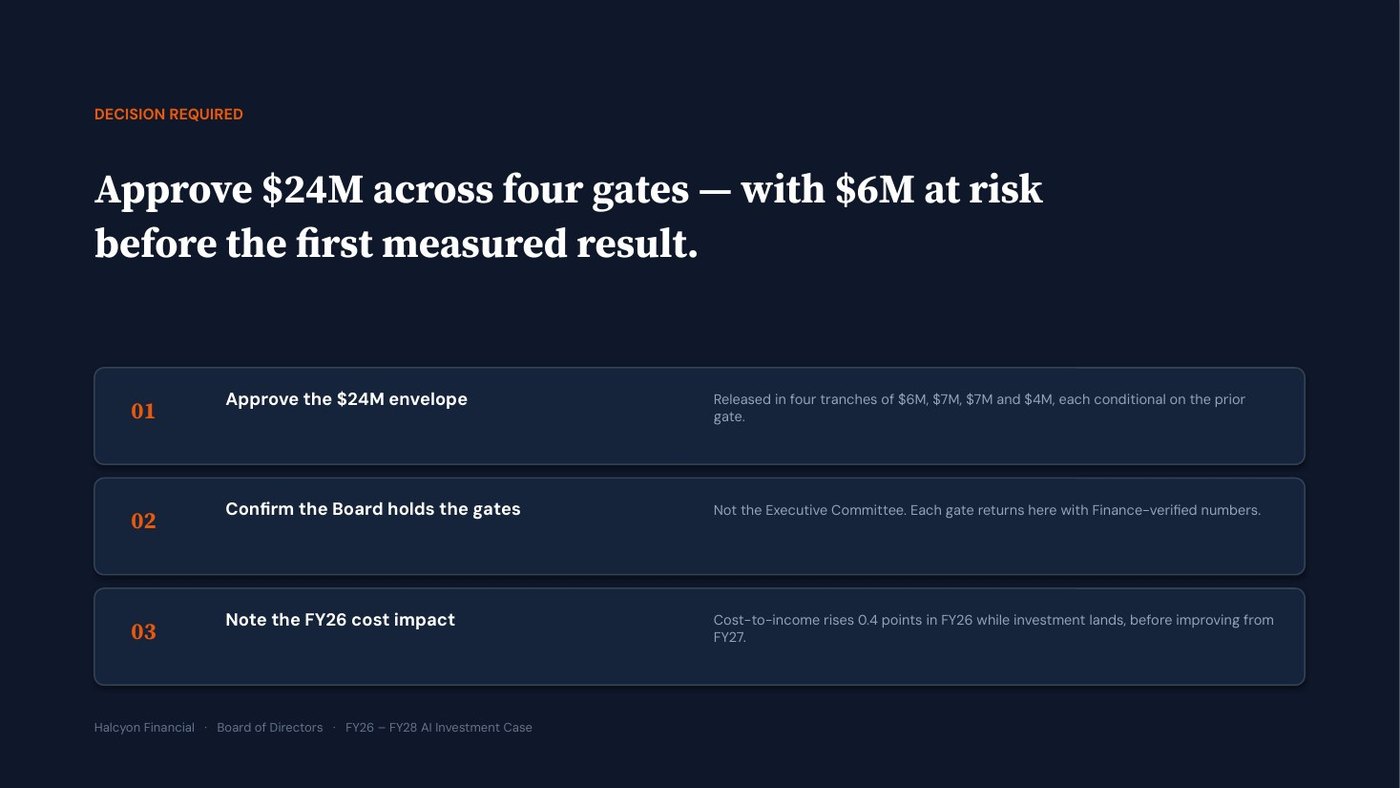
$24M, released at four gates. The board can stop the programme at any of them.
| Three reasons |
|---|
| AI is the only lever that closes a 14.9-point cost-to-income gap without shrinking the bank. |
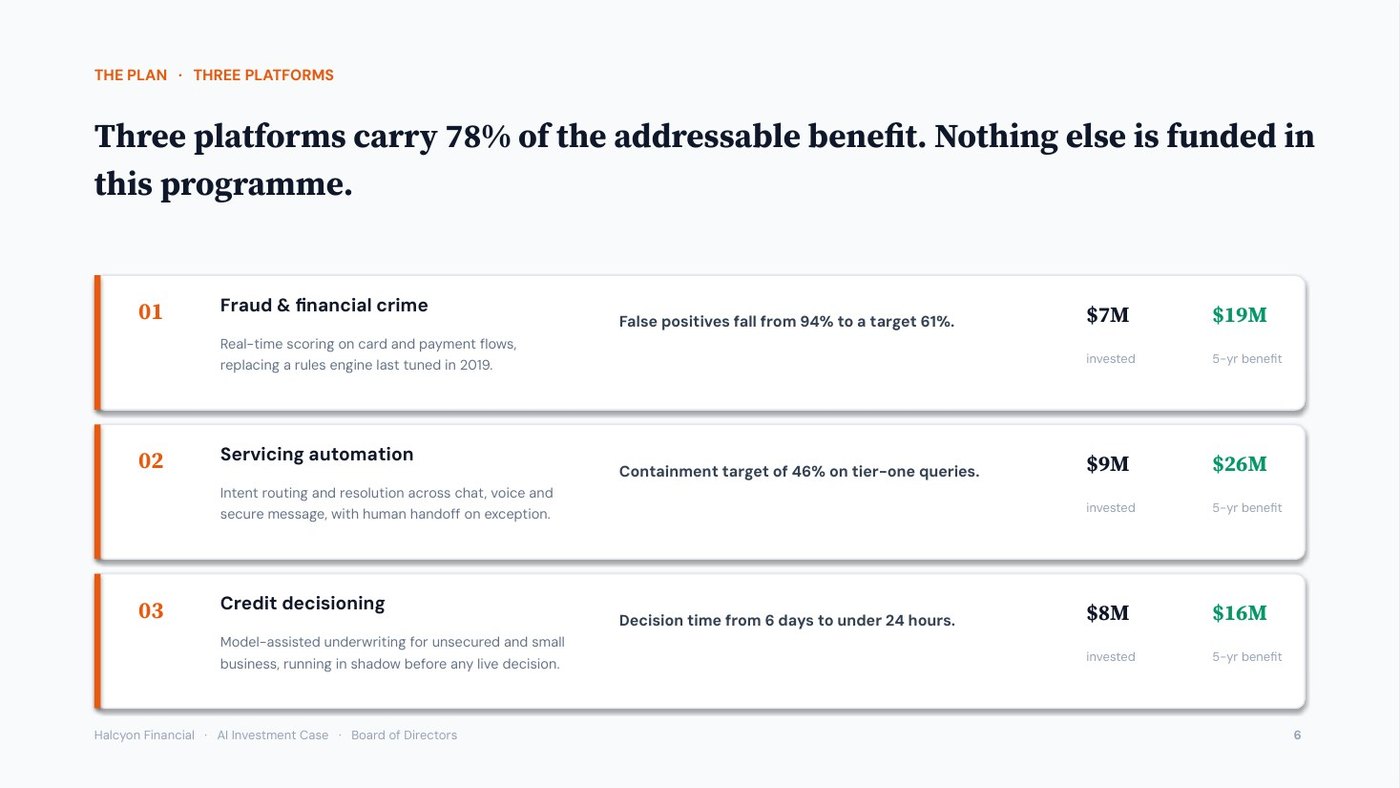
| Three platforms carry 78% of the addressable benefit. |
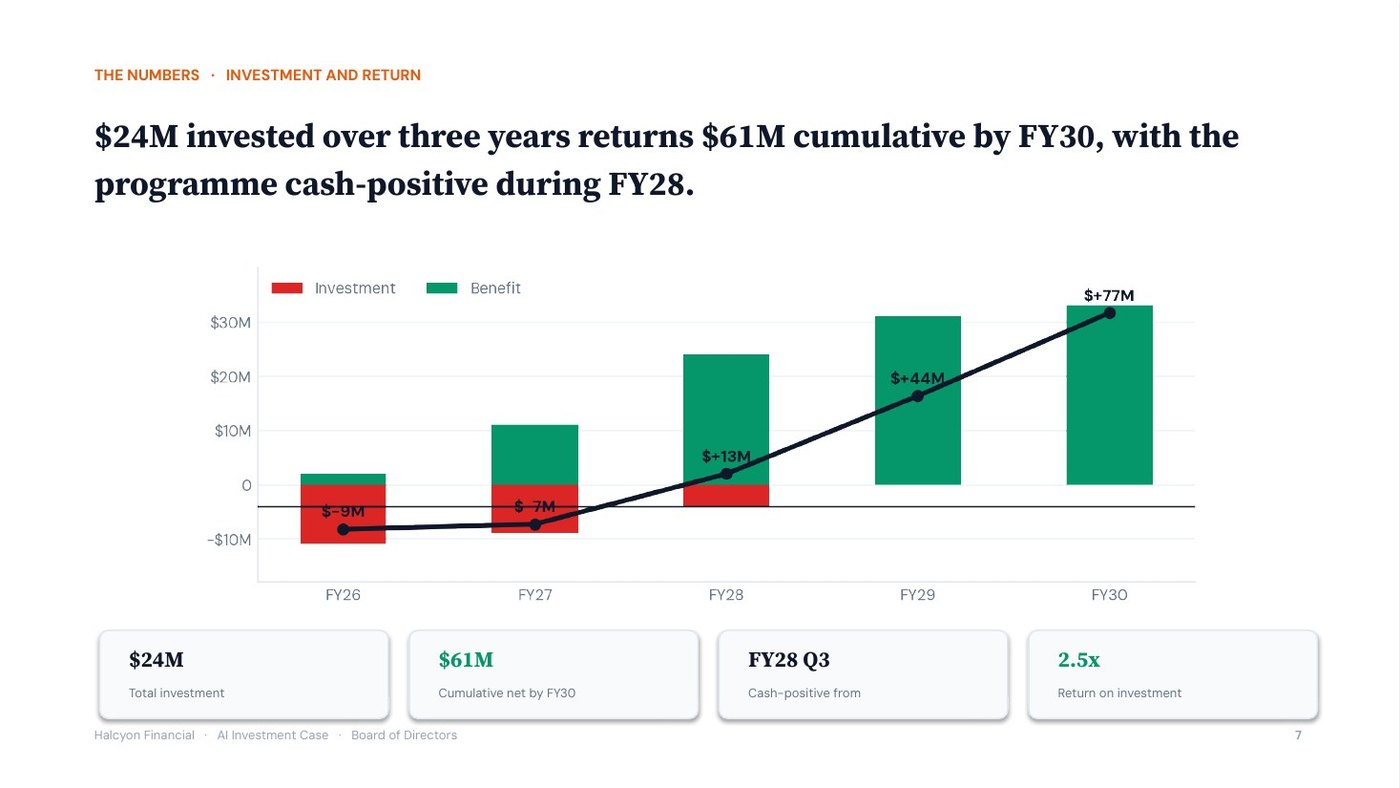
| $24M returns $61M cumulative, cash-positive during FY28. |
Sent two days before the meeting · short enough to read on a phone
On Thursday I will ask the board to approve $24M for AI across three platforms. I know the first question will be CoreShift and Pathfinder, so I want you to see the answer before the meeting.
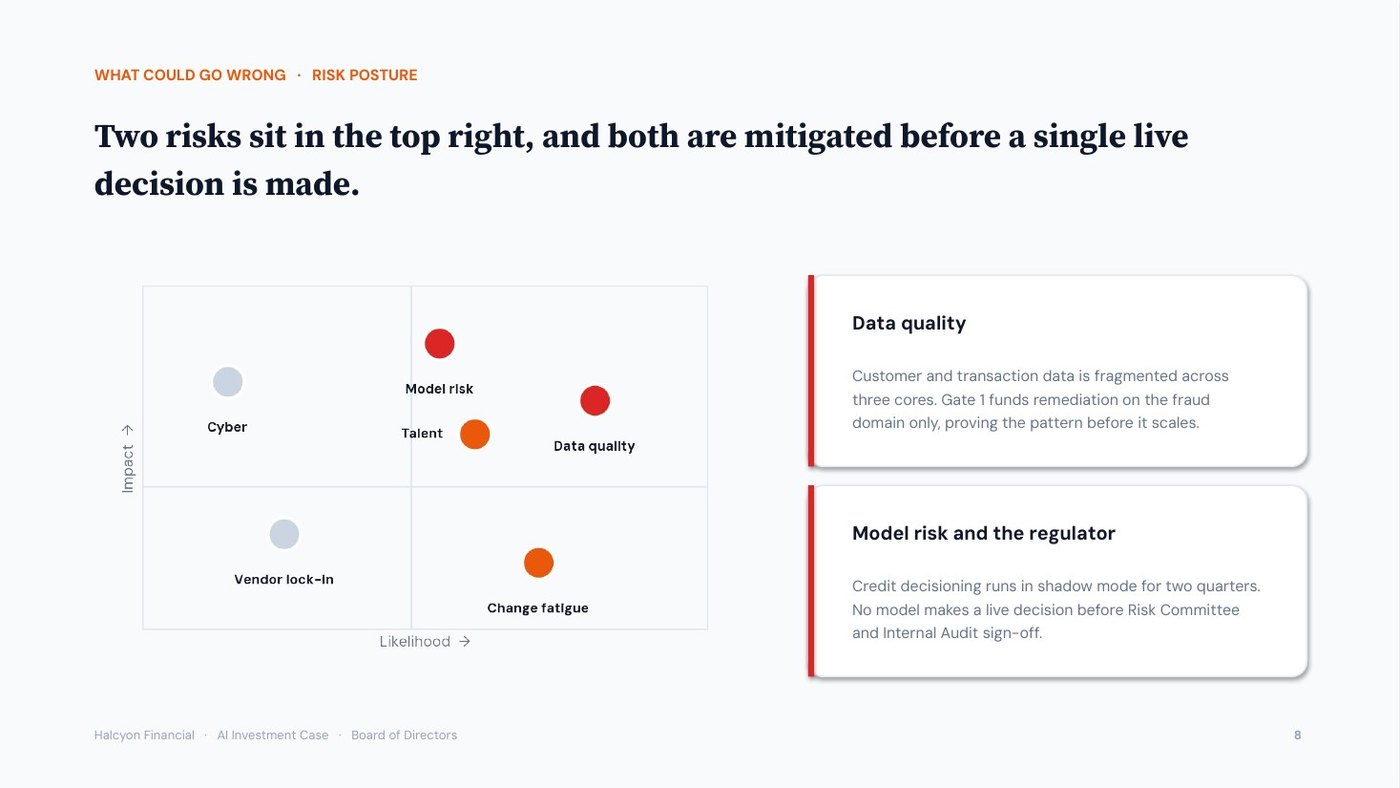
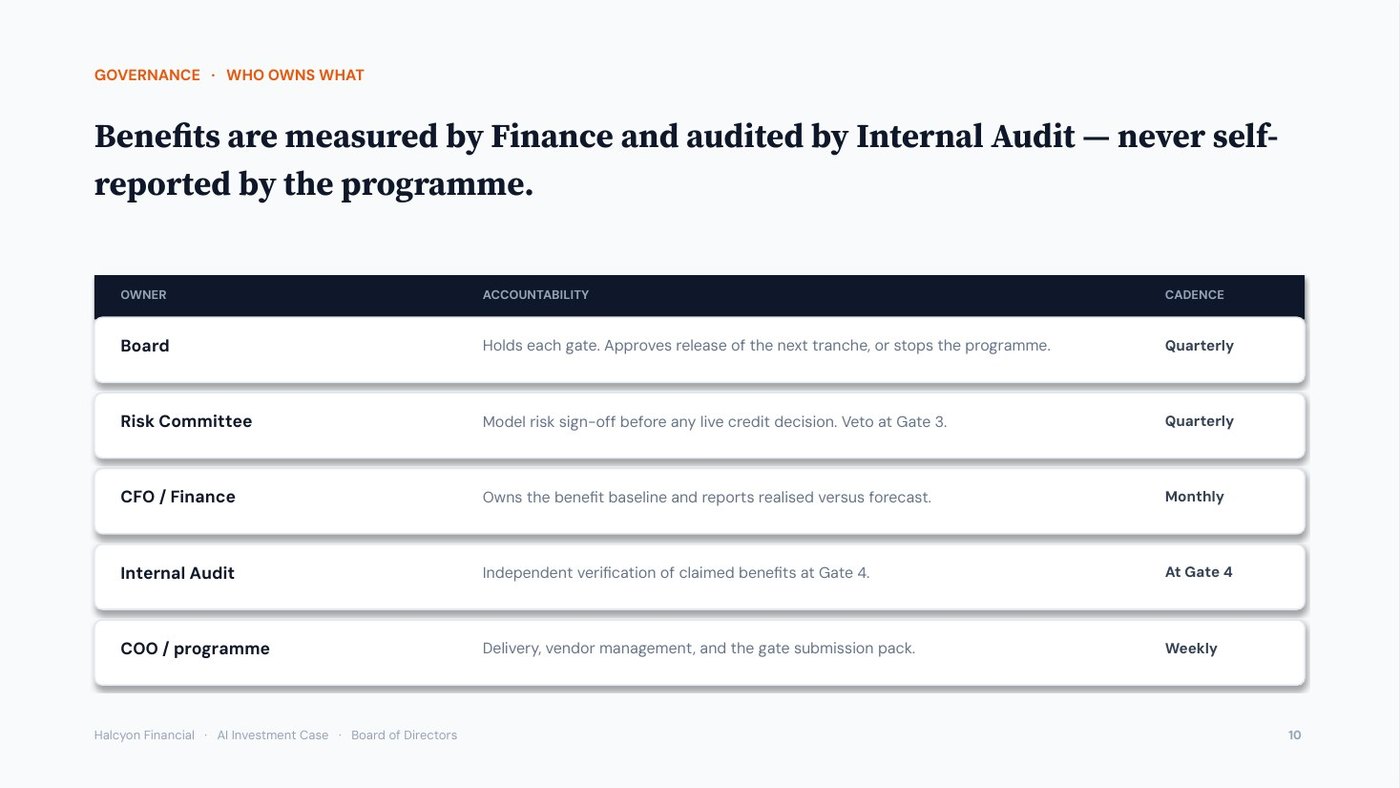
The money is not released at once. It is released at four gates, and the board can stop the programme at any of them. Before the first measured result, $6M is at risk, not $24M. Benefits are measured by Finance and audited by Internal Audit, not reported by the programme team.
The ask: approve $24M across four gates, with $6M at risk before the first result.
If you are comfortable, I would value you opening the item on Thursday. If you would rather test it first, I can take you through the gate structure in fifteen minutes before then.
Quality gates on the near-final deck, and the questions most likely to be asked
| Caught in review | Fix |
|---|---|
| The write-offs are buried at slide nine | Move them to slide four |
| Three slides have topic-label titles | Rewrite as action titles |
| One slide shows orphan data | Cut it |
| Most likely question | Prepared answer |
|---|---|
| “What is different from CoreShift?” | Slide five: funding is released in stages at four gates, so the board can stop early. |
| “Who verifies the benefits?” | Internal Audit, at Gate 4. Not the programme team. |
| “What happens if Gate 2 fails?” | $13M spent, $11M unspent, and the board decides. |
Prompt output, formatted for this page. In Claude each prompt returns it as a finished Word document; other tools return the same content as text and tables. The figures come from whatever you paste in. Halcyon Financial is fictional, so every number here is ours to show you.
All 10 prompts with full copy-paste templates and worked examples — a downloadable PDF plus a plain-text copy file. In Claude, every prompt ends in a finished Word document. Lifetime updates.
Instant download · lifetime updates
The pack ends with the documents above. The McKinsey-Grade PowerPoint Generator is a separate product, $19: paste the pack’s documents into it and it builds a board deck in Claude, as a real .pptx with native, editable charts.
Below is Halcyon’s, twelve slides, unedited.
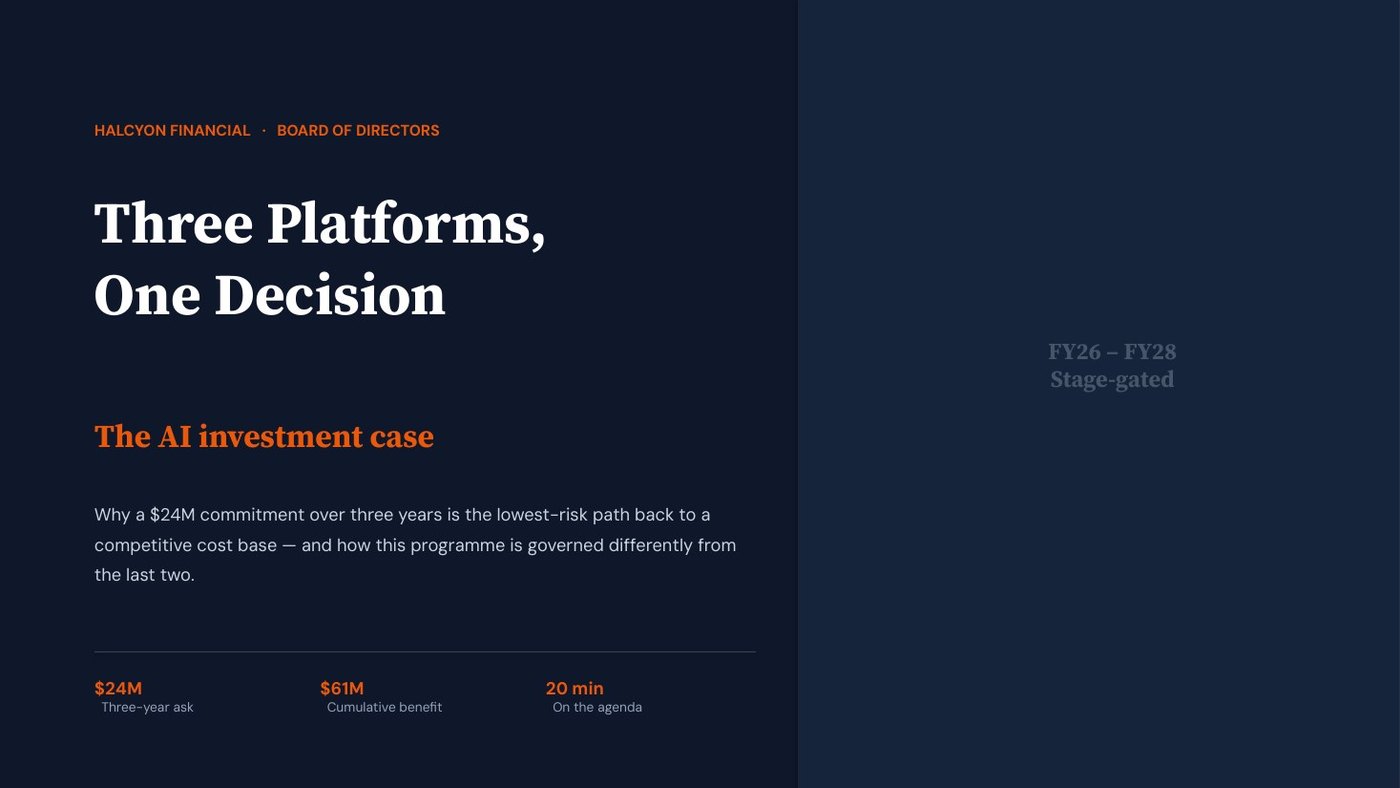
Halcyon Financial is a fictional bank, so every number here is ours to show you. Generated in the NOVA house style.
Built in
as a real .pptx with native, editable charts. Or take both generators together in the bundle, $25.