01Strategy
Presentation Strategy: Objective, Audience and Core Message
Defines the objective, the audience’s current beliefs, and the core message before any slide exists.
See it in Halcyon’s examplePrompts for Work · Pack 9 · 10 prompt templates
12 of 12 quality checks passed
The Executive Communication pack: 10 AI prompt templates for ChatGPT, Claude and Gemini
Turn raw findings into a clear board presentation. Paste your findings and say who will be in the room, and the executive communication prompts plan the message, build the storyline, write a clear title for every slide, pick the right charts, draft the executive summary and the board update, and prepare you for the hardest questions.
Free guide: How to write an executive summary
Real exampleExecutive one-pager · Prompt 06
The full 12-slide deck.
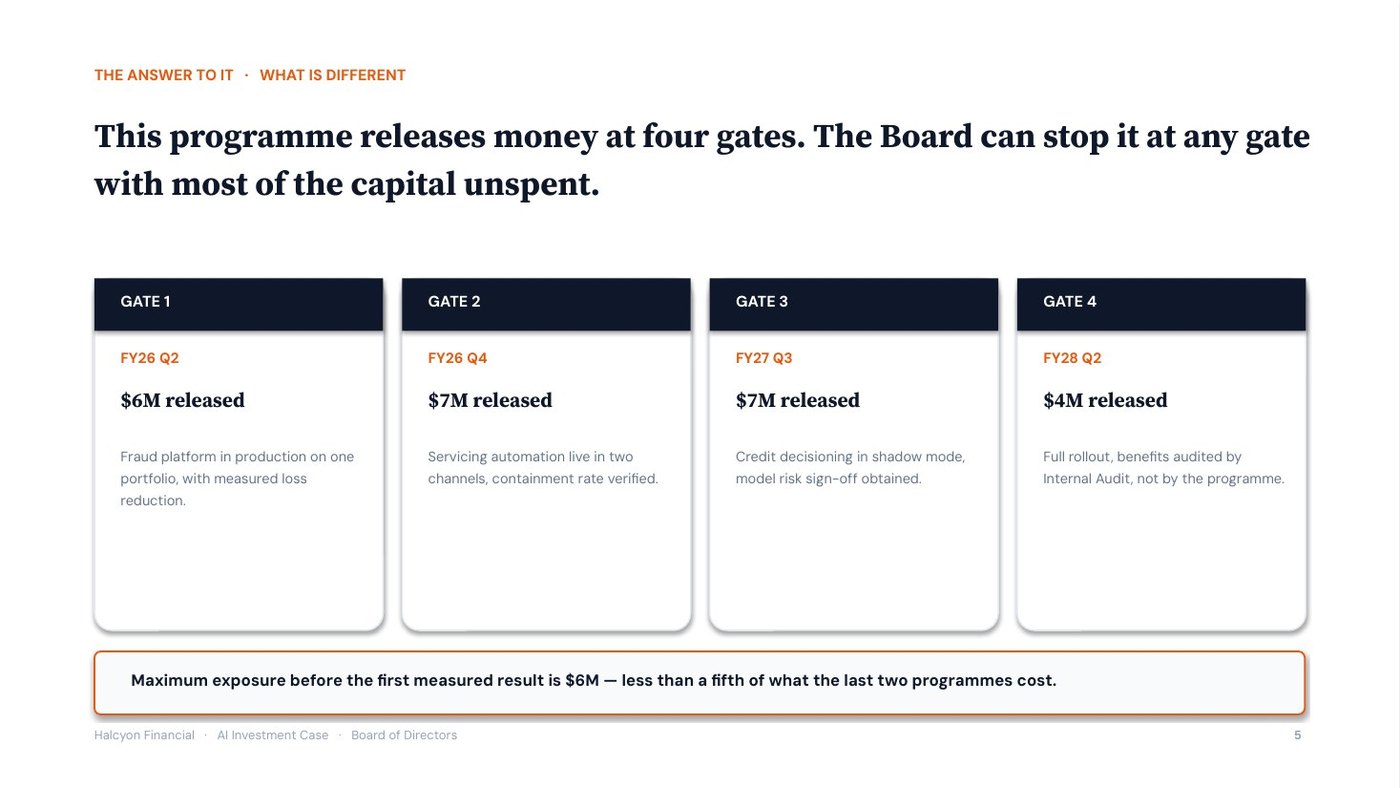
Approve $24M across four gates, with $6M at risk before the first result
Benefits of the executive communication prompts
Four things the board presentation prompts do for every executive summary, board update and presentation.
The strategy prompt sets the objective, what the audience believes today and the one message to land, before any slide exists.
Each slide gets a full-sentence title that states the point, and each chart is picked to show one number clearly.
The executive summary prompt turns the whole deck into the one page a CEO reads, with the answer first and bad news stated plainly.
The review prompt checks the deck and ranks the questions the board is most likely to ask, each with a prepared answer.
What is in the pack
Each executive communication prompt works on its own. The prompt asks for what is needed and, in Claude, returns a finished Word document. Run the one you need, or run all ten in order.
Defines the objective, the audience’s current beliefs, and the core message before any slide exists.
See it in Halcyon’s examplePicks the storyline and states the one governing thought.
See it in Halcyon’s exampleTurns the story into a slide-by-slide skeleton.
See it in Halcyon’s exampleRewrites every topic label into an action title that states the takeaway.
See it in Halcyon’s examplePicks the right chart for each point and the number to emphasize.
See it in Halcyon’s exampleCompresses the deck into the one page a CEO actually reads.
See it in Halcyon’s exampleThe written board update, with bad news stated first.
See it in Halcyon’s exampleWhat the presenter says on each slide, beyond what the slide already shows.
See it in Halcyon’s exampleThe pre-brief email to the board chair, short enough to read on a phone.
See it in Halcyon’s exampleQuality-checks the deck and prepares answers to difficult board questions.
See it in Halcyon’s exampleWorked example
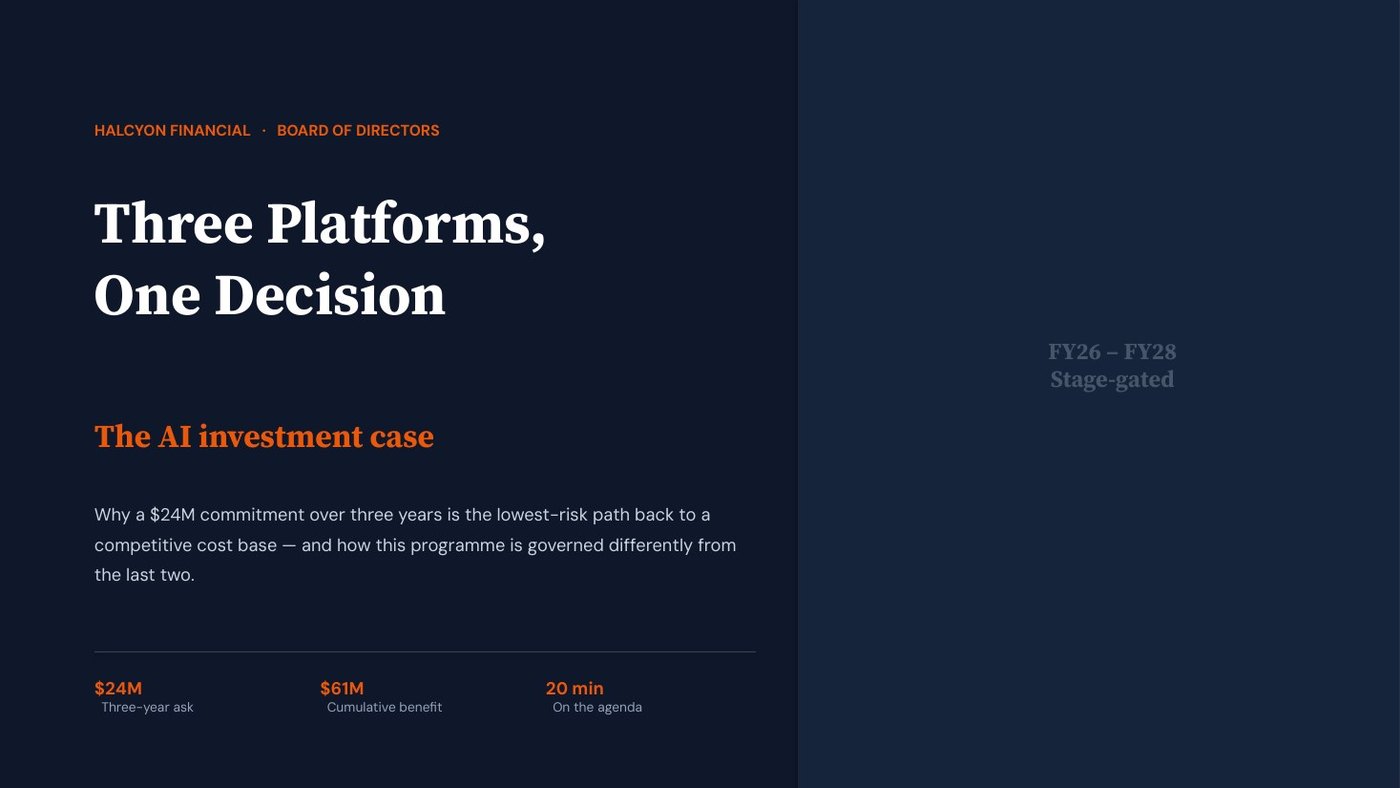
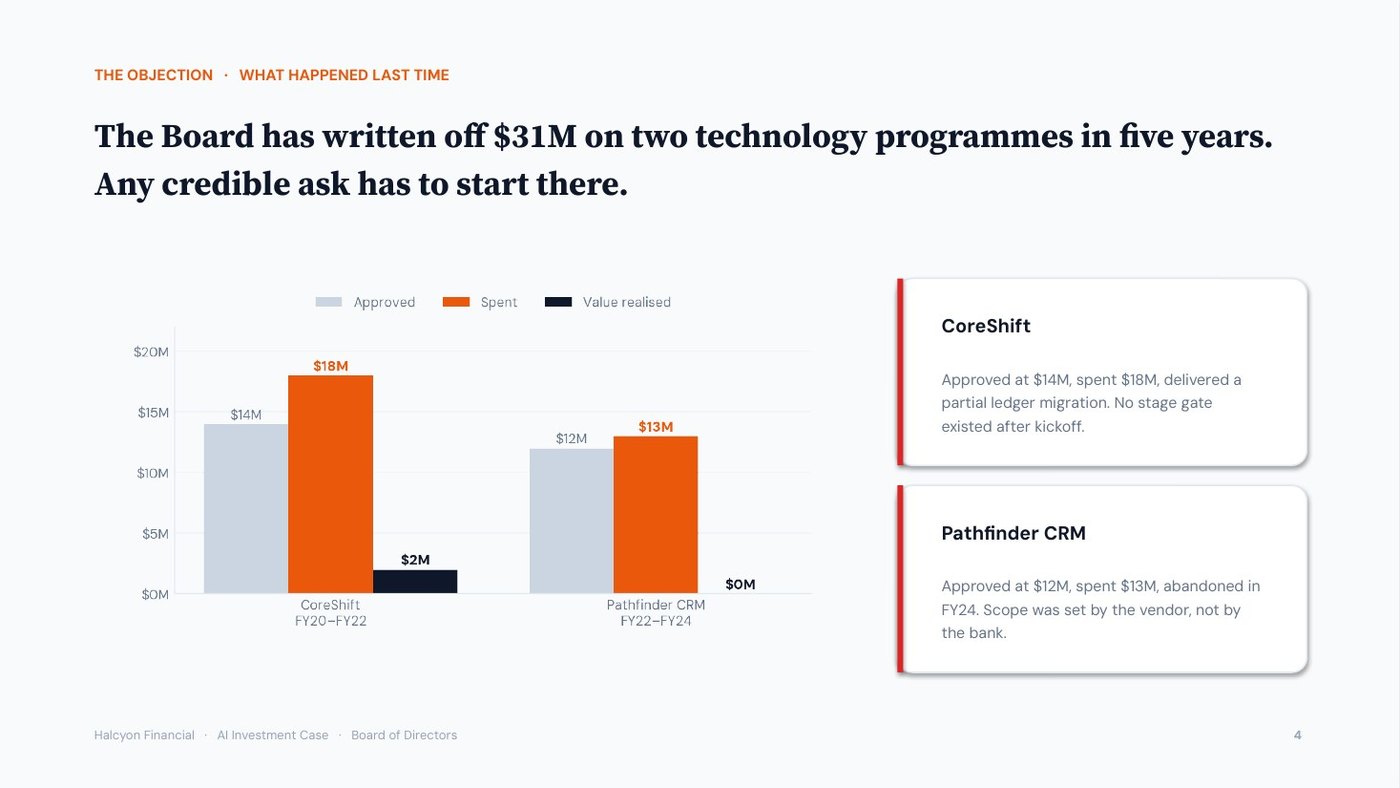
You are COO of a $9B-asset regional bank. You have 40 pages of AI findings, 20 minutes on the agenda, and a $24M ask. The complication: the board has written off $31M on two technology programmes in five years, and two directors sat through both. Here is how the ten prompts turn that into a presentation plan and the board documents at the end of this page, one step at a time.
This is a simplified view of how a top consultant builds a board deck. Each step below is condensed to a single highlight. In reality every prompt returns far more — full slide specs, speaker notes, chart encodings, and QA — not the one-line outputs shown here.
Prompt 01 · Strategy
What Halcyon brought · COO
Objective + 40 pages of findings + “20 minutes, board, Thursday.”
What the prompt returned
“Get $24M approved. The board’s real question is not the return. It is why this will not be a third write-off.”
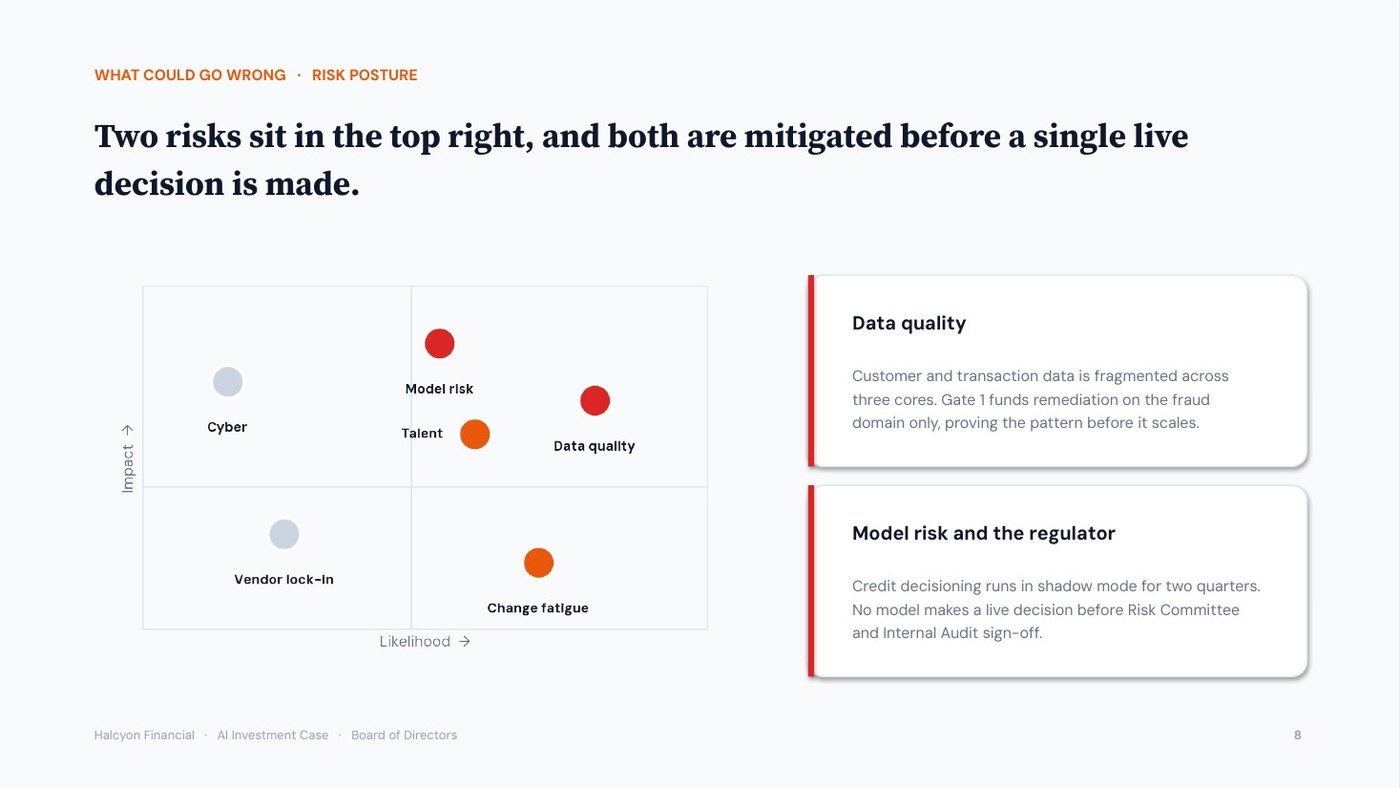
The strategy brief: the one objective, what the board believes today versus what it must believe, the core message stated as the answer, and the obstacles to a yes — here, CoreShift and Pathfinder.
Takeaway: build the deck around the board’s main concern, the risk of a third write-off, before presenting the opportunity.
An audience read identifies what the audience believes today and what it must believe to approve the objective. The objective is $24M approved; the core message is whatever produces that approval from a board that has written off two programmes.
Prompt 02 · Structure
What Halcyon brought · COO
Findings with no through-line.
What the prompt returned
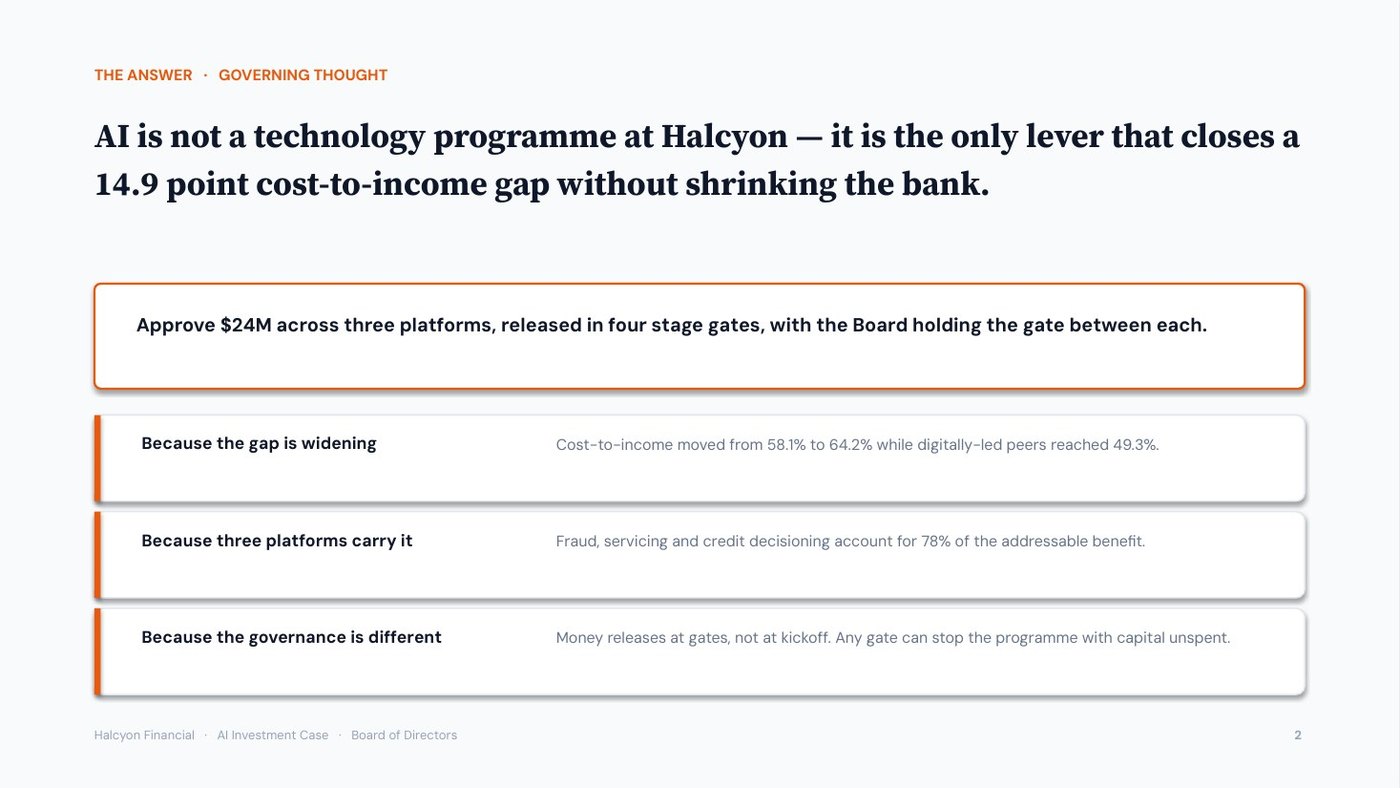
Governing thought: “AI is not a technology programme — it is the only lever that closes a 14.9 point cost-to-income gap without shrinking the bank.”
Stated as the answer up front, never a slow reveal — plus the 60-second spoken version.
Takeaway: state the governing thought on slide two, with its number, and prepare a 60-second version in case time is cut.
The governing thought is the single sentence the whole presentation proves, and the Pyramid Principle states it first, with the supporting arguments beneath. The prompt compares four storylines: SCR (Situation, Complication, Resolution), Pyramid (answer first), PSPA (Problem, Solution, Proof, Action) and CAR (Context, Action, Result).
Prompt 03 · Structure
What Halcyon brought · Chief of staff
The chosen storyline.
What the prompt returned
One message per slide, recommendation by slide 2, MECE across the deck — no orphan data.
Takeaway: present bad news early, directly before the plan that addresses it, and remove any slide without a clear message.
A slide outline assigns one message to each slide and checks the deck is MECE (mutually exclusive, collectively exhaustive), with no orphan data: data that supports no message. The first draft placed CoreShift and Pathfinder on slide nine, under governance.
Prompt 04 · Slides
What Halcyon brought · Strategy analyst
“AI Spend” · “Roadmap” · “Governance”
What the prompt returned
Read the new titles top to bottom and the whole argument is already there.
Takeaway: write every slide title as the conclusion of that slide, so a reader of the titles alone understands the argument.
An action title is a slide headline written as a full-sentence conclusion rather than a topic label. The read-the-titles test strips the deck to its headlines: if they read as an argument the deck works; if they read as a table of contents, it does not.
Prompt 05 · Slides
What Halcyon brought · Strategy analyst
One slide carrying twelve metrics on AI benefit.
What the prompt returned
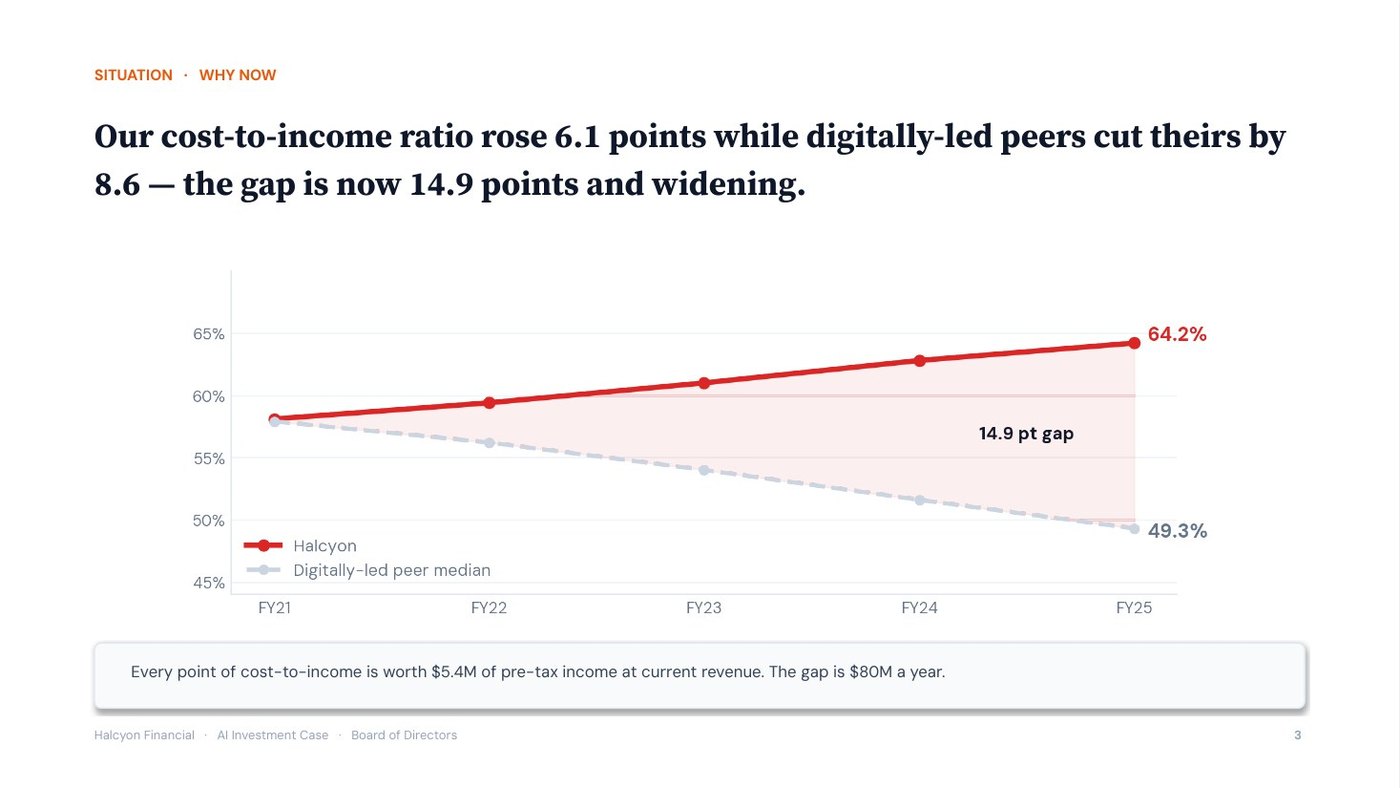
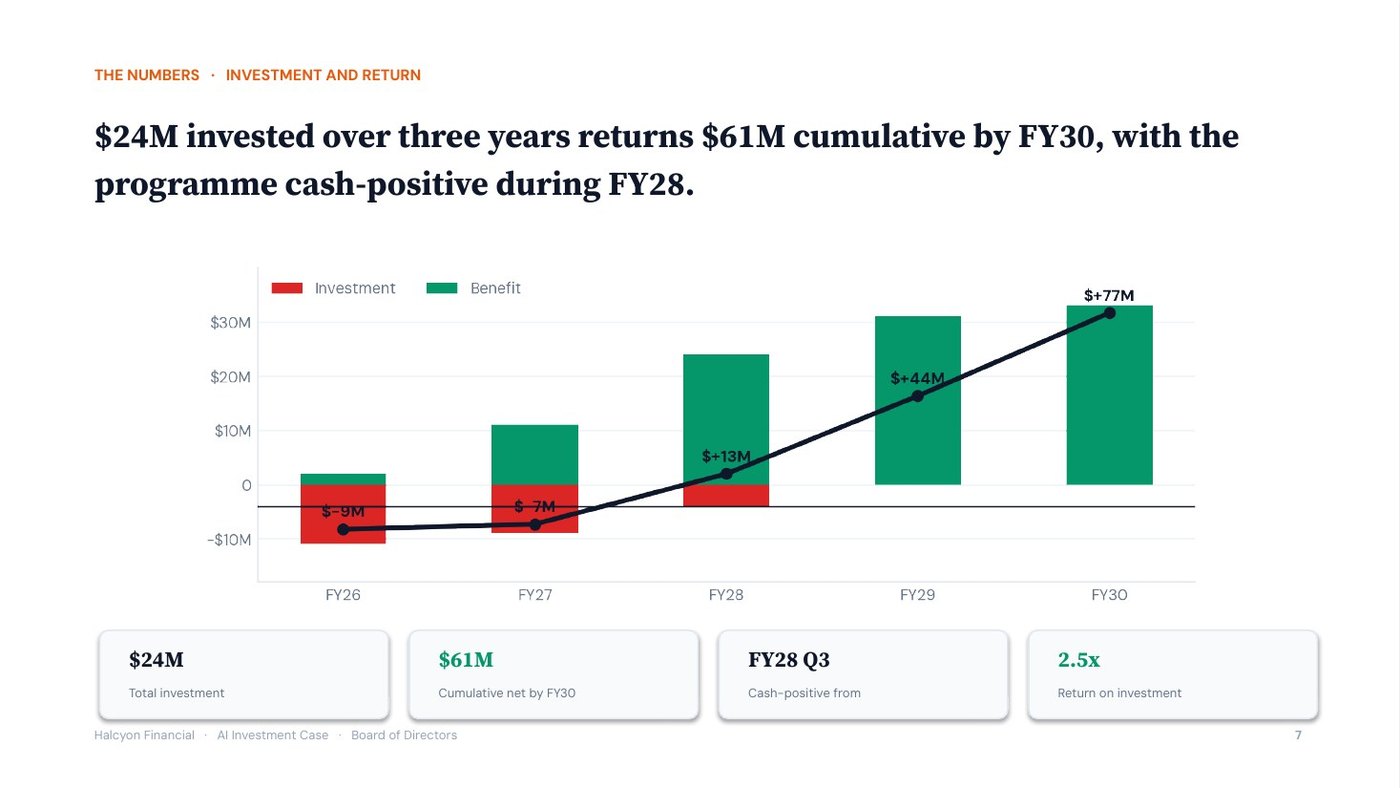
Cost-to-income becomes a two-line chart, the write-offs a three-bar comparison, the return a single cumulative curve. One takeaway per exhibit, and the number to say out loud.
Takeaway: choose each chart for the one point the slide makes, and say the key number aloud.
A chart decision tree matches the chart to the point: a trend takes a line, a comparison takes bars, a single figure takes a big-number callout, and a point with no data story stays as text. One slide carried twelve metrics on AI benefit; the tree split it into three exhibits, each with one takeaway.
Prompt 06 · Summary
What Halcyon brought · COO
The full 12-slide deck.
What the prompt returned
One answer-first page a senior leader absorbs in under a minute — recommendation first.
Takeaway: write the one-pager for a reader who missed the meeting: recommendation first, with the $6M risk stated.
An executive one-pager restates the argument for a reader who was not in the meeting, in answer-first order: headline, situation, three reasons, the ask and the risk. It is not a summary of the slides, because no presenter is there to explain it.
Prompt 07 · Summary
What Halcyon brought · Programme director
The Gate 1 quarterly report.
What the prompt returned
The miss is up front, not buried — with the ask, owners, and the three hardest questions answered.
Takeaway: report delays in the first paragraph, with their size, impact, owner and the decision needed.
A recommendation-first update opens with the status and the decision needed, and bad-news-up-front means any miss is reported before the good news. At Gate 1, data remediation is behind schedule.
Prompt 08 · Deliver
What Halcyon brought · COO
The slide outline + your delivery style.
What the prompt returned
Presenter-facing, never a re-read of the slide — plus a 60-second version for when time is cut.
Takeaway: use speaker notes for what the slide does not show: the evidence, the concession and the pause after key numbers.
Speaker notes are the presenter’s script: the proof points, concessions and transitions behind each slide, never a reading of it. The board reads faster than the presenter speaks, so narrating the slide wastes its attention.
Prompt 09 · Deliver
What Halcyon brought · COO
Pre-brief the board chair, two days out.
What the prompt returned
One-line ask pulled out so it can’t be missed — with a high-commitment and a low-friction close.
Bottom line first · the gate structure · the ask · the date.
Takeaway: send the chair a short pre-brief two days before the meeting, with the request on its own line and the main concern answered.
A pre-brief is a short email sent to a key decision-maker before the meeting, written answer-first with the ask on its own line. It lets the chair raise objections privately, two days before the board meets.
Prompt 10 · Review
What Halcyon brought · Chief of staff
The near-final Halcyon board deck.
What the prompt returned
Caught: the write-offs buried at slide nine, three topic-label titles, and one slide of orphan data — plus 15 ranked board questions answered.
→ Now deliver the board deck below. ↓
Takeaway: fix the RED slides first, including moving the write-offs forward, and rehearse answers to the three most likely questions.
Quality gates check the deck against defined standards and rate each slide RED, YELLOW or GREEN; the Q&A prep ranks fifteen difficult board questions by likelihood and damage. This deck returned 7 passes and 3 fails.
Three documents from Halcyon’s ten prompts: the one-pager for directors who read before the meeting, the pre-brief email to the board chair, and the Q&A preparation from the final review.
Approve $24M across four gates, with $6M at risk before the first result
Answer first: headline, situation, three reasons, the ask and the risk
Situation
Our cost-to-income ratio rose 6.1 points while peers cut theirs by 8.6. The gap to peers is now 14.9 points.
The ask
$24M, released at four gates. The board can stop the programme at any of them.
| Three reasons |
|---|
| AI is the only lever that closes a 14.9-point cost-to-income gap without shrinking the bank. |
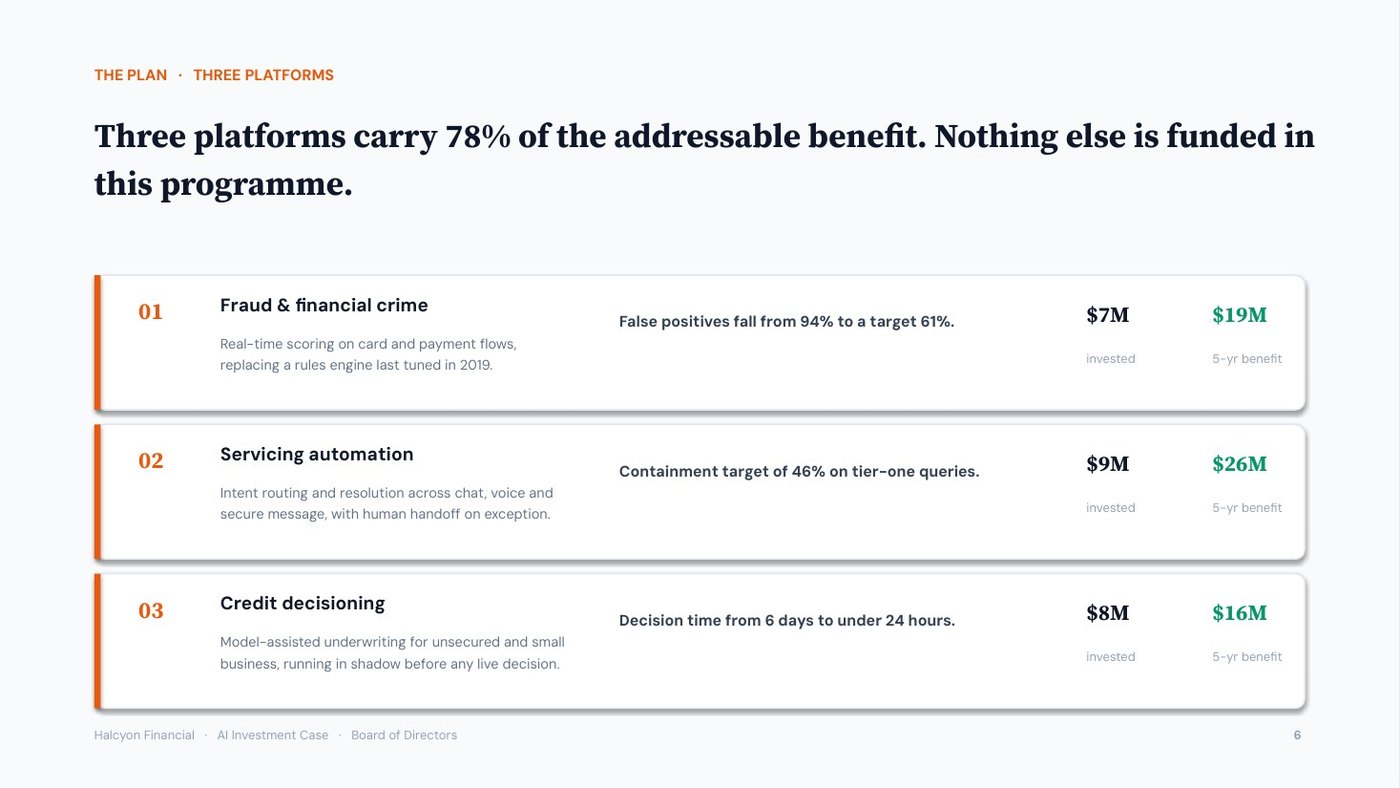
| Three platforms carry 78% of the addressable benefit. |
| $24M returns $61M cumulative, cash-positive during FY28. |
Pre-brief to the board chair
Sent two days before the meeting · short enough to read on a phone
On Thursday I will ask the board to approve $24M for AI across three platforms. I know the first question will be CoreShift and Pathfinder, so I want you to see the answer before the meeting.
The money is not released at once. It is released at four gates, and the board can stop the programme at any of them. Before the first measured result, $6M is at risk, not $24M. Benefits are measured by Finance and audited by Internal Audit, not reported by the programme team.
The ask: approve $24M across four gates, with $6M at risk before the first result.
If you are comfortable, I would value you opening the item on Thursday. If you would rather test it first, I can take you through the gate structure in fifteen minutes before then.
Review result: nearly ready, about 2 hours to fix the reds
Quality gates on the near-final deck, and the questions most likely to be asked
| Caught in review | Fix |
|---|---|
| The write-offs are buried at slide nine | Move them to slide four |
| Three slides have topic-label titles | Rewrite as action titles |
| One slide shows orphan data | Cut it |
| Most likely question | Prepared answer |
|---|---|
| “What is different from CoreShift?” | Slide five: funding is released in stages at four gates, so the board can stop early. |
| “Who verifies the benefits?” | Internal Audit, at Gate 4. Not the programme team. |
| “What happens if Gate 2 fails?” | $13M spent, $11M unspent, and the board decides. |
Prompt output, formatted for this page. In Claude each prompt returns it as a finished Word document; other tools return the same content as text and tables. The figures come from whatever you paste in. Halcyon Financial is fictional, so every number here is ours to show you.
Yes. The executive summary prompt turns your findings or your deck into one page: the answer first, then the reasons and the decision needed. In Claude, the summary comes back as a Word document.
The pack plans the presentation: the message, the storyline, the slide outline, the slide titles and the charts. For a finished .pptx file, paste the pack’s documents into the AI PowerPoint generator, a separate product at $19.
ChatGPT, Claude and Gemini. In Claude, every prompt ends with a finished Word document. ChatGPT and Gemini return the same content as text and tables.
No. Each prompt works on its own. Run the one you need, such as the executive summary or the board Q&A preparation, or run all ten in order for one presentation.
Pack 9 · Executive Communication
Paste the pack’s documents into the AI PowerPoint generator, a separate product at $19, and Claude builds the board presentation as a real .pptx file with editable PowerPoint charts.
Below is Halcyon’s, twelve slides, unedited.
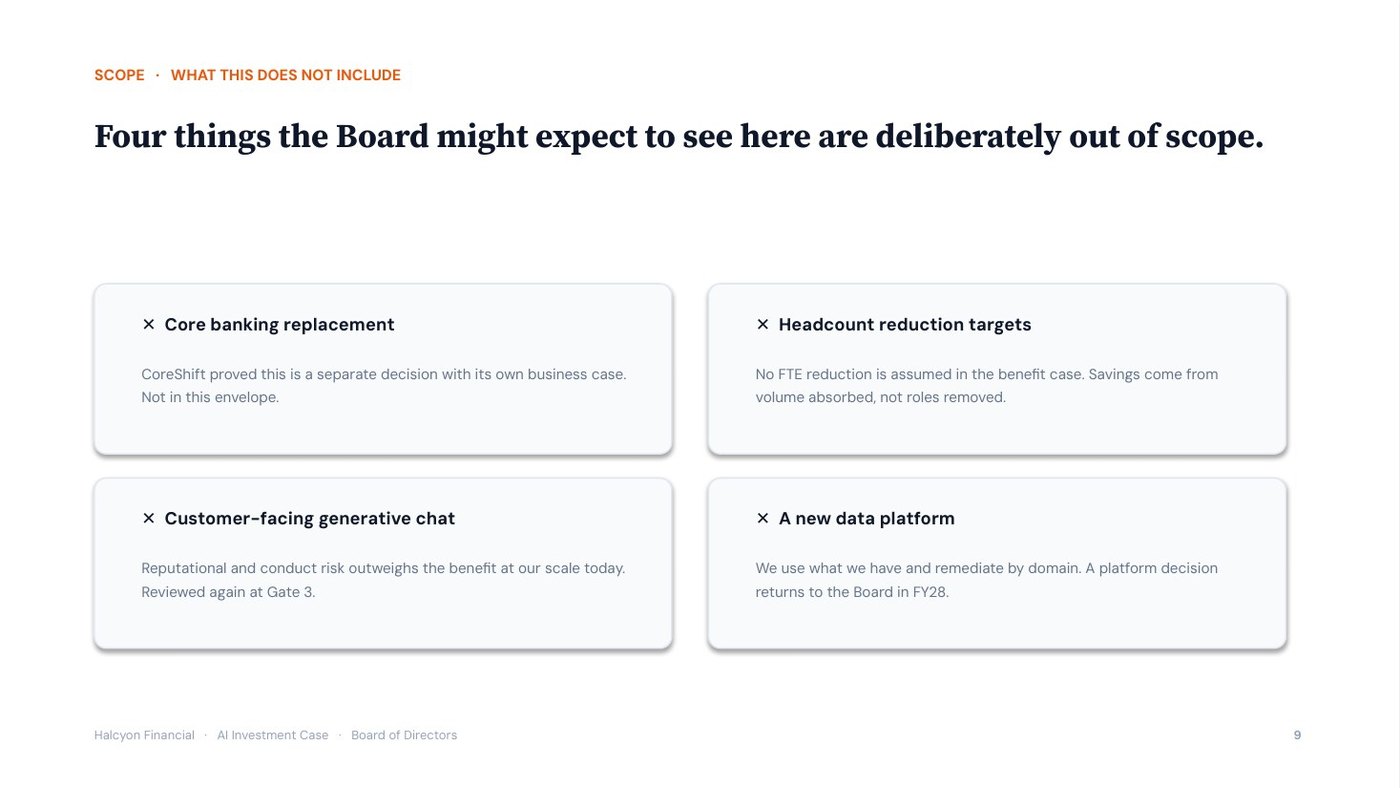
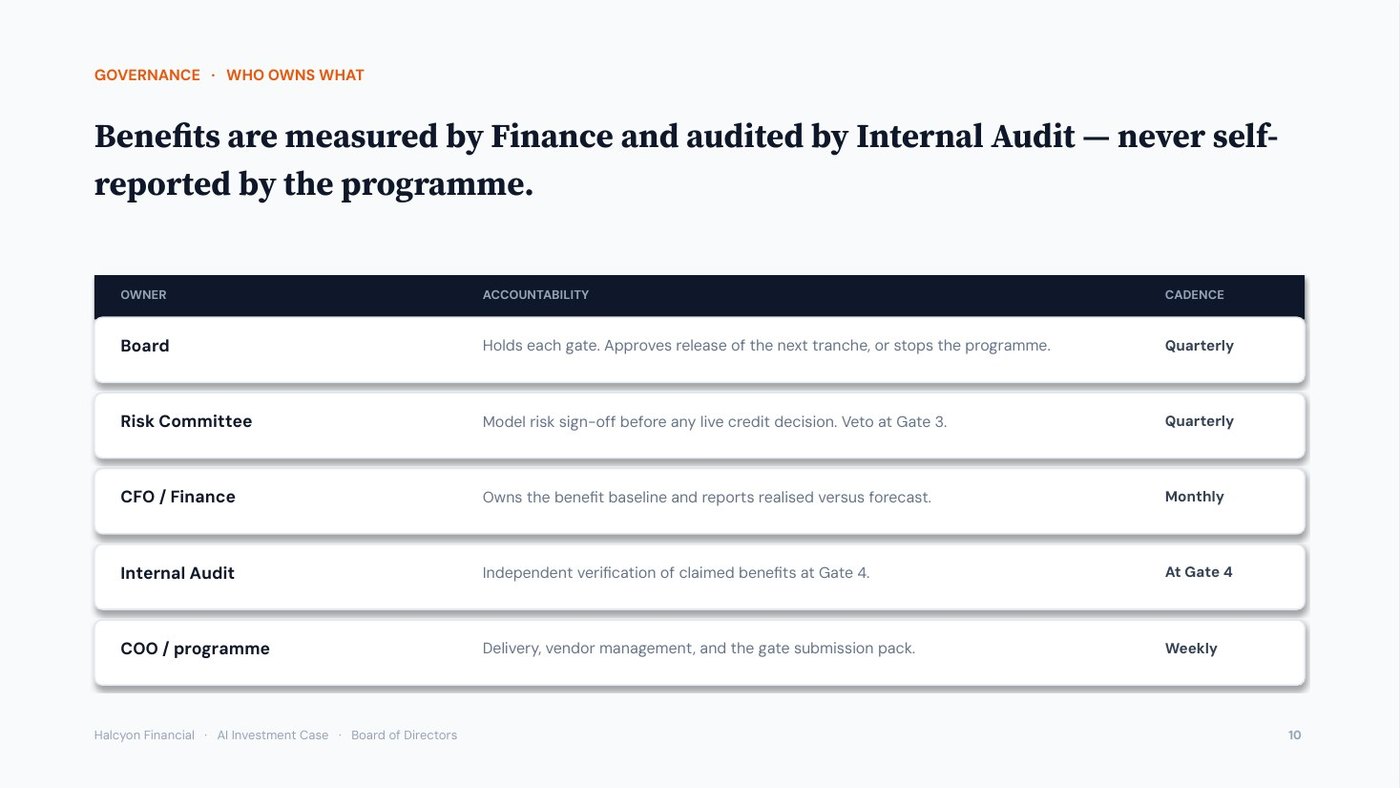
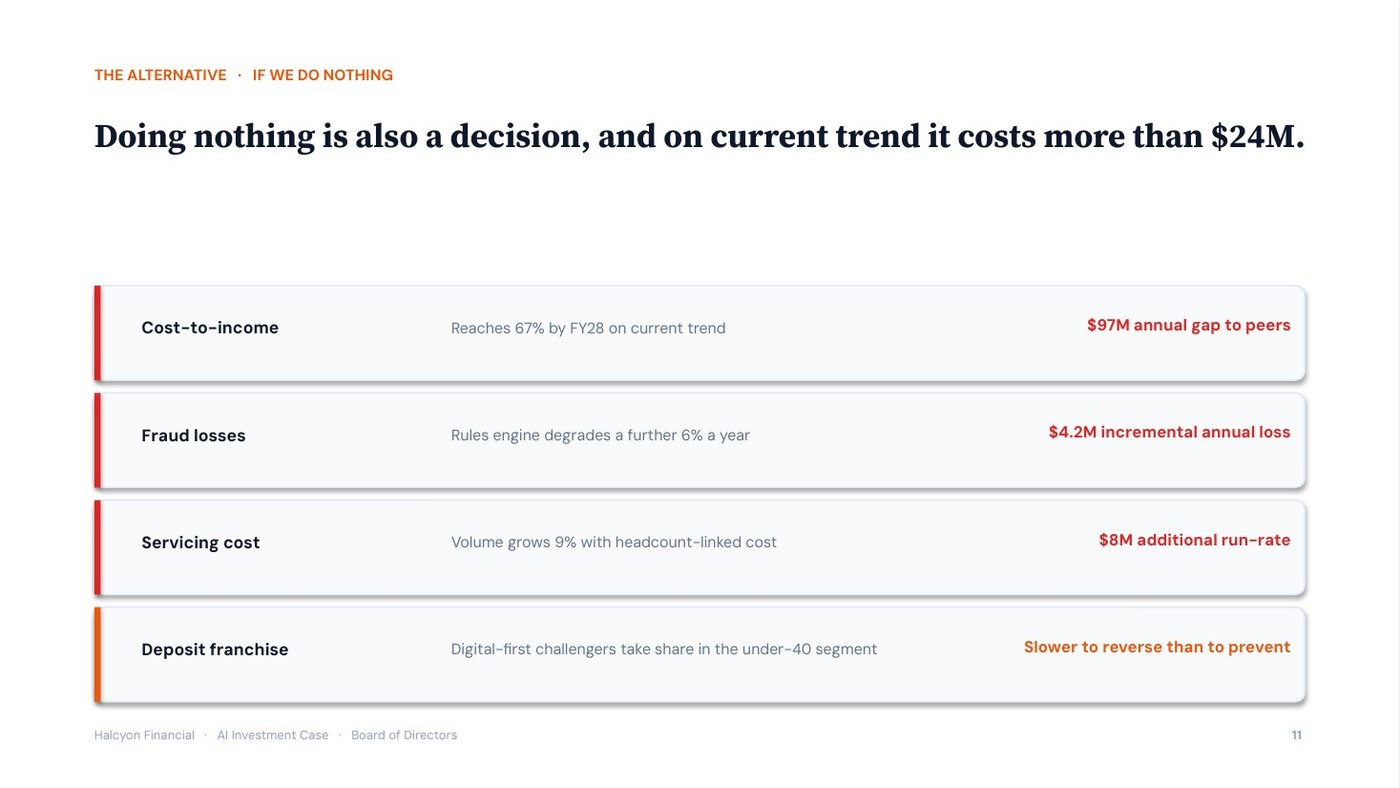
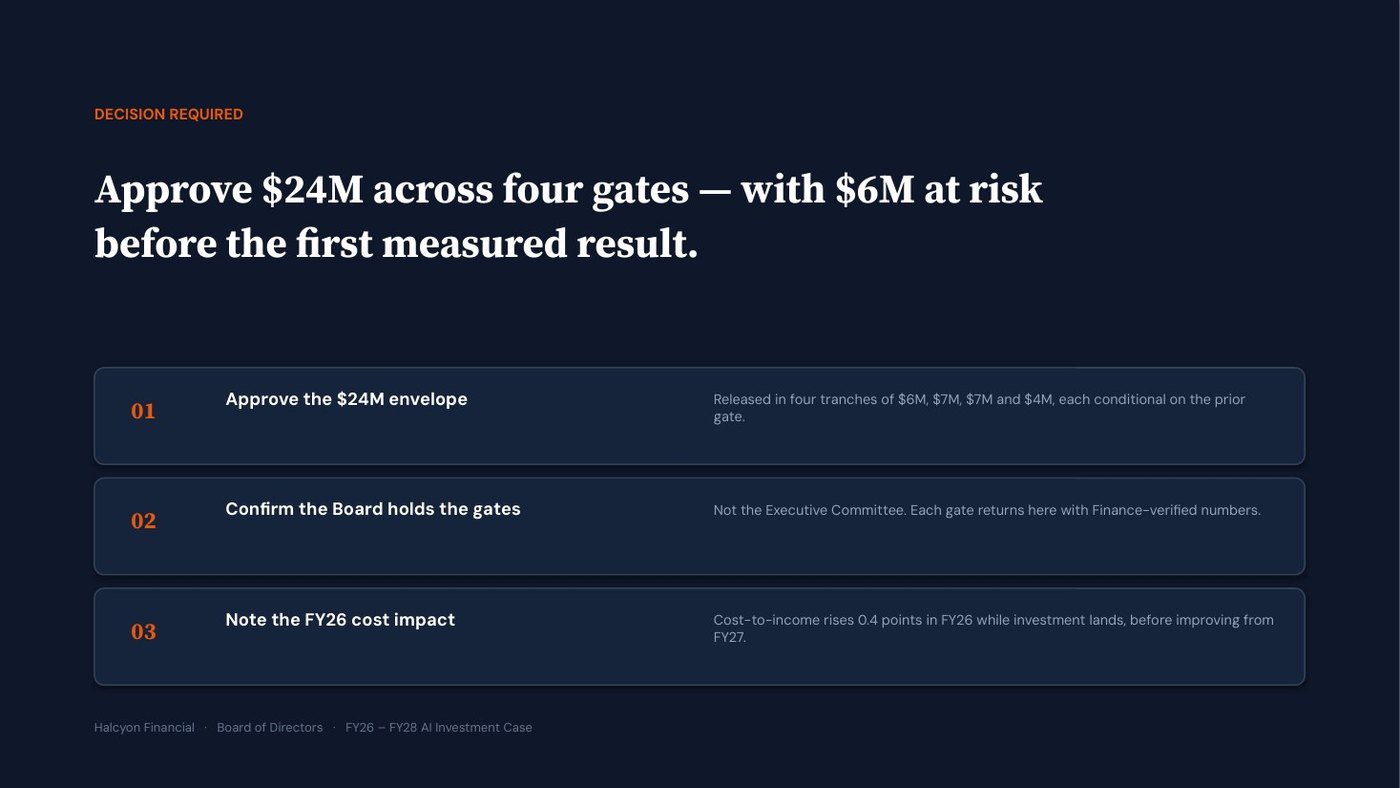
Halcyon Financial is a fictional bank, so every number here is ours to show you. Generated in the NOVA house style.
 Want the presentation built for you?
The AI PowerPoint Generator — $19
Built in  as a real .pptx file with editable charts. Or take both generators together in the bundle, $25.
Nine packs for work, from strategy and finance to sales, HR and operations, each written to the same standard with its own worked example.